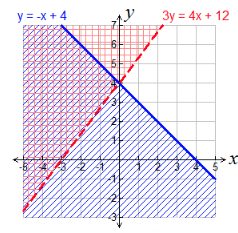
Unit 5: Linear Inequalities STUDY GUIDE

Flashcard
•
Mathematics
•
9th - 12th Grade
•
Practice Problem
•
Hard

Wayground Content
FREE Resource
Student preview

15 questions
Show all answers
1.
FLASHCARD QUESTION
Front
What is a linear inequality?
Back
A linear inequality is a mathematical statement that relates a linear expression to a value using inequality symbols such as <, >, ≤, or ≥.
2.
FLASHCARD QUESTION
Front
How do you graph a linear inequality?
Back
To graph a linear inequality, first graph the corresponding linear equation as a solid line (for ≤ or ≥) or a dashed line (for < or >). Then, shade the appropriate region based on the inequality.
3.
FLASHCARD QUESTION
Front
What does the symbol '≥' mean in an inequality?
Back
'≥' means 'greater than or equal to', indicating that the value can be either greater than or equal to the number.
4.
FLASHCARD QUESTION
Front
What does the symbol '≤' mean in an inequality?
Back
'≤' means 'less than or equal to', indicating that the value can be either less than or equal to the number.
5.
FLASHCARD QUESTION
Front
What is the difference between a solid line and a dashed line in graphing inequalities?
Back
A solid line indicates that points on the line are included in the solution (for ≤ or ≥), while a dashed line indicates that points on the line are not included (for < or >).
6.
FLASHCARD QUESTION
Front
How do you determine which side of the line to shade when graphing an inequality?
Back
Choose a test point not on the line (commonly (0,0)). Substitute it into the inequality. If the inequality holds true, shade the side containing the test point; otherwise, shade the opposite side.
7.
FLASHCARD QUESTION
Front
What is the solution set of a linear inequality?
Back
The solution set of a linear inequality is the set of all points (x, y) that satisfy the inequality, represented graphically by the shaded region on the graph.
Access all questions and much more by creating a free account
Create resources
Host any resource
Get auto-graded reports

Continue with Google

Continue with Email

Continue with Classlink

Continue with Clever
or continue with

Microsoft
%20(1).png)
Apple

Others
Already have an account?
Similar Resources on Wayground

15 questions
Eduqas AoS4 Pop Music Revision Summary
Flashcard
•
9th Grade - University
15 questions
Past Simple VS Prsent Perfect
Flashcard
•
KG - University
9 questions
Advantages of Cloud Storage
Flashcard
•
9th - 10th Grade
15 questions
Honors Vocabulary Flashcard Week 15
Flashcard
•
8th Grade - University
6 questions
PROBABILITY DISTRIBUTION
Flashcard
•
11th Grade
11 questions
Mostly Irrelevant Presidential Trivia
Flashcard
•
9th - 12th Grade
13 questions
Wives of Prophet Muhammad Flashcard
Flashcard
•
10th Grade - University
Popular Resources on Wayground
15 questions
Fractions on a Number Line

Quiz
•
3rd Grade
20 questions
Equivalent Fractions
Quiz
•
3rd Grade
25 questions
Multiplication Facts
Quiz
•
5th Grade
22 questions
fractions
Quiz
•
3rd Grade
20 questions
Main Idea and Details
Quiz
•
5th Grade
20 questions
Context Clues
Quiz
•
6th Grade
15 questions
Equivalent Fractions
Quiz
•
4th Grade
20 questions
Figurative Language Review
Quiz
•
6th Grade
Discover more resources for Mathematics
20 questions
Graphing Inequalities on a Number Line
Quiz
•
6th - 9th Grade
12 questions
Exponential Growth and Decay
Quiz
•
9th Grade
20 questions
Exponent Rules Review
Quiz
•
8th - 9th Grade
25 questions
Complementary and Supplementary Angles
Quiz
•
7th - 10th Grade
12 questions
Add and Subtract Polynomials
Quiz
•
9th - 12th Grade
13 questions
Model Exponential Growth and Decay Scenarios
Quiz
•
9th - 12th Grade
15 questions
Combine Like Terms and Distributive Property
Quiz
•
8th - 9th Grade
27 questions
7.2.3 Quadrilateral Properties
Quiz
•
9th - 12th Grade