

Google Drive

Flashcard
•
Computers
•
6th - 8th Grade
•
Practice Problem
•
Hard

Wayground Content
FREE Resource
Student preview

9 questions
Show all answers
1.
FLASHCARD QUESTION
Front
How do you create a new folder?
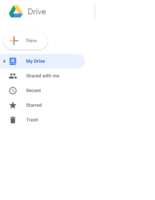
Back
Click "New"
2.
FLASHCARD QUESTION
Front
T/F: You can share folders with anyone.

Back
True
3.
FLASHCARD QUESTION
Front
Once you create a file, you must _________ it.
Back
name
4.
FLASHCARD QUESTION
Front
Where are documents that you place on Google Drive stored?
Back
In the cloud
5.
FLASHCARD QUESTION
Front
Why is there no Save button for your files?
Back
Google Drive uses autosave, which automatically and immediately saves your files as you edit them.
6.
FLASHCARD QUESTION
Front
Which of the following file types can be uploaded to Google Drive? Microsoft Word, Photos, Videos, All of the above
Back
All of the above
7.
FLASHCARD QUESTION
Front
Files that others give me access to view or edit are found in.

Back
Shared with me
Access all questions and much more by creating a free account
Create resources
Host any resource
Get auto-graded reports

Continue with Google

Continue with Email

Continue with Microsoft
or continue with

%20(1).png)
Apple

Others
Already have an account?



