
24-25 dockie's BORROWED Parts of a Check

Flashcard
•
Business
•
9th - 12th Grade
•
Practice Problem
•
Hard

Wayground Content
FREE Resource
Student preview

12 questions
Show all answers
1.
FLASHCARD QUESTION
Front
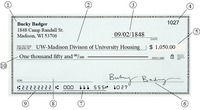
What is labeled number 1? Options: Maker, Payee, Date, Amount

Back
Maker
Answer explanation
The "maker" is the owner of the checking account; also called "drawer" and "depositor"
2.
FLASHCARD QUESTION
Front
What is labeled 2? Options: Date, Maker, Payee, Signature

Back
Payee
Answer explanation
The "payee" is the person or business that a check is written to
3.
FLASHCARD QUESTION
Front
What is labeled number 3? Options: Check number, Payee, Date, Account number

Back
Date
Answer explanation
The "date" is the date the check was written
4.
FLASHCARD QUESTION
Front
What is labeled number 4?

Back
Check number
Answer explanation
The "check number" is a unique identifier for each check, which is a series of sequential numbers and is used for record keeping. The check number is listed twice on the check: upper right corner and at the bottom
5.
FLASHCARD QUESTION
Front
What is labeled number 5? Options: Account number, Routing number, Written amount of check, Numeric amount of check

Back
Numeric amount of check
Answer explanation
The "numeric amount" of a check is written in the box to the right of the "Pay to the order of" line, with a dollar sign ($) preceding it, and should include both the dollar and cents amount (e.g., $123.45).
6.
FLASHCARD QUESTION
Front
What is labeled number 6?

Back
Signature
Answer explanation
The "signature" is written by the owner of the checking account; the owner of the account is also called "maker," "drawer," and "depositor"
7.
FLASHCARD QUESTION
Front
What is labeled number 7?

Back
Account number
Answer explanation
The "account number" is typically the second set of numbers printed at the bottom of the check, located between the routing number (the first set of numbers) and the check number (the last set of numbers).


Access all questions and much more by creating a free account
Create resources
Host any resource
Get auto-graded reports

Continue with Google

Continue with Email

Continue with Classlink

Continue with Clever
or continue with

Microsoft
%20(1).png)
Apple

Others
Already have an account?


