Operating CAD Software and Computer Hardware
Presentation
•
•
Hard
princess talicol
Used 7+ times
FREE Resource
23 Slides • 0 Questions
1
Technology and Livelihood Education Information and Communication Technology
TECHNICAL DRAFTING GRADE 10

2
Lesson 1. Operating CAD Software and Computer Hardware
This lesson is to enable the student to prepare and to familiarize himself with the different things needed in operating the CAD software and the computer hardware.
3
Some Technical Terms in Operating CAD Software and Hardware
Hardware - is all the physical equipment that makes up the computer system.
Software - is the set of programs and other related applications associated with a computer system.
Central Processing Unit (CPU) - is the brain of the computer where most of the “computing” takes place.
4
CAD Software and HardwareComputer system can be broken down into two basic elements, the hardware and the software.
THE HARDWARE The hardware is the physical equipment that makes up the computer system. It is divided into system hardware and peripherals. The systemICT-hardware includes the Central Processing Unit (CPU), the keyboard, the monitor and primary storage memory (RAM), and the secondary storage memory. Peripherals includes disk drives, mouse, digitizers, printers/plotters, etc.
5
System Unit
The main part of a microcomputer, is sometimes called the chassis. It includes the following parts: motherboard, microprocessor, memory chips, buses, ports, expansion slots and cards.
6
SYSTEM UNIT
The main part of a microcomputer, is sometimes called the chassis. It includes the following parts: motherboard, microprocessor, memory chips, buses, ports, expansion slots and cards.
7
Sample Tower Type System Unit
The Central Processor Unit (CPU) – is the brain of the computer where most of the “computing” takes place. It is also known as processor. It performs all instructions and calculations that are needed to manage the flow of information.
8
Intel Core 2 Duo
9
AMD ATHLON
10
KEYBOARD
is the principal device for communicating with your computer. All keyboards have letter keys, punctuation keys, and a space bar which is similar to the keys on a typewriter. Keyboards also have functions, numeric and arrow keys in additional to Alt, Ctrl, and Enter keys.
11
MONITOR
it has a screen that displays information, such as the instruction you send to your computer and the information and results your computer sends back after interpreting your instruction. A color monitor will not display color unless there is a video card fits inside your computer. The video card determines the screen resolution and the number of colors that the monitor can display.
12
HARD DISK DRIVE
it also known as hard drive. It is a magnetic storage device that is installed inside the computer. The hard drive is used as a permanent storage for data. In a Windows computer, the hard drive is usually configured as the C: drive and contains the operating system and applications.
13
OPTICAL DRIVE
is a storage device that uses lasers to read data on the optical media. There are three types of optical drives: Compact Disc (CD), Digital Versatile Disc (DVD) and Blu-ray Disc (BD).
14
MOUSE is a small hand-held device used to control the cursor/crosshair on the screen. They can be used to select an item by pointing to it and clicking a button.
15
DIGITIZER TABLET.
a graphics drawing tablet used for sketching new images or tracing old ones. It is also called a "graphics tablet," where the user writes or draws on the surface of the device with a wired or wireless pen or puck. Often, mistakenly called a mouse, the puck is officially the "tablet cursor.".
16
PRINTER
It is an output device that used to print information processed by your computer. Printers and plotters varies in speed and output capabilities.Sample Types
17
PLOTTER
an output device able to produce better quality drawings as compared to printer, however the speed of plotter is generally slower than printer.
18
THE SOFTWARE
is the set of programs, procedures, and related documentation associated with a computer system. A program is a coded set of instructions that interprets the information given to the computer with the keyboard or mouse and directs the computer to carry a task. Softwares can be categorized into two main groups: operating system software and application software.
19
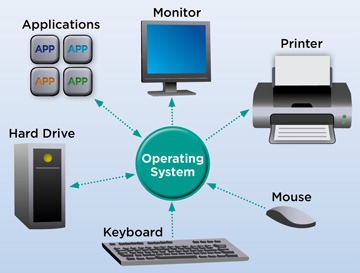
OPERATING SYSTEM SOFTWARE
The operating system software provides various levels of interaction (called interface) between the computer and the user, as well as between the computer and the application software.
20
21
22
23
APPLICATION SOFTWARE
The application software also called programs, has a specific use or task to perform such as AutoCAD for Architectural drawings and layouts, Lotus 1-2-3 for business and marketing, Adobe Photoshop for image processing, and so on.
Technology and Livelihood Education Information and Communication Technology
TECHNICAL DRAFTING GRADE 10

Show answer
Auto Play
Slide 1 / 23
SLIDE

Similar Resources on Wayground
18 questions
Breathing
Presentation
•
7th - 10th Grade
18 questions
Waves, Currents, Winds
Presentation
•
7th Grade
18 questions
Intro to Scientific Notation (2)
Presentation
•
8th Grade
18 questions
Multiplying Rational Expressions
Presentation
•
10th - 12th Grade
18 questions
Introduction to the Scientific Method
Presentation
•
4th - 8th Grade
18 questions
VS.5a American Revolution
Presentation
•
4th Grade
18 questions
Louisiana Territory
Presentation
•
8th Grade
18 questions
Stem Cells
Presentation
•
7th Grade
Popular Resources on Wayground
10 questions
Safety Day 2026 – Student Review
Quiz
•
9th Grade
21 questions
Continents and Oceans
Quiz
•
6th Grade
20 questions
Parts of Speech
Quiz
•
5th Grade
16 questions
Subject & Predicate
Quiz
•
5th Grade
25 questions
Multiplication Facts
Quiz
•
5th Grade
12 questions
Map Skills
Quiz
•
3rd Grade
22 questions
Continents and Oceans
Quiz
•
5th Grade
15 questions
Rounding Decimals
Quiz
•
5th Grade
Discover more resources for
10 questions
Safety Day 2026 – Student Review
Quiz
•
9th Grade
21 questions
Continents and Oceans
Quiz
•
6th Grade
20 questions
Parts of Speech
Quiz
•
5th Grade
16 questions
Subject & Predicate
Quiz
•
5th Grade
25 questions
Multiplication Facts
Quiz
•
5th Grade
12 questions
Map Skills
Quiz
•
3rd Grade
22 questions
Continents and Oceans
Quiz
•
5th Grade
15 questions
Rounding Decimals
Quiz
•
5th Grade