Instructional Software
Presentation
•
Instructional Technology
•
Professional Development
•
Easy
Jennifer Nudalo
Used 12+ times
FREE Resource
26 Slides • 10 Questions
1
Instructional Software
Lesson 4
2
Learning Objectives:
Outline the Framework of a Computer System.
Differentiate between the two main types of software.
Explain the different Categories of Instructional Software.
3
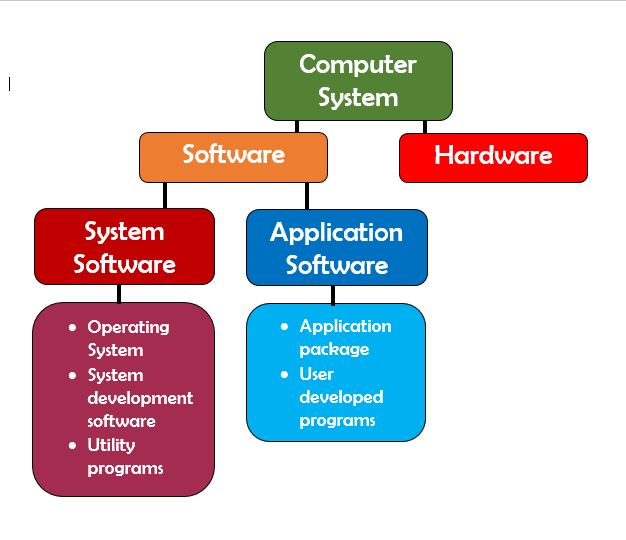
Diagram
4
Software
refers to the programs your computer uses to perform the actions you want it to.
5
Hardware
refers to the physical aspects of a computer like your mouse, keyboard, screen/monitor, CPU, hard disk, etc.
6
Two main types of software:
System Software
Application Software
7
System Software
is a type of computer program that is designed to run a computer’s hardware and application programs.
8
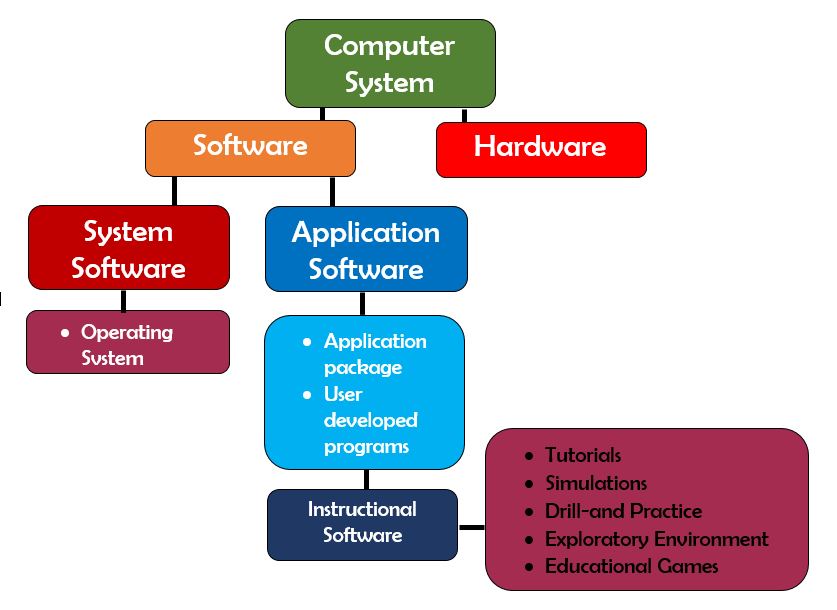
Diagram
9
Operating System
is a software that allows the different components of the computer, such as its memory, disk storage devices and display output, to function together while allowing the user to run applications.
10
Application Software
consists of programs that perform specific task for users, such as a word processing program, email program, or Web browser.
11
Check-In
brain exercise
12
Multiple Choice
A type of computer program that is designed to run a computer’s hardware and application programs.
application software
system software
13
Multiple Choice
An example of system software that allows the different components of the computer, such as its memory, disk storage devices and display output, to function together while allowing the user to run applications.
operating system
application software
14
Multiple Select
What are the two types of software? Select two that applies.
application software
computer software
system software
15
Multiple Choice
It consists of programs that perform specific task for users, such as a word processing program, email program, or Web browser.
application software
computer software
16
Multiple Choice
It refers to the physical aspects of a computer like your mouse, keyboard, screen/monitor, CPU, hard disk, etc.
hardware
software
17
18
Instructional Software
is a computer software designed to assist in the delivery of instruction. Primary purpose is to support teaching and learning.
19
Five Categories of Instructional Software
Tutorials
Simulations
Drill-and Practice
Educational Games
Exploratory Environment Software
20
Tutorials
is an instructional sequence on a topic that is similar to what the teacher instruction is in the classroom.
21
Two types of Tutorials:
Linear Tutorials - give the same instruction sequence of explanation, practice
and feedback to all learners
Branching Tutorials - provides more sophisticated instructions that direct learners on their own personal path depending on how they respond to the question right or wrong.
22
Simulations
provides a controlled learning environment that replicates key elements of real-world environment.
23
Types of Simulations:
Physical or Iterative - simulations that teach about something
Procedural or Situational - simulations that teach how to do something
24
Drill-and Practice
is commonly used to reinforce mastery of specific skills.
25
Educational Games
are very popular among our students mainly because this type of software challenges and excites them. It's designed to emphasize competition and entertainment.
26
Exploratory Environment
is designed to provide manageable and responsive computer-based worlds for learners to explore and manipulate.
27
Advantages of Instructional Software
Promotes personalized learning
Increases students’ motivation and creativity
Provides extended learning opportunities and practices
28
Advantages of Instructional Software
Addresses different learning styles
Provides virtual and simulated real-life learning experiences
Learners have direct control of their learning
29
Advantages of Instructional Software
Develops problem-solving skills and Encourages active learning\fosters metacognition skills
30
Knowledge Check
31
Multiple Choice
It is a computer software designed to assist in the delivery of instruction. The primary purpose is to support teaching and learning.
system software
instructional software
32
Multiple Choice
Which is not part of the five categories of Instructional Software?
Tutorials
Simulations
Operating system
33
Multiple Choice
Simulations provides a controlled learning environment that replicates key elements of real-world environment.
True
False
34
Multiple Choice
Drill-and Practice is NOT commonly used to reinforce mastery of specific skills.
True
False
35
Multiple Choice
One of the categories of instructional software that
is designed to provide manageable and responsive computer-based worlds for learners to EXPLORE and manipulate.
Exploratory Environment
Drill-and Practice
36
Thank you!
This ends my presentation. Have a good day!
Instructional Software
Lesson 4
Show answer
Auto Play
Slide 1 / 36
SLIDE

Similar Resources on Wayground
35 questions
Mission: Immersion Possible
Presentation
•
Professional Development
31 questions
Wayground (Quizizz) Lessons for Districtwide 2025
Presentation
•
University - Professi...
31 questions
Assessment of Learning
Presentation
•
Professional Development
29 questions
Homework Session 1 Power Generation
Presentation
•
Professional Development
28 questions
End of Year SWAT Wrap Up
Presentation
•
Professional Development
33 questions
Asynchronous: Bury Your Lifeless Presentations
Presentation
•
Professional Development
31 questions
Part 1: Southern Colonies Lesson
Presentation
•
4th Grade
29 questions
Chapter 1 Fundamentals
Presentation
•
KG - University
Popular Resources on Wayground
20 questions
"What is the question asking??" Grades 3-5
Quiz
•
1st - 5th Grade
20 questions
“What is the question asking??” Grades 6-8
Quiz
•
6th - 8th Grade
10 questions
Fire Safety Quiz
Quiz
•
12th Grade
20 questions
Equivalent Fractions
Quiz
•
3rd Grade
34 questions
STAAR Review 6th - 8th grade Reading Part 1
Quiz
•
6th - 8th Grade
20 questions
“What is the question asking??” English I-II
Quiz
•
9th - 12th Grade
20 questions
Main Idea and Details
Quiz
•
5th Grade
47 questions
8th Grade Reading STAAR Ultimate Review!
Quiz
•
8th Grade