

Q3 WEEK 3 DAY 1-2

Presentation
•
Computers
•
7th Grade
•
Practice Problem
•
Easy

Jonalyn Rosario
Used 10+ times
FREE Resource
11 Slides • 6 Questions
1
By Jonalyn Rosario
2
Lesson Overview:
Like any other do it yourself projects, computer building requires certain skills, tools, and resources. For example:
You must be able to read and write.
You have to know how to do basic math.
You need some basic hand tools.
You have to have a clean place to work with suitable workbench.
You need to be able to follow instructions and observe basic safety and anti-static precautions.
Some text here about the topic of discussion
3
Types of Computer 1. Desktop Computers
Many people use desktop computers, or desktops as they are often referred to, at work, home, school, or the library.
2. Laptop Computer
Laptops are battery or AC-powered personal computers that can be easily carried and used in a variety of locations.
Subject | Subject
A computer is a machine or device that performs processes, calculations and operations based on instructions provided by a software or hardware program

4
Open Ended
What are the types of computer?
5
Parts of Computer
1. Monitor
The term "monitor" is often used with "computer screen" or "display." The monitor displays the computer's user interface and open programs, allowing the user to interact with the computer.
2. Modem
It is a hardware component that allows a computer or another device,
such as a router or switch, to connect to the Internet
Subject | Subject
A computer is a machine or device that performs processes, calculations and operations based on instructions provided by a software or hardware program


6
Parts of Computer
3. System Unit
It is the main part of a desktop computer. It includes the motherboard, CPU,
RAM, and other components
4. Mouse
It is a handheld hardware input device that controls a cursor in a GUI (graphical user interface) and can move and select text, icons, files, and folders on your computer
Subject | Subject
A computer is a machine or device that performs processes, calculations and operations based on instructions provided by a software or hardware program


7
Parts of Computer
5. Speaker
The purpose of speakers is to produce audio output that can be heard by the listener
6. Printer
A printer is an output device that prints paper documents
7. Keyboard
Similar to an electric typewriter, a keyboard is composed of keys and buttons that create letters, numbers, and symbols, as well as other functions.
A computer is a machine or device that performs processes, calculations and operations based on instructions provided by a software or hardware program


8
Open Ended
What are the parts of computer?
9
Multiple Choice
It is often called as computer screen. It displays the computer's user interface allowing the user to interact with the computer
Keyboard
Printer
Monitor
Mouse
10
Multiple Choice
It is a handheld input device that can move and select text, icons, files, and folders on your computer
Keyboard
Printer
Monitor
Mouse
11
1. CHAIR
Seat - Adjust chair height so that your feet are comfortably flat on the Floor, thighs approximately horizontal and lower legs approximately vertical.
Back Support - Raise the back rest to its maximum height, sit on the chair and check the fit of the back rest to the curve of the lower back.
Arm Rest- If your chair does however have arm rests, make sure they allow you to get as close to the desk as required and do not impede on your elbows.
Some text here about the topic of discussion
12
2. DESK
Height - First adjust your chair to fit you and then adjust your desk so the top of the surface is just below elbow height.
Clearance and Drawers - General items should not be stored under the desk where they will obstruct the space required by the legs.
Storage on Desk- In-trays should be in the outer reach sector of the desk and should not be located above shoulder height.
Some text here about the topic of discussion
13
3. Keyboard
Place the keyboard as close to the front edge of the desk as is comfortable.
4. Mouse
Place the mouse mat directly beside the end of the keyboard on either side. Use the mouse in this position and try to keep the mouse on the mat while in use.
Some text here about the topic of discussion
14
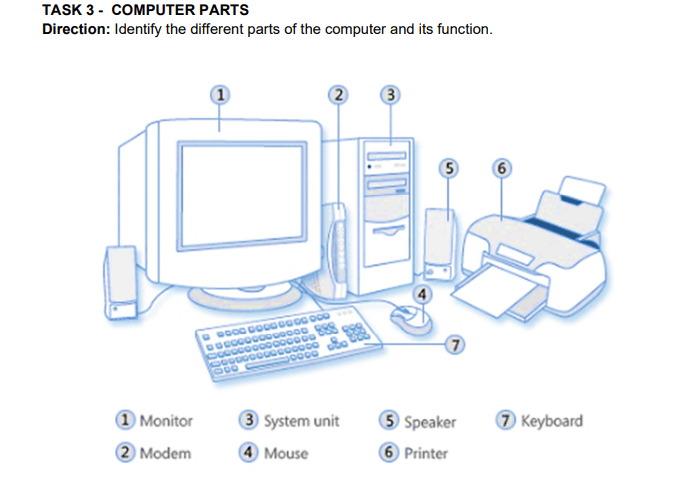
Directions:
Identify the different parts of the computer
Some text here about the topic of discussion.
Computer parts
15

Some text here about the topic of discussion.
16
Open Ended
How do computers help student?
17
Open Ended
What are the positive effects of using computer?
By Jonalyn Rosario
Show answer
Auto Play
Slide 1 / 17
SLIDE
Similar Resources on Wayground

11 questions
Materi Analisis Data
Presentation
•
7th Grade
12 questions
Computing Systems Scenarios
Presentation
•
6th - 8th Grade
12 questions
Motion and types of motion
Presentation
•
7th Grade
12 questions
types of energy
Presentation
•
7th Grade
12 questions
Drawing Conclusions/Making Inferences
Presentation
•
7th Grade
12 questions
Simple Past
Presentation
•
7th Grade
12 questions
Multiplying Integers
Presentation
•
7th Grade
12 questions
Air Masses
Presentation
•
7th Grade
Popular Resources on Wayground
10 questions
Safety Day 2026 – Student Review

Quiz
•
9th Grade
21 questions
Continents and Oceans
Quiz
•
6th Grade
20 questions
Parts of Speech
Quiz
•
5th Grade
16 questions
Subject & Predicate
Quiz
•
5th Grade
25 questions
Multiplication Facts
Quiz
•
5th Grade
12 questions
Map Skills
Quiz
•
3rd Grade
22 questions
Continents and Oceans
Quiz
•
5th Grade
15 questions
Rounding Decimals
Quiz
•
5th Grade