

Grade 3 Input and output devices

Presentation
•
Computers
•
1st - 5th Grade
•
Practice Problem
•
Hard

Dr Marcel Greene
Used 69+ times
FREE Resource
3 Slides • 5 Questions
1

Step one: What is computer hardware
Computer hardware refers to the physical components of a computer system, such as the processor, memory, hard drive, and so on. Input and output devices are essential components of a computer system, as they allow a user to communicate with the computer and receive information back from it.
Cmputer hardware can be divided into input and output devices
Computer Hardware
2

Input devices are devices that allow a user to enter data into a computer. Some common examples of input devices include:
The keyboard is a common input device that allows a user to enter text and other data into a computer.
The mouse is another common input device that allows a user to interact with a computer by moving a cursor on the screen and selecting items.
The touchpad is a type of input device that is often found on laptops and allows a user to interact with the computer by sliding their finger across a flat surface.
The scanner is a device that allows a user to convert physical documents or images into digital format.
The microphone is an input device that allows a user to input sound into a computer.
Step two: Input devices
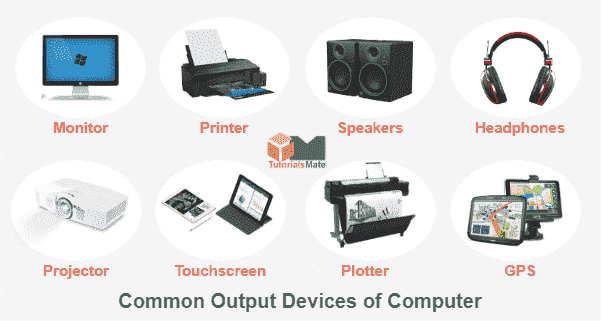
Output devices are devices that allow a computer to communicate information to a user. Some common examples of output devices include the monitor, printers, and speakers.
The monitor is a common output device that displays visual information from a computer. It can be a cathode ray tube (CRT) monitor, a liquid crystal display (LCD) monitor, or a light-emitting diode (LED) monitor.
The printer is an output device that allows a user to print documents or images from a computer. The speakers are output devices that allow a user to hear sound from a computer.
Output devices
3

Other examples of hardware
In addition to input and output devices, a number of other hardware components make up a computer system. These include the processor, memory, storage devices, and communication devices.
The processor, also known as the central processing unit (CPU), is the brain of the computer. It is responsible for executing instructions and performing calculations.
Memory, also known as Random access memory (RAM), is where the computer stores data that is being used or processed. Storage devices, such as the hard drive or solid-state drive (SSD), are where the computer stores data that needs to be saved for later use. Communication devices, such as the network card, allow the computer to connect to the internet or other computer networks.
Some text here about the topic of discussion.
Other hardware component of the computer
4
Multiple Choice
What is the primary function of an input device?
To output data from a computer
To store data on a computer
To input data into a computer
To process data on a computer
5
Multiple Choice
Which of the following is an example of an input device?
Monitor
Mouse
Keyboard
Printer
6
Multiple Choice
Which of the following is an example of an output device?
Monitor
Mouse
Keyboard
Printer
7
Multiple Choice
Which of the following is not an example of an input device?
Touchscreen
Scanner
Speaker
Game controller
8
Multiple Choice
What is the primary function of an output device?
To output data from a computer
To store data on a computer
To input data into a computer
To process data on a computer
Step one: What is computer hardware
Computer hardware refers to the physical components of a computer system, such as the processor, memory, hard drive, and so on. Input and output devices are essential components of a computer system, as they allow a user to communicate with the computer and receive information back from it.
Cmputer hardware can be divided into input and output devices
Computer Hardware
Show answer
Auto Play
Slide 1 / 8
SLIDE
Similar Resources on Wayground

7 questions
Грамматика: притяжательные местоимения, сущ, предлог of
Presentation
•
1st - 5th Grade
4 questions
Ovecoming Teaching Challenges
Presentation
•
KG
7 questions
Mein Haus
Presentation
•
1st - 6th Grade
3 questions
practice
Presentation
•
1st - 4th Grade
11 questions
Would you rather...
Presentation
•
1st - 5th Grade
11 questions
Smaller but smarter Angles 2 3C
Presentation
•
1st - 5th Grade
12 questions
Computer Fundamentals and Devices
Presentation
•
2nd - 5th Grade
4 questions
Hardware and Software
Presentation
•
3rd - 5th Grade
Popular Resources on Wayground
10 questions
Safety Day 2026 – Student Review

Quiz
•
9th Grade
21 questions
Continents and Oceans
Quiz
•
6th Grade
20 questions
Parts of Speech
Quiz
•
5th Grade
16 questions
Subject & Predicate
Quiz
•
5th Grade
25 questions
Multiplication Facts
Quiz
•
5th Grade
12 questions
Map Skills
Quiz
•
3rd Grade
22 questions
Continents and Oceans
Quiz
•
5th Grade
15 questions
Rounding Decimals
Quiz
•
5th Grade
