

quizziz

Presentation
•
Computers
•
Professional Development
•
Practice Problem
•
Hard

Patyrose Panlilio
Used 1+ times
FREE Resource
21 Slides • 0 Questions
1
2

GamifiedClassroomQuizzes!
contact@quizizz.com
3

What isQuizizz?
A fun game toconduct
quickassessments
withyourclass.
4

What’sdifferent about Quizizz?
Student-paced
RealtimeFeedback
QuestionLibrary
BYOD
5

6

7

Playinga Quizizz
8
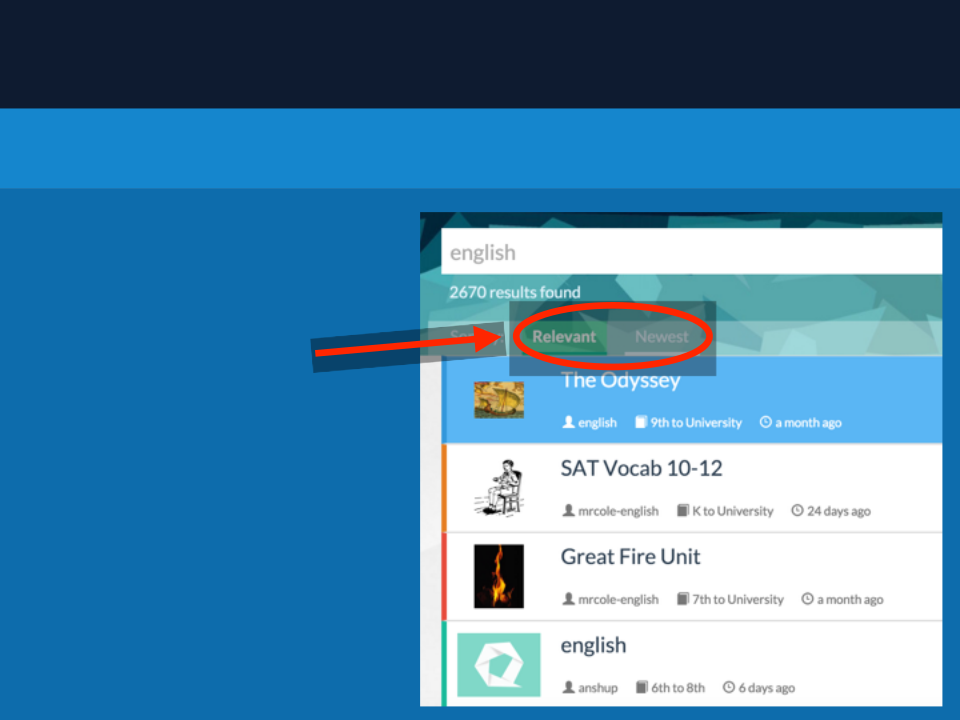
Playinga Quizizz
Step1:Search
Searchforquizzesusingrelevant
keywords,ortheusernameofthe
creator.
2 Sorting Options
1.Relevant(default):Thissortsthe
quizzesbyhowcloselytheymatch
yourkeywords.
2.Newest: Thissortsthequizzes
(that matchyourkeywords)by
howrecentlytheywerecreated.
Bonus Option: Includeduplicates?
Includeduplicateversionsofquizzesin
thelist ofresults.
(Usefulifyoulikea quiz,andwant to
seevariationsofit.)
9

Playinga Quizizz
Step 2:LiveorHomework?
Quizizz supports2modesforconductinga game,liveandhomework.
1.Idealforanin-classreviewsession.
2.Gameautomaticallyendswhenall
thestudentshavecompleted.
3.Studentsneedtocompleteinone
sitting,theycannot resumea game
later.
4.Hasa “LiveResults”dashboard
whilethegameisrunning.
1.Idealfora homeworkassignment.
2.Youcanset a deadlineupto2
weeksintothefuture.
3.Gameautomaticallyendsat the
deadline.
4.Studentscanresumea half-done
assignment later.
BothLiveandHomeworkgamedata willshowupinthe“MyReports”tab
10

Playinga Quizizz
Step3:Quiz Settings
Use these settings to adjust the level
ofcompetition and fun.
1.JumbleQuestionsorderforeachstudent
2.JumbleAnswersforeachquestion
3.ShowAnswersafterquestions
4.ShowQuizReviewonstudent devicesat theend
ofthequiz
5.Show Leaderboard
6.QuestionTimer: IfON,studentsget 600points
forcorrect + upto400timebonus,0pointsfor
wronganswers.IfthisisturnedOFF,students
willget 1000pointsforcorrect,and0forwrong.
7.Show memes(thefunnypicturesafter
questions)
8.PlayMusiconstudent devices
11

Playinga Quizizz
Step 4:ShareCode
TEACHER’SSCREEN
STUDENT’SSCREEN
Ask yourstudentstoopen
Onceyouclick PROCEED on the
http://join.quizizz.com
customization page, your 5digitGAMECODE
and
is shown on thescreen.
1.
EntertheGAMECODE
2.Entertheirname/nickname
12

Playinga Quizizz
Step 4: GO!!!
Ifyouareplayinga homeworkgame,it willalreadybestarted.
Foralivegame,oncestudentshavejoined,click “STARTGAME”tobeginyourQuizizz!
TIP 1:Clickona student’sname/icontokickthemout ofthegameifrequired.
TIP 2:Studentscanjoina livegameafterthequiz beginsalso,soyoucanget startedevenifa
fewstudentsareyet tojoin.
13

Playinga Quizizz
Step5:RealtimeFeedback
Forlivegames,youwillseerealtimeupdatesof student-levelprogress,aswellasthe
numberofright/wronganswersona question-level.
Homeworkgamesalsohavea report that givesyouallthesamedata.
Tip1:Thegameautomaticallyendsonceallthestudentshavecompletedallthe
questions.
Tip2:Usethestudent progressgraphtoseehowmucheachstudent hasleft todo.
Tip3:Youcanalsoendthegameanytimebyclicking“EndGame”.
14

Playinga Quizizz
Step 6: View/Save Data
Youcanalsodownloada moredetailedExcelreport ofthedata fromthereport page.
15

Creatinga Quizizz
16

Creatinga Quizizz
Step1:NameandTags
Note: You’ll need to be logged-in to
CREATEa Quizizz.
1.Clickthe“CREATE”tabinthetop
navigationbar.
2.Entera descriptivenameanda
coverimageforthequiz.
3.Select whetherthequiz shouldbe
Public/Private.
4.Choosethelanguageofthequiz
(Englishisdefault)
Tip:Enteringa descriptivenamegoesa
longwayinmakingyourquiz easyto
findforotherteachers,sopleasechip
in ☺
17

Creatinga Quizizz
Step2:CreatingQuestions
Viewa previewof
thequestion.
Edit quiz name,
coverimage,
language,
public/private.
QuestionOptions
(min 2 reqd.)
Duplicateand
Delete buttons
“Teleport”
questionsfrom
otherpublic
quizzes.
Addquestionto
yourimages
Addsymbolsand
text formatting.
Dragn’dropto
reorderQs.
Hoverover
questionstosee
what is
incomplete.
18

Creatinga Quizizz
Step3:FinishandSave
A fewfinaldetails
1.Specifythegrade range.
2.Select Subjects,andQuizwithin
thosesubjectstomakeit easierto
searchforthemlater.
3.YoucanalsoaddcustomTagsthat
youfeelarerelevant.
4.Onceyou’redone,makesureto
click “FinishandCreateQuiz” to
completetheprocess.Youcan
alwaysedit thequiz anytimeyou
want.
5.Youcanplayyourquiz now!
19

Show/hide
answers
Creatinga Quizizz
Step4:Review,Play,Shareandmore!
Duplicate,Edit
or Delete
Shareyour
quizzeswith
others!
Show/hide
answers
Viewsquestions
slideshow
20

HowcanIuseQuizizz?
Super-fun review sessions!
Self-pacedclasswork
Homeworkwitha twist!
Quicktestsandpop-quizzes
21

Thankyou!
Havefeedbackorsuggestions?
Weneedyourfeedbackandsupport tokeepimprovingQuizizz,sopleasetakea
moment toshoot usanemailat contact@quizizz.com,ortweet to@quizizz, or
usetheonsitefeedbackoptionstoreachus.Workingtogether,wecancreate
somethingamazing!
Show answer
Auto Play
Slide 1 / 21
SLIDE
Similar Resources on Wayground

12 questions
Presentasi TOT Batch-1 Simulasi
Presentation
•
Professional Development
19 questions
PID - Refleksi Awal
Presentation
•
Professional Development
14 questions
Cladograms
Presentation
•
KG - University
19 questions
Modals of obligation
Presentation
•
Professional Development
17 questions
MODAL VERBS
Presentation
•
Professional Development
19 questions
TWK (Bela Negara) MODUL 2
Presentation
•
Professional Development
11 questions
Robotics
Presentation
•
University
20 questions
Digital Coach Jobe
Presentation
•
KG
Popular Resources on Wayground
10 questions
Safety Day 2026 – Student Review

Quiz
•
9th Grade
21 questions
Continents and Oceans
Quiz
•
6th Grade
20 questions
Parts of Speech
Quiz
•
5th Grade
16 questions
Subject & Predicate
Quiz
•
5th Grade
25 questions
Multiplication Facts
Quiz
•
5th Grade
12 questions
Map Skills
Quiz
•
3rd Grade
22 questions
Continents and Oceans
Quiz
•
5th Grade
15 questions
Rounding Decimals
Quiz
•
5th Grade