

MS Teams Introduction

Presentation
•
Computers
•
8th Grade
•
Practice Problem
•
Medium

Tracy Mutter
Used 9+ times
FREE Resource
9 Slides • 6 Questions
1
Microsoft Teams
in Computing
2
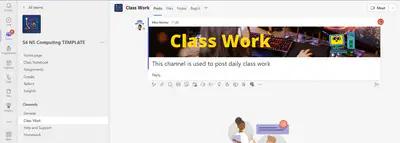
In computing we use teams to store all class work and homework
Computing
Teams
3
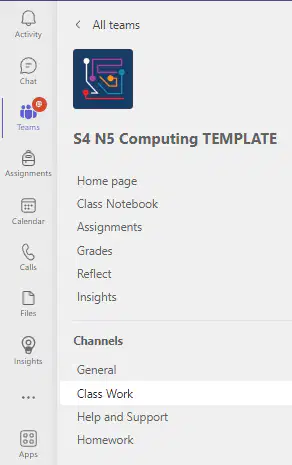
Your Team will have a number of channels each with their own purpose.
GENERAL - class & school announcements
CLASS WORK - daily work tasks
HELP & SUPPORT- ask questions to help with work
HOMEWORK - homework assignments
Team Structure
4
Multiple Choice
Where would you ask for help with class work?
General
Class Work
Help & Support
Homework
5
Multiple Choice
Which channel would you find class and school announcements?
General
Class Work
Help & Support
Homework
6

Homework is normally issued as a teams assignment
These will be posted in the homework channel
Homework Assignments
7
Teams Assignments
Where to find them
On your ipad you can either click the assignment announcement in the homework channel or go into assignments from the More menu inthe General channel
8

Cilck assignment in homework channel
Or
Select General Channel - More then assignments
Forthcoming - not due yet
Past Due - should be handed in
Returned - marked and sent back to you
Assignments on iPad
9
Multiple Select
Where do you find our Team assignments on your iPad?
Homework channel
More
Files
Posts
10
Multiple Select
An assignment which is past due means?
You have completed it and handed it in
You have completed it and not handed it in
You have not yet completed it
You have not to do that one
11
Multiple Choice
Where would you see your feedback and marks for an assignment?
Forthcoming
Past Due
Returned
12
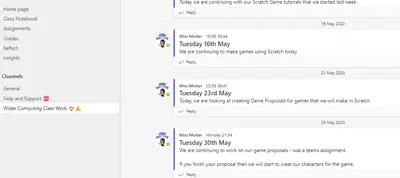
Class tasks are posted in the class work channel.
If you are absent but can work from home then you can complete the work and stay up to date
Class work
13
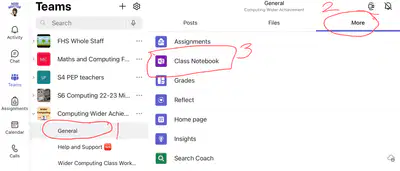
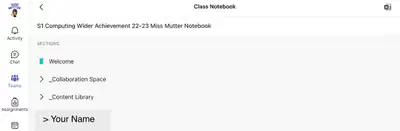
Most class tasks are stored in our Class Notebook
You can access it from the General channel by selecting More
Class Notebook
14
Class Notebook
Notebook has the following sections
WELCOME - landing page with general class information
COLLABORATION SPACE - work in real time with others
CONTENT LIBRARY - read only section, worksheets, etc. shared by your teacher
YOUR NAME - your private workbook within the notebook
15
Poll
Have you used Class Notebook in previous classes?
Yes
No
Microsoft Teams
in Computing
Show answer
Auto Play
Slide 1 / 15
SLIDE
Similar Resources on Wayground

14 questions
Immigration and Urbanization
Presentation
•
8th Grade
11 questions
Place value with decimals
Presentation
•
8th Grade
11 questions
Parallel and Series Circuits
Presentation
•
8th Grade
12 questions
SUPERLATIVE ADJECTIVES
Presentation
•
8th Grade
10 questions
Coding in Kindergarten 2023
Presentation
•
KG
12 questions
World energy needs
Presentation
•
8th Grade
10 questions
Professionalism - Who gets the job?
Presentation
•
8th Grade
13 questions
CSD U01L04 What is a Computer Warm up and Wrap up
Presentation
•
8th Grade
Popular Resources on Wayground
6 questions
Secondary Safety Quiz
Presentation
•
9th - 12th Grade
10 questions
Afterschool Activities & Sports

Quiz
•
6th - 8th Grade
19 questions
ROAR Week 2026
Quiz
•
9th - 12th Grade
20 questions
Lab Safety Quiz
Quiz
•
6th Grade
15 questions
Cool Tool:Chromebook
Quiz
•
6th - 8th Grade
22 questions
would you rather
Quiz
•
3rd - 11th Grade
21 questions
Continents and Oceans
Quiz
•
6th Grade
20 questions
Parts of Speech
Quiz
•
5th Grade
Discover more resources for Computers
20 questions
Early Computing
Quiz
•
7th - 12th Grade
10 questions
Exploring the Parts of a Computer

Interactive video
•
6th - 10th Grade
10 questions
Navigating Digital Citizenship and Online Safety
Interactive video
•
6th - 10th Grade
11 questions
Technology Acceptable Use
Quiz
•
6th - 8th Grade
9 questions
Discussion Boards
Quiz
•
6th - 8th Grade
10 questions
Mastering Proper Keyboarding Techniques
Interactive video
•
6th - 10th Grade