
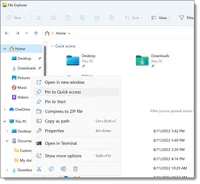
File explorer

Presentation
•
Computers
•
6th Grade
•
Practice Problem
•
Hard

GLORIA RESENDIZ
Used 107+ times
FREE Resource
6 Slides • 4 Questions
1
File Explorer in Windows
(Windows Explorer)
2

Helps you get the files and folders you need quickly and easily
3
Press the Windows logo key + E on your keyboard.
2
Select it on the taskbar or the Start menu.
1
How do I find File Explorer?
4
Fill in the Blanks
File explorer helps you get the _____ ___ _______ you need.
5
Shortcut
In Microsoft Windows, a shortcut is a link that points to a computer program. Shortcuts allow you to create links to programs in any folder, Start bar, Taskbar, desktop, or other locations on the computer. A shortcut in Windows has a small arrow in the bottom-left corner of the icon, and shortcut file names end with a file extension of .lnk.
A shortcut is useful for accessing software programs or files more easily.
6

A shortcut in Windows has a small arrow in the bottom-left corner of the icon.
7
Multiple Select
What is a Shortcut?
Allow you to create links to programs in any folder, Start bar, Taskbar, desktop, or other locations on the computer
Is a link that points to a computer program
Is useful for accessing software programs or files more easily
8
To change how your items appear in File Explorer, select View on the ribbon and choose between showing icons, lists, details, and more..
To reduce the space between files, select View > Compact view.
To find relevant files from your PC and the cloud, search from File Explorer Home.
9
Multiple Choice
How do I change the appearance of my files or folders?
Select view
Select compact view
Select tool bar
10
Multiple Choice
How can you move the location of a file or folder?
Select it and share
Select it and cut
Select Quick access
File Explorer in Windows
(Windows Explorer)
Show answer
Auto Play
Slide 1 / 10
SLIDE
Similar Resources on Wayground

10 questions
TIK Kelas 5
Presentation
•
5th Grade
10 questions
SISTEMA OPERATIVO
Presentation
•
7th Grade
8 questions
Search
Presentation
•
5th Grade
9 questions
MS. PowerPoint
Presentation
•
6th Grade
9 questions
ASAP 11/30/2020
Presentation
•
6th Grade
9 questions
Writing Ratios
Presentation
•
6th Grade
10 questions
DEMO Leccion Computacion
Presentation
•
6th Grade
9 questions
Statistical Questions
Presentation
•
6th Grade
Popular Resources on Wayground
6 questions
PRIDE Always and Everywhere
Presentation
•
12th Grade
20 questions
Lab Safety Quiz

Quiz
•
6th Grade
26 questions
KOR Review Kahoot Questions
Quiz
•
8th Grade
21 questions
Continents and Oceans
Quiz
•
6th Grade
12 questions
Unit Zero lesson 2 cafeteria
Presentation
•
9th - 12th Grade
20 questions
Parts of Speech
Quiz
•
5th Grade
10 questions
Riddles Riddles fun Riddles
Quiz
•
6th - 12th Grade
16 questions
Subject & Predicate
Quiz
•
5th Grade
