

week 5

Presentation
•
Computers
•
6th - 8th Grade
•
Practice Problem
•
Hard

klaithem NEYADI
FREE Resource
17 Slides • 0 Questions
1


Programming in Kodu
G r a d e 6
W e e k 5
Class Welcome
Classroom Rules
Daily Routine
Wellbeing
Lesson
Objectives
Keywords
Lesson
Explanation
Main
Activity
Plenary
Exit Card
(Self Assessment)
2

01
03
05
YOUR TEXT HERE
02
04
Lorem ipsum dolor sata amet,
consectetur adipiscing elit, sed
do eiusmod tempor incididunt
ut labore et dolore
YOUR TEXT HERE
Classroom Rules
We want our classroom to be a happy, fun and safe place.
05
06
Class Welcome
Classroom Rules
Daily Routine
Wellbeing
Lesson
Objectives
Keywords
Lesson
Explanation
Main
Activity
Plenary
Exit Card
(Self Assessment)
3


Starter
Typing Club
Class Welcome
Classroom Rules
Daily Routine
Wellbeing
Lesson
Objectives
Keywords
Lesson
Explanation
Main
Activity
Plenary
Exit Card
(Self Assessment)
https://www.typingclub.com/
4


E- safety
Use a good antivirus and
keep it updated
Class Welcome
Classroom Rules
Daily Routine
Wellbeing
Lesson
Objectives
Keywords
Lesson
Explanation
Main
Activity
Plenary
Exit Card
(Self Assessment)
5


Wellbeing
Class Welcome
Classroom Rules
Daily Routine
Wellbeing
Lesson
Objectives
Keywords
Lesson
Explanation
Main
Activity
Plenary
Exit Card
(Self Assessment)
6

Success Criteria
Lesson Objectives
• Analyse And Deconstruct Code To Work Out Its Purpose.
• Recognised The Difference Between Sequence, Selection And
Repetition
Student can write a description of code in my own words.
Student can use different Programming structure to Program
Kodu Game
Class Welcome
Classroom Rules
Daily Routine
Wellbeing
Lesson
Objectives
Keywords
Lesson
Explanation
Main
Activity
Plenary
Exit Card
(Self Assessment)
7

keywords
Deconstructing
Sequence
Selection
Looping
look at existing code
and figure out what it
does or how it works
the order we want
the computer to
execute the
commands.
use conditions to
decide which
commands
to complete.
repeat a set of codes a
specific number of
times
Class Welcome
Classroom Rules
Daily Routine
Wellbeing
Lesson
Objectives
Keywords
Lesson
Explanation
Main
Activity
Plenary
Exit Card
(Self Assessment)
8
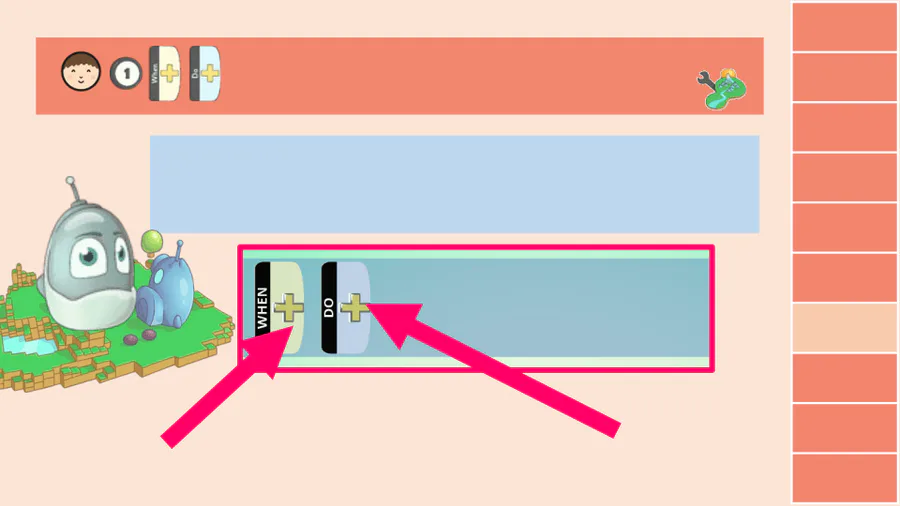
Creating Worlds and Code
In Kodu, we use When and Do to create code that
programs an object.
Conditions
Actions
Class Welcome
Classroom Rules
Daily Routine
Wellbeing
Lesson
Objectives
Keywords
Lesson
Explanation
Main
Activity
Plenary
Exit Card
(Self Assessment)
9



Deconstructing Code
look at existing
code and figure
out what it does
or how it works.
Can you deconstruct some
sample code and explain
what it is intended to do?
Class Welcome
Classroom Rules
Daily Routine
Wellbeing
Lesson
Objectives
Keywords
Lesson
Explanation
Main
Activity
Plenary
Exit Card
(Self Assessment)
10


Programming Structures
Sequence
Selection
Reptation
Class Welcome
Classroom Rules
Daily Routine
Wellbeing
Lesson
Objectives
Keywords
Lesson
Explanation
Main
Activity
Plenary
Exit Card
(Self Assessment)
11


Sequence
Commands created using sequence are completed one time in the order they
are written.
In this example of sequence, the command will move a character forward:
Scratch
Kodu
Class Welcome
Classroom Rules
Daily Routine
Wellbeing
Lesson
Objectives
Keywords
Lesson
Explanation
Main
Activity
Plenary
Exit Card
(Self Assessment)
12


Selection
Commands created using ‘selection’ use conditions to decide which commands to complete.
This works in Kodu with ‘conditions’ and ‘actions.’
In this example of selection, the condition is: when the arrow keys are
pressed, the command completed is: move the character quickly:
Class Welcome
Classroom Rules
Daily Routine
Wellbeing
Lesson
Objectives
Keywords
Lesson
Explanation
Main
Activity
Plenary
Exit Card
(Self Assessment)
13

• Repetition (also known as looping) is used when we need to repeat a
sequence of commands.
• In scratch, for example, the ‘forever’ loop is used.
• With Kodu, there are no tiles for repetition. Kodu automatically uses
repetition
Scratch
Kodu
Repetition
Class Welcome
Classroom Rules
Daily Routine
Wellbeing
Lesson
Objectives
Keywords
Lesson
Explanation
Main
Activity
Plenary
Exit Card
(Self Assessment)
14


Activity
Class Welcome
Classroom Rules
Daily Routine
Wellbeing
Lesson
Objectives
Keywords
Lesson
Explanation
Lesson
Activity
Plenary
Exit Card
(Self Assessment)
15


Demonstrate how to program control commands (to make the rover move)
Activity
Class Welcome
Classroom Rules
Daily Routine
Wellbeing
Lesson
Objectives
Keywords
Lesson
Explanation
Main
Activity
Plenary
Exit Card
(Self Assessment)
16

Plenary
https://quizizz.com/admin/quiz/63597eaeb9ec3d001eb39d4b?source=
quiz_share
Class Welcome
Classroom Rules
Daily Routine
Wellbeing
Lesson
Objectives
Keywords
Lesson
Explanation
Main
Activity
Plenary
Exit Card
(Self Assessment)
17

Exit card
Tell Me
2
Things
You have
Learned Today ..!
Class Welcome
Classroom Rules
Daily Routine
Wellbeing
Lesson
Objectives
Keywords
Lesson
Explanation
Main
Activity
Plenary
Exit Card
(Self Assessment)
Programming in Kodu
G r a d e 6
W e e k 5
Class Welcome
Classroom Rules
Daily Routine
Wellbeing
Lesson
Objectives
Keywords
Lesson
Explanation
Main
Activity
Plenary
Exit Card
(Self Assessment)
Show answer
Auto Play
Slide 1 / 17
SLIDE
Similar Resources on Wayground

11 questions
Percents: Part of a Whole
Presentation
•
6th - 8th Grade
10 questions
Quadrilaterals
Presentation
•
6th - 8th Grade
14 questions
Earth's Movement in Space
Presentation
•
6th - 8th Grade
14 questions
Photosynthesis
Presentation
•
6th - 8th Grade
15 questions
MAD
Presentation
•
6th - 8th Grade
14 questions
CS Media Chatting safely Online
Presentation
•
6th - 8th Grade
15 questions
Cellular Transport Lesson
Presentation
•
6th - 8th Grade
15 questions
23-24 SBAC Score Review
Presentation
•
6th - 8th Grade
Popular Resources on Wayground
10 questions
Safety Day 2026 – Student Review

Quiz
•
9th Grade
21 questions
Continents and Oceans
Quiz
•
6th Grade
20 questions
Parts of Speech
Quiz
•
5th Grade
16 questions
Subject & Predicate
Quiz
•
5th Grade
25 questions
Multiplication Facts
Quiz
•
5th Grade
12 questions
Map Skills
Quiz
•
3rd Grade
22 questions
Continents and Oceans
Quiz
•
5th Grade
15 questions
Rounding Decimals
Quiz
•
5th Grade