

4-OS-Lessons-4

Presentation
•
Computers
•
12th Grade
•
Medium

Zahra Nema
Used 14+ times
FREE Resource
50 Slides • 15 Questions
1


Operating
Systems
2
3


We’ll be looking at:
Define what a user interface (UI) is and explain its importance in operating systems.
Identify the different types of UIs (e.g., command-line, graphical user interface) and explain their advantages and disadvantages.
Learning Objectives
4

User Interfaces
5

The User Interface (UI)
With the OS managing all the processing and hardware and
everything, we need a nice, easy way of communicating with and
managing the OS.
6


The User Interface (UI)
With the OS managing all the processing and hardware and
everything, we need a nice, easy way of communicating with and
managing the OS.
We saw
these
“interfaces”
earlier
This is what the User Interface gives us, and it is constantly
evolving – sometimes for the better and sometimes not.
7

User Interfaces - CLI
>> CLI
Command Line Interface
8


User Interfaces - CLI
>> CLI
Command Line Interface
9

Computer “experts” often prefer the CLI interface
as it can be quicker.
30 sec
10

User Interfaces - GUI
>> GUI Graphical User Interface
11


User Interfaces - GUI
>> GUI Graphical User Interface
12

45sec
13

Windows Icons
14


Windows Icons
Windows 1 & 2
15


Windows 1 & 2
Windows 3
Windows Icons
16


Windows 1 & 2
Windows 3
Windows 7
Windows Icons
17


Windows 1 & 2
Windows 3
Windows 7
Windows 10
Windows Icons
18


Windows 1 & 2
Windows 3
Windows 7
Windows 10
Windows Icons
Which do you prefer?
19
Poll
Which do you prefer?
Windows 1 & 2
windows 3
Windows 7
Windows 10
20


Windows 1 & 2
Windows 3
Windows 7
Windows 10
Windows Icons
Which do you prefer?
Do they always get better?
21
Poll

Do they always get better?
Yes
No
22

User Interfaces - WIMP
In the Microsoft Windows GUI, programs are opened by
double-clicking an Icon with your mouse Pointer. Once a program
is opened, it is contained within a Window. In the window, the
programs features are accessed through Menus (or ribbon bars).
23

User Interfaces - WIMP
In the Microsoft Windows GUI, programs are opened by
double-clicking an Icon with your mouse Pointer. Once a program
is opened, it is contained within a Window. In the window, the
programs features are accessed through Menus (or ribbon bars).
Icon
24


User Interfaces - WIMP
In the Microsoft Windows GUI, programs are opened by
double-clicking an Icon with your mouse Pointer. Once a program
is opened, it is contained within a Window. In the window, the
programs features are accessed through Menus (or ribbon bars).
Icon
Pointer
25


User Interfaces - WIMP
In the Microsoft Windows GUI, programs are opened by
double-clicking an Icon with your mouse Pointer. Once a program
is opened, it is contained within a Window. In the window, the
programs features are accessed through Menus (or ribbon bars).
Icon
Pointer
Window
26


User Interfaces - WIMP
In the Microsoft Windows GUI, programs are opened by
double-clicking an Icon with your mouse Pointer. Once a program
is opened, it is contained within a Window. In the window, the
programs features are accessed through Menus (or ribbon bars).
Icon
Pointer
Menus
Window
27


User Interfaces - WIMP
In the Microsoft Windows GUI, programs are opened by
double-clicking an Icon with your mouse Pointer. Once a program
is opened, it is contained within a Window. In the window, the
programs features are accessed through Menus (or ribbon bars).
All WIMPs are GUIs but not all GUIs are WIMPs - explain
Icon
Pointer
Menus
Window
28
Open Ended

All WIMPs are GUIs but not all GUIs are WIMPs - explain
29


User Interfaces - WIMP
In the Microsoft Windows GUI, programs are opened by
double-clicking an Icon with your mouse Pointer. Once a program
is opened, it is contained within a Window. In the window, the
programs features are accessed through Menus (or ribbon bars).
All WIMPs are GUIs but not all GUIs are WIMPs - explain
– smartphones do not use Windows or Pointers but are graphical.
Icon
Pointer
Menus
Window
30
30 sec

31

32

Futuristic 3D GUI
45sec
33

User Interface – voice (VUI)
34

User Interface – voice (VUI)
“Assistants”
“Assistants”
35

User Interfaces – touch (TUI)
36

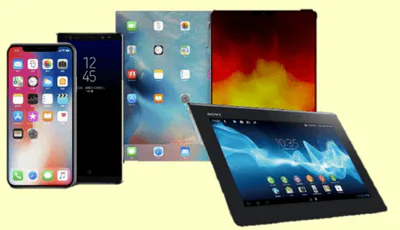
User Interfaces – touch (TUI)
Your finger
is now the pointer.
37


User Interfaces – touch (TUI)
Your finger
is now the pointer.
Do you remember… smartphones use graphical interfaces (GUI),
38


User Interfaces – touch (TUI)
Your finger
is now the pointer.
Do you remember… smartphones use graphical interfaces (GUI),
but do not use windows or pointers so do not use WIMP.
39

User Interfaces – gesture
Now, you can gesture in 3D
rather than touch on a 2D screen.
40

1min45
41

User Interface - development
That was Sci-Fi…
but it was actually developed like this…
42

2min
43


User Interfaces - summary
44


User Interfaces - summary
45


User Interfaces - summary
46


User Interfaces - summary
47



User Interfaces - summary
48


User Interfaces - summary
Pens down, and turn your worksheets over please.
49


Your turn…
Work with your table partner
and discuss your answers.
We’ll then go through the
answers and complete the
worksheet together.
Arrange in the
correct order
50
Labeling
Arrange in the correct order
Touch
Text
Graphics
CLI
Touchless
Voice
GUI
TUI
VUI
51


Your turn…
Complete
1 - 7
Work with your table partner
and discuss your answers.
We’ll then go through the
answers and complete the
worksheet together.

52

Sign in - Google Accounts
You can open this webpage in a new tab.
53


54
Multiple Choice
Instructions were fed in to early computers using
hole cards
punch cards
row cards
operating cards
55
Multiple Select
The job of a compter operator was to (choose TWO)
clean the computer
feed in batches of punch cards
sort out any blockages
keep people away from the computer
56
Multiple Choice
Computer speed is measured in Hertz (Hz)
True
False
57
Multiple Select
Punch cards were replaced with (select ALL that apply)
tape
floppy disks
hard disks
solid state drives
58
Multiple Choice
Who created the first microcomputer Operating System (CP/M) in the 1970s?
Bill gates
Gary Kildall
Steve Jobs
Jeff Bezos
59
Multiple Select
Which of these does the Operating System manage (tick ALL that apply)?
computer memory
CPU
files
network
60
Multiple Choice
You communicate with the Operating System through a User Interface
True
False
61
Multiple Choice
Early computers in the 1950s used a
text interface
graphical interface
touch interface
voice interface
62
Multiple Choice
The Windows GUI uses a Pointer, a Window, Menus and Icons, abbreviated to
WPIM
WIMP
IMWP
MIWP
63
Multiple Choice
A VUI uses
video
voice
64
Multiple Choice
Siri and Alexa are examples of Voice interfaces
True
False
65

The End.
Operating
Systems
Show answer
Auto Play
Slide 1 / 65
SLIDE
Similar Resources on Wayground

58 questions
Lesson 5
Presentation
•
KG - University
56 questions
Table Top Exercise
Presentation
•
12th Grade
57 questions
1002 Chap. 06 Securing Devices and Data
Presentation
•
Professional Development
58 questions
Vlan
Presentation
•
University
52 questions
4G-The Evolution of Programming Languages
Presentation
•
University
57 questions
Net+ 4.3/4.4
Presentation
•
11th Grade
57 questions
Database Usage
Presentation
•
12th Grade
60 questions
Rede de computadores - 2 Trimestre
Presentation
•
Professional Development
Popular Resources on Wayground
10 questions
How much do you know about our Portrait of an Eagle?

Quiz
•
10th Grade
10 questions
Fast Food Slogans
Quiz
•
6th - 8th Grade
21 questions
Continents and Oceans
Quiz
•
6th Grade
20 questions
Parts of Speech
Quiz
•
5th Grade
16 questions
Subject & Predicate
Quiz
•
5th Grade
25 questions
Multiplication Facts
Quiz
•
5th Grade
12 questions
Map Skills
Quiz
•
3rd Grade
22 questions
Continents and Oceans
Quiz
•
5th Grade