

CWD PK FOR MCF

Presentation
•
Other
•
Professional Development
•
Practice Problem
•
Medium

Alyana Atitiw
Used 1+ times
FREE Resource
21 Slides • 25 Questions
1
MECHANICS:
If you’re using your phone, turn OFF your screen time out or choose the longest time possible.
Connect to a stable internet. Go to joinmyquiz.com and enter the code:
For your name, use your UTAK initials.
Choose the correct answer before the time runs out! Be ready to be called to explain your answer/do demos in front.
Using your Utak tablet/phone, also do the demos on your end.
- Log in to demo account: trainings@utak.io / pw: asdasd
- Log in to the hello button using your UTAK initials
2
Multiple Choice
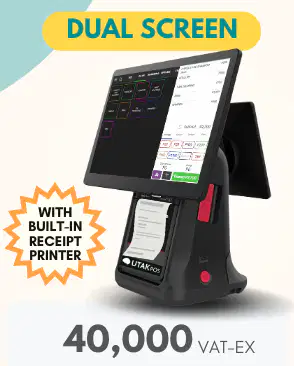
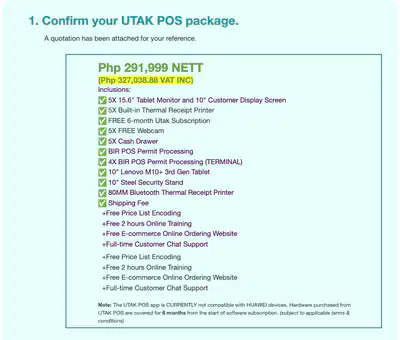
(Hardware): How much is the UTAK Dual package with software only, NETT price?
39,999
44,000
49,999
54,000
3
ADD ON:
4
5
6
Multiple Choice
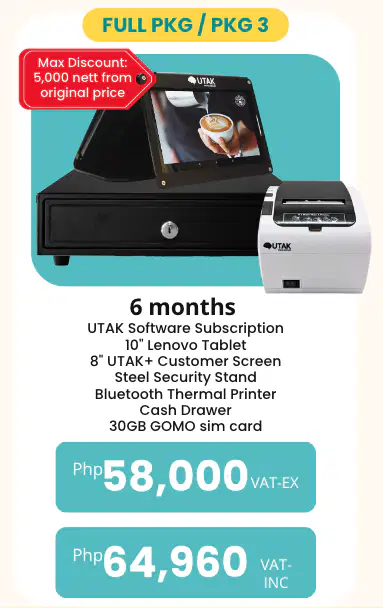
(Hardware): How much is the UTAK+ SET package, NETT price?
49,999
54,000
64,999
69,999
7
8
Multiple Choice
(Hardware): How much is an Utak MPOS package, NETT price with discount?
24,999
29,999
34,999
36,999
9
Multiple Select
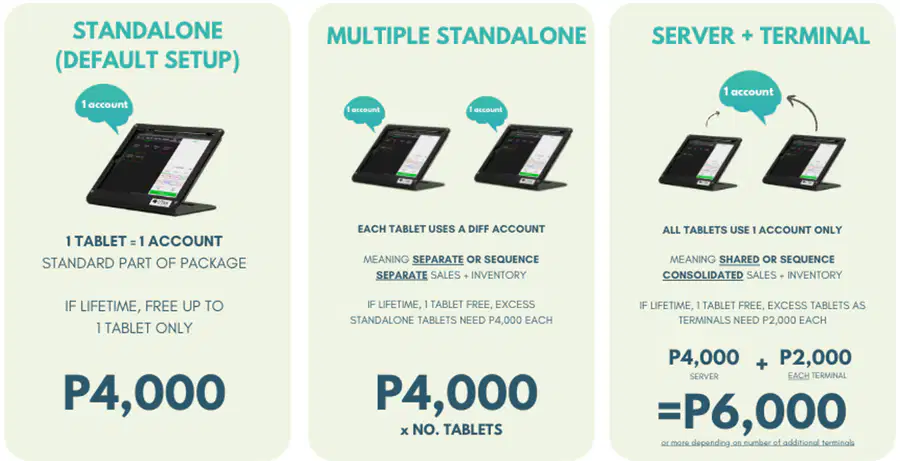
(Hardware): Client X's package is P3RPCD but will be adding an extra tablet, RP, and CD so they can have 2 cashiers. What are the implications of having this setup? Check all that applies.
Inventory and Cashdrawer will be consolidated.
Transactions made by the two tablets will not properly sync if both tablets are not connected to a stable internet connection all the time.
Total cash transactions from the 2 cashiers will be accounted separately.
Once they get BIR PTU, they should pay 6k.
10
11
Multiple Select
(Merchant app): Which of the following are the push notifications you can receive through the UTAK Merchant app? Select all correct answers.
Staff time in / Out
Refund Transaction
Retail Inventory Low stock
DSE is sent in their mail
Expense is added, edited, deleted
12
Multiple Choice
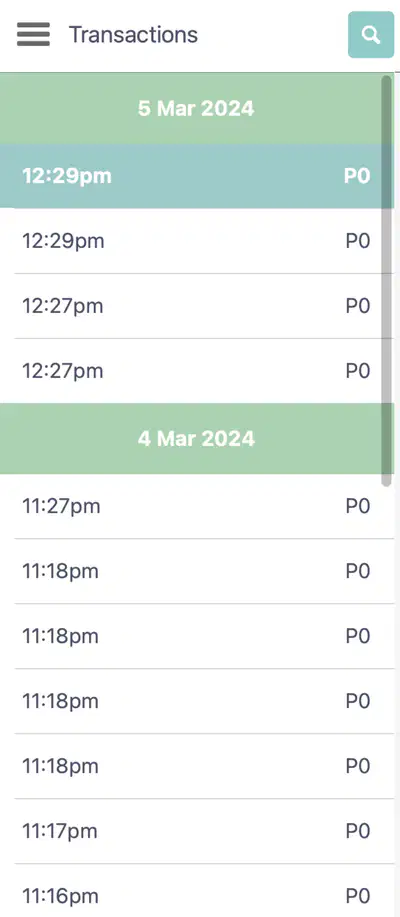
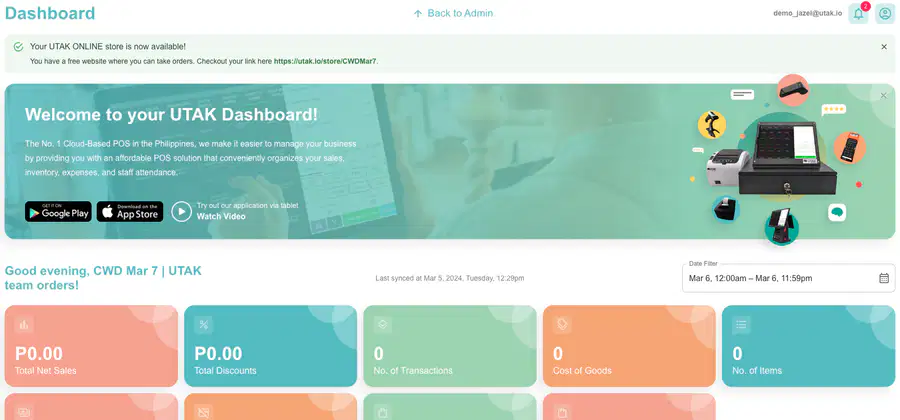
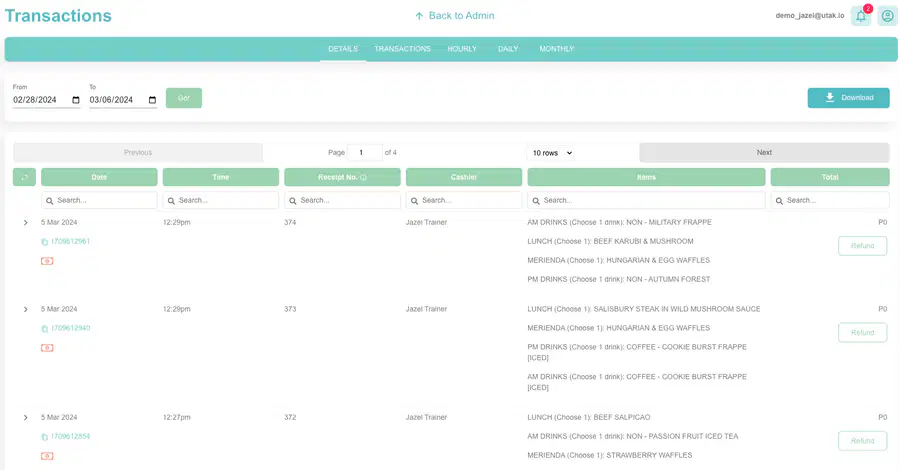
(Real-time Sales & Expenses): What’s the best way to check if the data in the back office is updated?
View the Reports tab in the Back Office
Open the back office for it to sync real time automatically
Monitor the movement of the inventory in the Inventory tab
Check the last synced time and date in the Dashboard of the Back Office
13
14
Multiple Choice
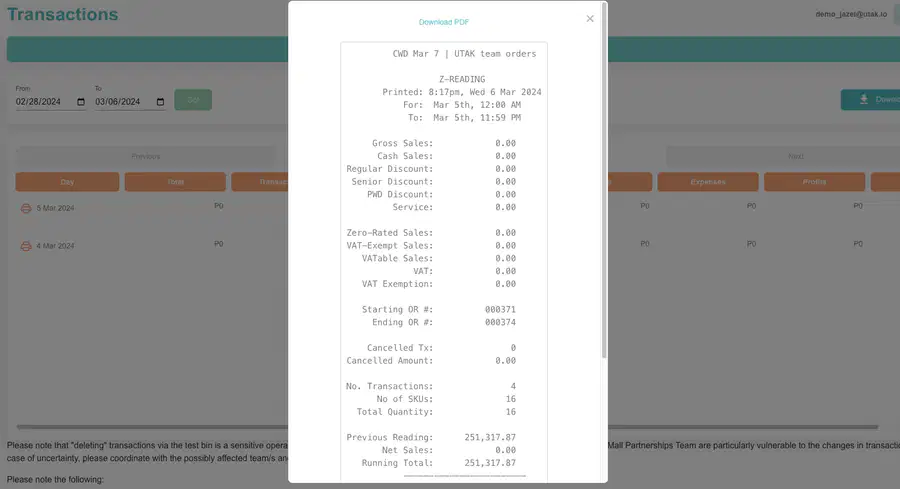
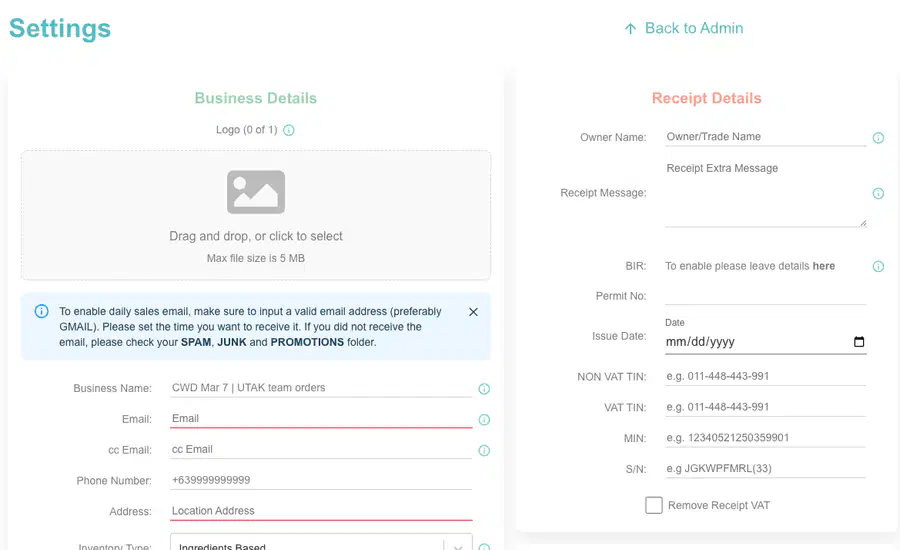
(Real time Sales & Expenses): Client B sells coffee beans per kg and their inventory type is retail. How can they best apply the 5% discount for Senior/PWD?
When they apply the SNR disc to the item, it will automatically compute for the 5% disc
They have to manually input the 5% and this will be reflected under Regular disc and not SNR disc
When they choose the 5% button in the disc applied in the total bill, it will still be recorded as a SNR disc since their inv type is retail
Create a category with discounted prices already to easily see the total discounts given for snr/pwd in the product mix report
15
16
17
18

19
20
Multiple Choice
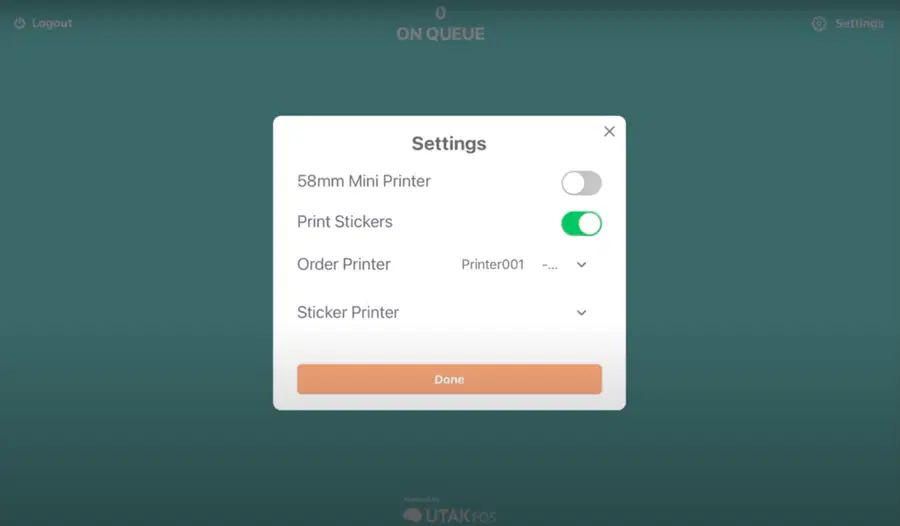
(Real time Sales & Expenses): Client D wants to separate the food and drinks in the order slip since their bar is far from the kitchen. What workaround can we suggest to make this possible?
As long as they have 2 order printers, this is already possible
They need to have a KDS since the printed order slip would be for the drinks then the KDS would be for the food
Request to tech to hardcode this
This is not possible in the system not unless they manually separate the punching of the food from the drinks
21
Multiple Select
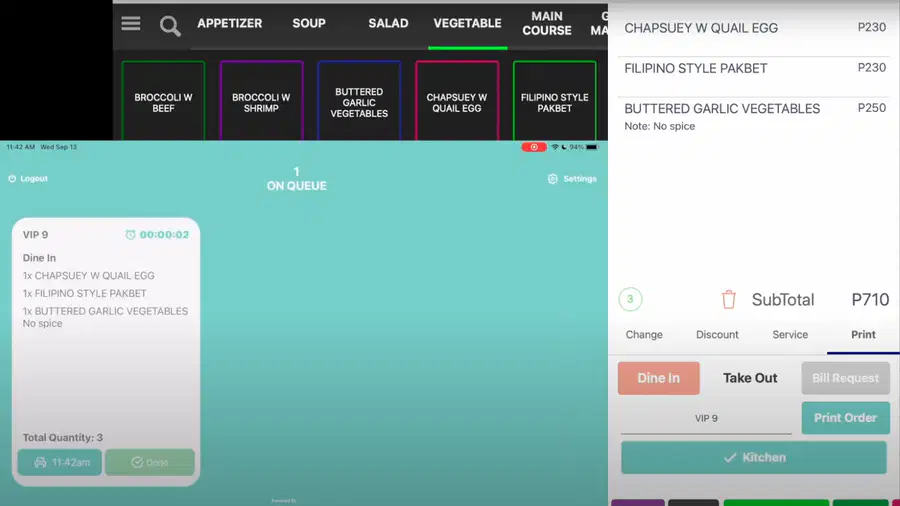
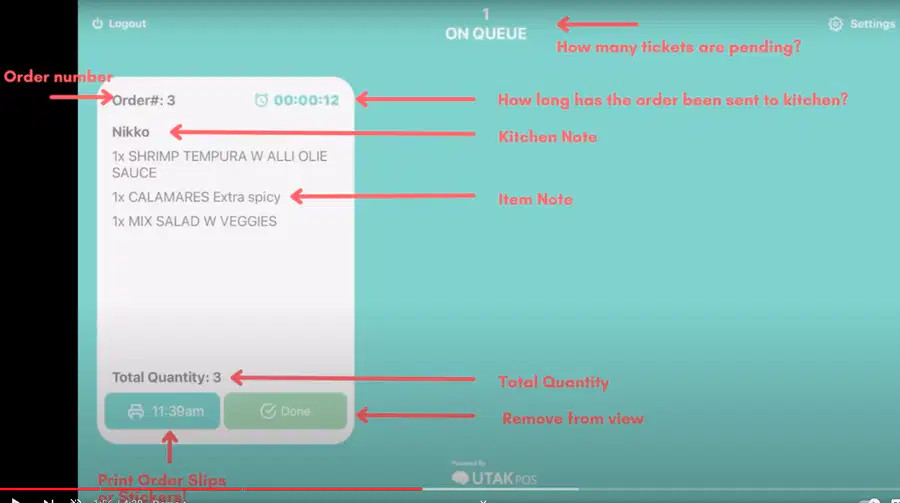
(Real time Sales & Expenses): Client C is inquiring about our Kitchen Display Screen. Which of the following are the correct features? Select all that applies.
There is a sound notification once an order has been received in the tab of the KDS.
Once we clicked "Done", there's a trail of all the done orders at the Back office.
Multiple KDS is possible.
Once we voided an item in the tablet and saved, the changes will also apply in the KDS.
A separate printer can be connected to the KDS.
22
23
24
25
Multiple Select
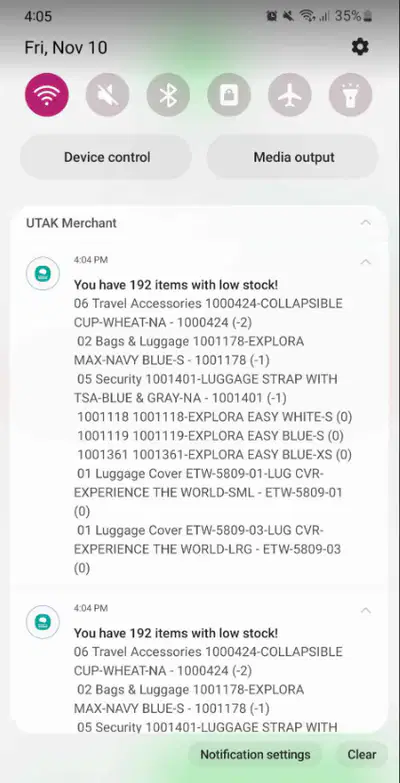
(Inventory): Which type/s of inventory is there a Low Stock Alert notification? Check all that applies.
Ingre based
Ingre-input based
Retail
26
27

28
Multiple Choice
(Real time Sales & Expenses): What’s the best way to check if the data in the back office is updated?
View the Reports tab in the Back Office
Open the back office for it to sync real time automatically
Monitor the movement of the inventory in the Inventory tab
Check the last synced time and date in the Dashboard of the Back Office
29
Multiple Choice
(Real-time Sales & Expenses): Will I still be able to print receipts and order slips even if the tablet is not connected to the internet?
Yes, but it will only be recorded as an actual transaction once it’s back online.
Yes, the tablet can still punch transactions, print receipts, and order slips even if it's offline.
No, the tablet needs stable internet connection to be able to print receipts and order slips.
No, the transactions won’t go through and you won’t be able to print the receipts and order slips.
30
Multiple Choice
(Real-time Sales & Expenses): I own a Sisig Hooray franchise and I always seem to run out of cooked rice at the most inconvenient times. How will I know which is the best time to start cooking the rice so that I don’t run out?
Check all of the transactions in the Transactions tab to see which time has the most transactions.
Refer to the heatmap found in the Reports tab in the Back Office.
Monitor the time the staff clocks in through the Staff tab and use that as the reference.
Ask the staff their recommendation the best time to start cooking the rice.
31
Multiple Choice
(Inventory): Client A needs to know how much is the value of their current stock on hand. Where do we redirect him?
Download ingredients mix report
It's included in the summary in the Dashboard
Download the excel file in inventory to view that data
View the Z-reading in the BO
Unfortunately, we don't have that in the system
32
Multiple Choice
(Inventory): As you know, modifiers are modifications of options. In a cafe setup, they could have milk alternatives, ice levels, and sugar levels as modifications to customer orders. Will all these be accounted for in the inventory if added as modifiers?
Yes, definitely.
No, it won't be.
Perhaps, if tech team can hardcode it.
33
Multiple Choice
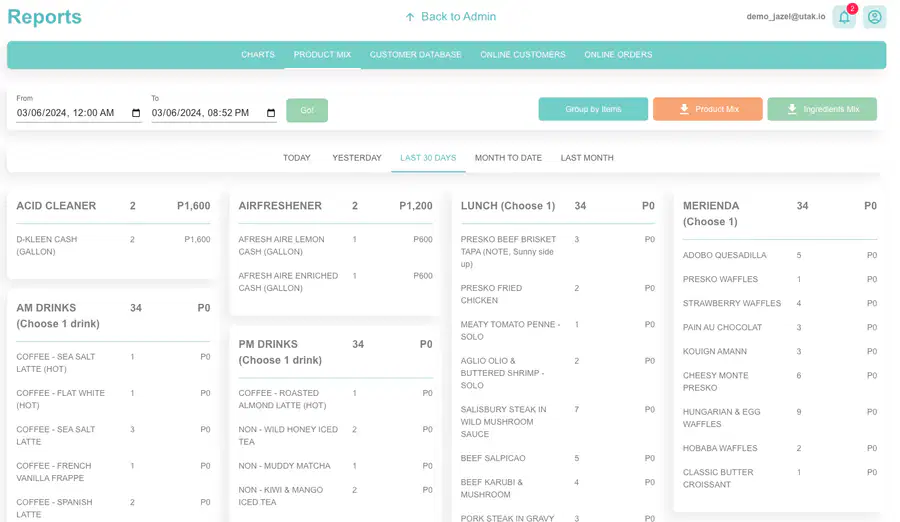
(Reports): February was a great month of sales for my bistro, but I noticed halfway through February that I was running out of stocks. How could I track the raw ingredients my kitchen have consumed in February for better restocking levels moving forward?
Download the Ingredients Mix found in the Reports tab in the Back Office.
Look at the current stock on hand of the last day of the month - Feb 29.
Use the product mix table to see the best sellers and increase the stock for the ingredients of those best-selling items.
Change inventory type to Ingredients Input Based and ask the staff to log their Staff Count at the end of each day and base the ingredients movement from that.
34
35
Multiple Choice
(Hardware): The customer bought 5 Cafe Lattes, but I only want to print ONE sticker for the five drinks. How can I do this?
Uncheck the items you don’t want to print through the sticker printer.
Adjust the quantity of stickers you want to print through the Receipt Details in the post order tray.
You can’t. All five stickers will be printed by default.
36
Multiple Choice
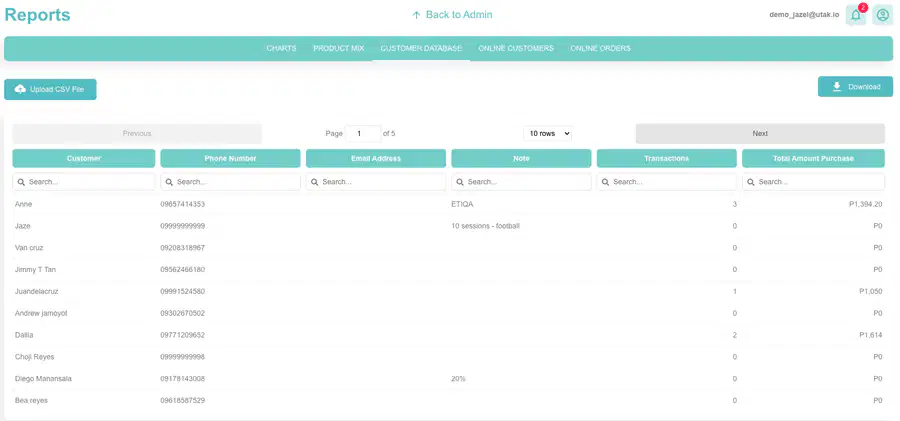
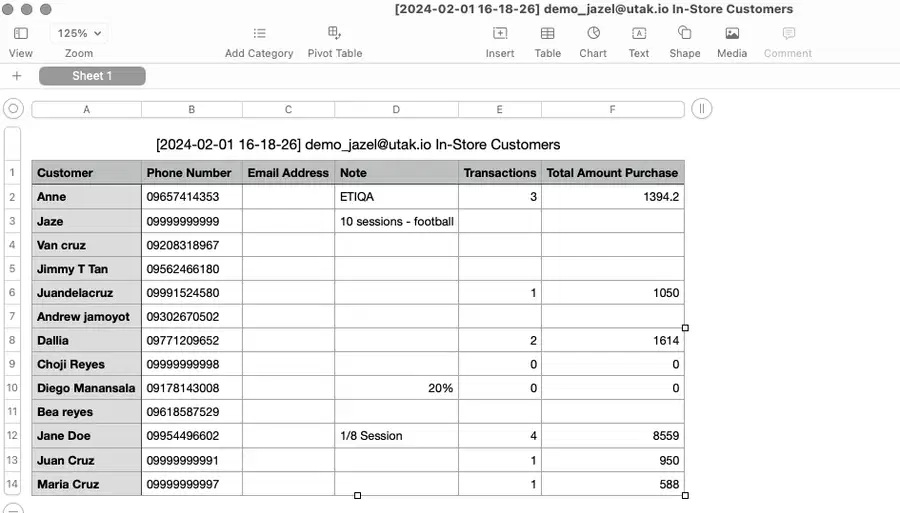
(Reports): I have an existing list of regular customers already, how do I integrate this with UTAK’s Customer Database?
Add the customer names individually through the Back Office.
Upload the CSV file of the customer names in the Reports tab in the Back Office.
List the customer names one by one through the Customer Database in the tablet.
We cannot integrate any existing list into our Customer Database.
37
38
39
Multiple Choice
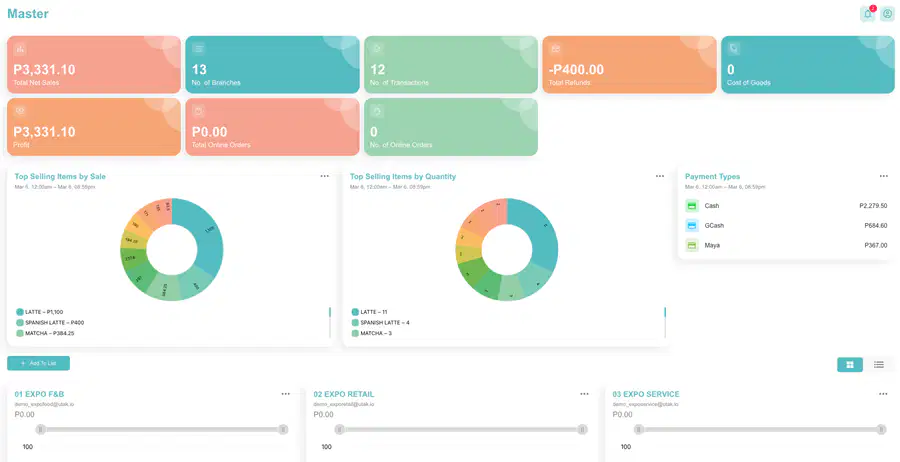
(Back office): Client Z has 2 accounts with Utak - 1 cafe and 1 laundry business. Can she still request for a master account?
Yes, but she has to pay an additional fee since the two accounts are not the same business.
No, we can only create a master account if it's 2 diff branches that has the same menu.
Yes, she can still request for a free master account but reports seen in the dashboard are not as efficient to view.
No, master account is only given for owners who has 3 or more accounts with us.
40
41
Multiple Choice
(Utak Online): I already set up my UTAK Online for my commissary, but I want the link to be exclusive for the branch managers. Can I limit access to my UO Website? How?
Yes. You can assign a passcode for your Utak Online website.
Yes. You can create a custom URL that only your branch managers have access to.
Yes. You can create user profiles that will require credentials before they can access the site.
No. The UTAK website is accessible to anyone who knows the link.
42
Multiple Choice
(Commissary Setup): Lead is a coffee bean supplier and is asking if our system has a feature that is fit for their commissary setup. Which UTAK feature should you highlight the most?
Customer Database
Free Online Store
Real-time Sales & Expenses
Inventory Management
43
Multiple Choice
(Hardware): How much is our Barcode Scanner?
2,000
3,000
4,000
5,000
44
Multiple Choice
(Hardware): I ordered a Barcode Scanner as an add-on and I’d like to use it for my iPad. How do I pair the barcode scanner to my iPad?
iOS devices are auto-pairing so there’s no need to pair the barcode scanner. Just go to the barcode scanning function in the register tab and start scanning.
Go to your iPad’s settings, then pair it through the Bluetooth settings.
No need to pair the barcode scanner, you just have to assign the barcode scanner in the UTAK App Settings.
45
Multiple Choice
What's our upcoming feature roll out? Select all that applies.
Pax Discount
Split Bill
Merge Bill
Pre-set tables
46
Multiple Choice
(Reports): I always seem to be running out of chocolate chips for my cookie shop business. How would I know about the other ingredients that are usually consumed so that I can stock more of these ingredients in the future?
Download the Ingredients Mix found in the Reports tab in the Back Office.
Monitor the daily movement of the ingredients in the Inventory tab found in the tablet and back office.
Use the product mix table to see the best sellers and increase the stock for the ingredients of those best-selling items.
Change inventory type to Ingredients Input Based and ask the staff to log their Staff Count at the end of each day and base the ingredients movement from that.
MECHANICS:
If you’re using your phone, turn OFF your screen time out or choose the longest time possible.
Connect to a stable internet. Go to joinmyquiz.com and enter the code:
For your name, use your UTAK initials.
Choose the correct answer before the time runs out! Be ready to be called to explain your answer/do demos in front.
Using your Utak tablet/phone, also do the demos on your end.
- Log in to demo account: trainings@utak.io / pw: asdasd
- Log in to the hello button using your UTAK initials
Show answer
Auto Play
Slide 1 / 46
SLIDE
Similar Resources on Wayground

44 questions
Copy of G2_K8_L6_22-23
Presentation
•
KG - Professional Dev...
40 questions
Getting to Know You
Presentation
•
KG - University
40 questions
Kitchen Equipment 1
Presentation
•
KG - University
43 questions
Sepsis/Shock/MODS/AKI
Presentation
•
University
43 questions
US 30616
Presentation
•
Professional Development
44 questions
Chapter 19 - Cancer Medicine (Oncology)
Presentation
•
University - Professi...
41 questions
Pembuatan media pembelajaran berbasis AI
Presentation
•
Professional Development
42 questions
Belgium: Territorial and political organization
Presentation
•
Professional Development
Popular Resources on Wayground
11 questions
Hallway & Bathroom Expectations

Quiz
•
6th - 8th Grade
10 questions
HCS SCI 03 Summer School Assessment 2
Quiz
•
3rd Grade
11 questions
Home Scope
Quiz
•
7th - 8th Grade
12 questions
2026 TAP Technology in the Classroom
Presentation
•
Professional Development
15 questions
HCS SCI 05 Summer School Assessment 2 Review
Quiz
•
5th Grade
15 questions
HCS SCI 04 Summer School Review 2
Quiz
•
4th Grade
59 questions
Geometry Unit 3 Review
Quiz
•
9th - 12th Grade
14 questions
FAST ELA READING SMAPLE TEST MATERIALS

Passage
•
3rd Grade