Search Header Logo
Introduction to Excel

Introduction to Excel

Assessment

Presentation

Computers

4th Grade

Medium

Created by

Nicola Pantry

Used 31+ times

FREE Resource

11 Slides • 9 Questions

1

1. Excel is a spreadsheet software developed by Microsoft.

2. Excel can only be used for basic arithmetic calculations.

3. Excel allows users to organize, analyze, and visualize data efficiently.

Let's Play (Two Truths and a Lie)

2

  1. Small businesses often use Excel for accounting and financial management due to its affordability and flexibility.

  2. Graphic designers typically use specialized software like Adobe Photoshop or Illustrator for image editing, not Excel.

  3. Hospitals may use Excel for various administrative purposes, but it's not specific to patient care.

Let's Play (Two Truths and a Lie)

3

Lesson Objectives

At the end of this lesson students should be able to:

  1. Differentiate between worksheets and workbook

  2. Identify and explain Rows and Columns in reference to a spreadsheet

  3. Define the terms cell reference/cell address , cell

  4. Explain types of data stored in a spreadsheet (labels, values, labels, formula and functions)

  5. Perform basic calculations using the application

  6. Show an appreciation through discussion the benefits of Microsoft Excel

4

Multiple Choice

Question image

What is Microsoft Excel?

1

A graphical word processing program that users can type with. It is made by the computer company Microsoft. Its purpose is to allow users to type and save documents. Similar to other word processors, it has helpful tools to make documents.

2

An information management tool, or relational database, that helps you store information for reference, reporting and analysis.

3

A software program produced by Microsoft that allows users to organize, format and calculate data with formulas using a spreadsheet system.

4

A powerful slide show presentation program.

5

media

6

Multiple Choice

Question image

What is a work book ?

1

A collection of one or more spreadsheets, also called worksheets, in a single file.

2

A collection of cells organized in rows and columns. It is the working surface you interact with to enter data.

3

An intersection of a column and row.

4

Shows the address of the current selection or active cell.

7

Multiple Choice

Question image

Each Excel worksheet is made up of more Excel Worksheets.

1

True

2

False

8

Poll

Question image

How familiar are you with the parts of an Excel Sheet?

Very familiar

Somewhat Familiar

I do not know what it is

I am an expert

9

What are Rows, Cells and Columns in Microsoft Excel ?


Rows:

Cells:

Columns:

Cell address

10

Multiple Choice

Question image

The columns in an Excel sheet are named through the use of letters or combination of letters

1

True

2

False

11

Multiple Choice

Question image

Each row is named by a number.

1

True

2

False

12

media

13

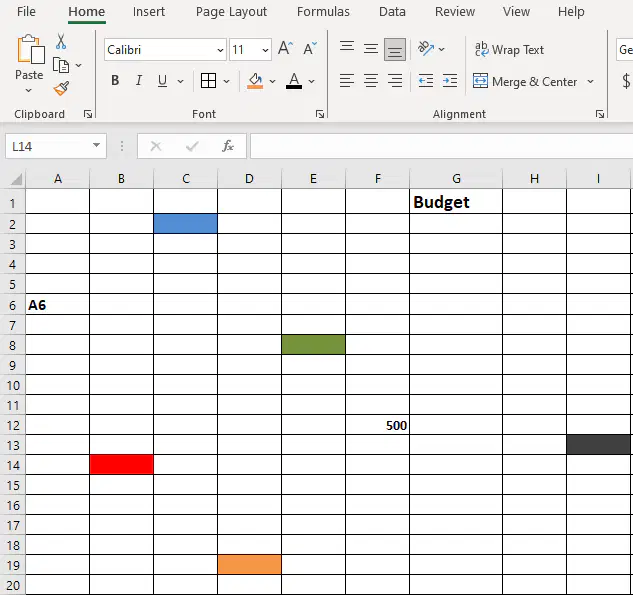
Lets Identify Cell Address

media

14

Multiple Choice

Question image

Which of the following displays information entered—or being entered as you type—in the current or active cell. The contents of a cell can also be edited in the formula bar.

1

Formula Bar

2

Tool Bar

3

Name Box

4

Cell

15

Multiple Choice

Question image

The heavy border around the selected cell is called the _________________.

1

Cell Pointer

2

Bolded Section

3

Selected Cell

4

Cell

16

Types of Data stored in a spreadsheet (Ms. Excel)

Values:

Labels:

Formula:

Functions:

17

Multiple Choice

The __________ cell is the cell that receives data and commands you give it.

1

Passive

2

Active

3

Intersected

4

Pointed

18

Activity Time!!!!!!


Listen carefully to the instructions and follow accordingly.

19

media

20

media

1. Excel is a spreadsheet software developed by Microsoft.

2. Excel can only be used for basic arithmetic calculations.

3. Excel allows users to organize, analyze, and visualize data efficiently.

Let's Play (Two Truths and a Lie)

Show answer

Auto Play

Slide 1 / 20

SLIDE