

HTML

Presentation
•
Computers
•
KG - University
•
Practice Problem
•
Easy

Soleha Majeed
Used 5+ times
FREE Resource
17 Slides • 2 Questions
1
HTML5 - Introduction
PG 105.
2
Multiple Choice

What is HTML used for?
Creating desktop applications
Structuring and displaying content on the web
Designing graphics and animations
Storing data in a database
3
HTML VS HTML5
HTML is the older version of the language, while HTML5 is the latest, more modern version, introducing new features like multimedia support, semantic tags, better forms, and enhanced mobile and offline functionality.
5
HTML5: The doctype is simplified.
<!DOCTYPE html>
HTML5
HTML: The doctype declaration is long and complex.
html
<!DOCTYPE HTML PUBLIC "-//W3C//DTD HTML 4.01 Transitional//EN" "http://www.w3.org/TR/html4/loose.dtd">
HTML
Doctype Declaration
7
Introduced semantic tags like <header>, <footer>, <article>, and <section>
Code:
<header></header>
HTML5
Lacked specific semantic tags, using generic tags like <div> and <span>.
Code:
<div class="header"></div>
HTML
3. New Semantic Elements
8
Introduced the <canvas> element for 2D drawing and animations, and supports SVG (Scalable Vector Graphics).
Code:
<canvas></canvas>
HTML5
No built-in support for graphics or animations; required external tools like Flash or JavaScript.
HTML
4. Graphics and Animation Support
9
Categorize
<div>
<span>
<table>
<font>
<header>
<footer>
<video>
<audio>
<canvas>
<center>
Organize these options into the right categories
10
Backward Compatibility
Backward compatibility means HTML5 can work on both new and old browsers.
Even if a browser doesn’t recognize new HTML5 tags, it will still display the page without errors. It treats new tags as if they were regular tags, ensuring the webpage runs smoothly
11
Points to remember - pg 106
Tags are not case sensitive: You can write tags in uppercase or lowercase (but lowercase is preferred).
Quotes are optional: You don’t need to use quotes for attributes, but it's good practice.
DOCTYPE: The first line should be <!doctype html> to tell the browser that you're using HTML5.
Omitting Tags: You can skip the <html> and <body> tags, but it's recommended to include them for better structure.
Character Encoding: Use <meta charset="UTF-8"> to ensure the browser correctly displays all text and symbols (like special characters or emojis).
Text editor Notepad, Notepad++ and Netbeans.
12
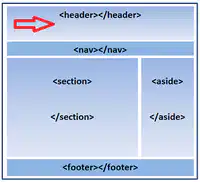
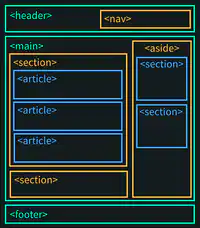
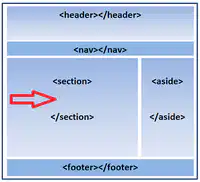
Important HTML5 Tags:
<header>: For the top section (like a title or logo).
<nav>: For the navigation menu.
<article>: For articles or independent content.
<section>: For dividing the page into sections.
<aside>: For side content like extra information or ads.
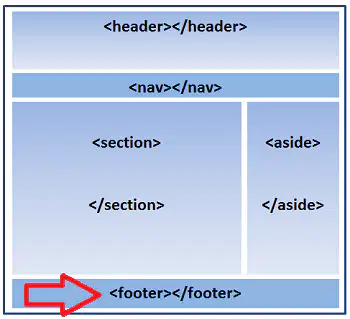
<footer>: For the bottom section, usually with copyright info.
13
TRY IT OUT! - header
<header>: Defines the top section (like a title or logo).
<header>
<h1>Website Title</h1>
<nav> ... </nav>
</header>
14
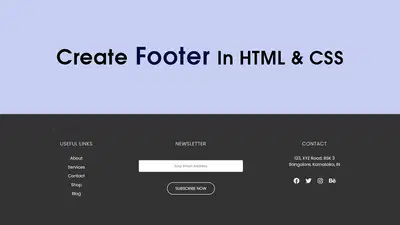
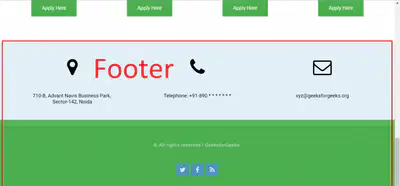
<Footer>
15
TRY IT OUT! - footer
Represents the footer of a section or page, usually containing copyright information, links to privacy policies, or contact information.
<footer>
<p>© 2024 MyWebsite. All rights reserved.</p>
</footer>
16
TRY IT OUT! - <article>
Represents a self-contained, independent piece of content, such as a news article or blog post, that could be distributed separately.
<article>
<h2>Breaking News</h2>
<p>Here is the latest news story...</p>
</article>
17
TRY IT OUT! - <section>
For dividing the content into different sections.
<section>
<h2>About Us</h2>
<p>This section is all about our company...</p>
</section>
18
TRY IT OUT! - <aside>
For side content like extra information or ads.
<aside>
<h2>Related Articles</h2>
<p>Check out these other stories...</p>
</aside>

19
TRY IT OUT! - <nav>
For side content like extra information or ads.
<aside>
<h2>Related Articles</h2>
<p>Check out these other stories...</p>
</aside>
HTML5 - Introduction
PG 105.
Show answer
Auto Play
Slide 1 / 19
SLIDE
Similar Resources on Wayground

14 questions
Race cars
Presentation
•
4th - 9th Grade
14 questions
Adverbs of Frequency and Degree
Presentation
•
4th Grade
13 questions
Present Simple & Present Continuous
Presentation
•
11th Grade
13 questions
Phase Change Diagrams
Presentation
•
8th Grade
13 questions
The Electoral College
Presentation
•
6th - 12th Grade
15 questions
Programming
Presentation
•
6th Grade
12 questions
Formatting Tags - Font Tag
Presentation
•
7th - 8th Grade
15 questions
Pengenalan Internet
Presentation
•
11th Grade
Popular Resources on Wayground
11 questions
Hallway & Bathroom Expectations

Quiz
•
6th - 8th Grade
10 questions
HCS SCI 03 Summer School Assessment 2
Quiz
•
3rd Grade
11 questions
Home Scope
Quiz
•
7th - 8th Grade
12 questions
2026 TAP Technology in the Classroom
Presentation
•
Professional Development
15 questions
HCS SCI 05 Summer School Assessment 2 Review
Quiz
•
5th Grade
15 questions
HCS SCI 04 Summer School Review 2
Quiz
•
4th Grade
59 questions
Geometry Unit 3 Review
Quiz
•
9th - 12th Grade
14 questions
FAST ELA READING SMAPLE TEST MATERIALS

Passage
•
3rd Grade