

Year 7 - Hardware and Software

Presentation
•
Computers
•
6th Grade
•
Practice Problem
•
Medium

K McVeagh
Used 29+ times
FREE Resource
8 Slides • 13 Questions
1


Yr7 Software
TODAY OUR LEARNING OBJECTIVE IS
•Explain why we need software
•Describe the different purposes of different types of software
Unlocking Potential | Creating Opportunity
YOU WILL SHOW YOUR LEARNING BY
Defining the difference between hardware and software
Give examples of different types of software
GIve an example of a non-windows based operating system
TODAYS KEY WORDS ARE
Operating System
Peripheral
Application
LITERACY/NUMERACY/SMSC
Appreciation that not all software is free or legal or safe to use
You should work on your own during this lesson and answer the questions provided clearly and in the best way you can.
2
Draw
Find the 6 differences on the second Christmas tree.
The quicker you find them, the more points you earn.
3
Your Learning Journey
Unlocking Potential | Creating Opportunity
Types of
Computer
•Personal •Portable •Embedded •Super Computer
Inside the
Computer
•Input- Process-Output Functions
•Fetch-Decode-Execute Cycle
Computer
Hardware
•CPU Motherboard
•RAM PSU
•Hard Disk Graphics Card
History of
Computing
•Babbage & Lovelace
•Grace Hopper (debugging)
•Steve Jobs
Software
•Types
•Hardware, Operating Systems, Applications, User
•Purpose
You are almost finished this unit.
At the end of the unit, you will complete an assessment on everything you have been learning since you joined the school.
If you have time at the end of this lesson, review and complete the work in your books that is unfinished or needs to be improved.
Respond to any feedback provided
4
Drag and Drop
5
Categorize
Mouse
Speaker
Web Cam
Microphone
Keyboard
Scanner
Printer
Monitor
Projector
Organise these HARDWARE devices in to the correct category depending on whether they provide an input to the computer, or get an output from the computer.
6

HARDWARE & SOFTWARE
Let see if you can tell the difference between Hardware and Software?
7


Hardware Inside and Outside the computer

Hardware inside the computer is needed to allow the computer perform the
Input, Process, Output
functions needed from the computer.
These parts all fit into the computer and connect to the motherboard.
Hardware outside the computer is sometimes known as peripherals. These are the devices, that plug into or connect to the computer to make using it easier, or to allow it to complete tasks that are not possible using the hardware inside on the motherboard alone.
Inside
Outside
8
Fill in the Blanks
What does CPU stand for?
Type answer...
9
Fill in the Blanks
What is the purpose of a Hard Drive?
Type answer...
10

A computer needs to be told what to do, otherwise it will just sit on your desk collecting dust and taking up space.
Software are the applications and programming instructions that tell your computer what to do and enable you to use it
for things such as playing games, writing an essay or
listening to music.
There are 4 different types of software which you will learn about.
Software
11
Categorize
CPU
Google Classroom
Hard Drive
Microphone
Keyboard
RAM
Microsoft Word
Minecraft
Fortnite
Talaxy
Organize these options into the right categories as either Hardware or Software
12
Software Types
There are four basic types of software to be aware of.
The most well known types of system software are Operating Systems, or “OS”. An OS is software that communicates with the hardware on a computer and allows basic functionality to be performed.
An Operating System will allow all other programs to run.
Common desktop operating systems include Windows, and Linux.
Common mobile phone operating systems include Android and i/OS.
Operating systems provide the main functionality of the computer and the GUI(graphical user interface). The GUI allows you to use a mouse, interact with icons and images, and scroll and click. Before we had GUIs, we had to type instructions using text!
Application software.
When instructions are provided to the Computer, the CPU will not carry out any instructions unless the software says it’s ok. Every desktop computer, tablet, and device also usually includes Utilities software for managing battery life, storage space, or running programs.
13
Software Types
There are four basic types of software to be aware of.
The most well known types of system software are Operating Systems, or “OS”. An OS is software that communicates with the hardware on a computer and allows basic functionality to be performed.
An Operating System will allow all other programs to run.
Common desktop operating systems include Windows, and Linux.
Common mobile phone operating systems include Android and i/OS.
Operating systems provide the main functionality of the computer and the GUI(graphical user interface). The GUI allows you to use a mouse, interact with icons and images, and scroll and click. Before we had GUIs, we had to type instructions using text!
Application software.
When instructions are provided to the Computer, the CPU will not carry out any instructions unless the software says it’s ok. Every desktop computer, tablet, and device also usually includes Utilities software for managing battery life, storage space, or running programs.
14
Match
Match the logos to the correct software
Chrome
Linux
Windows
Google Classroom
Chrome
Linux
Windows
Google Classroom
15
Multiple Choice
Which of the following logos are NOT an operating system?
Chrome
16
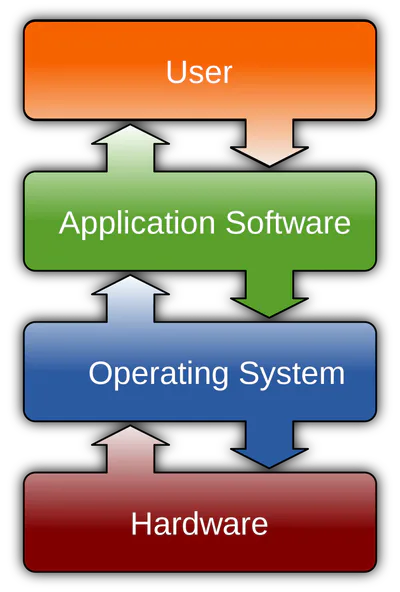

What is Software?
Software is the instructions stored on your computer that tell the computer what you want to do.
In the same way that there are 4 different categories of computer types, we also have 4 different types of software.
Each of these different types of software do different tasks.
Operating systems provide the main functionality of the computer and the GUI(graphical user interface).
'Apps' are the program you use every time you log into your computer. Examples are games, presentation, drawing, video editing
Software is needed to operate the parts of the computer correctly. The software is also needed to be able to detect when new hardware is added to the computer eg new mouse, printer
User software allows different users to use the same device securely
17
Fill in the Blanks
What does GUI stand for?
Type answer...
18
Multiple Select
Which of the following does a GUI provide?
Mouse arrows on screen as you move it
Scroll bars
Icons and visual images
Menus with selectable items
19
Open Ended
Why do you think we have so many different types of software?
20
Open Ended

Do you think the Android operating system is better than the Apple i/os operating system? Explain your reasons for your choice.
21
Open Ended
Plenary – 3,2,1
Give 3 reasons we need different software
Give 2 categories of different software
Give 2 examples of software and explain its purpose
Yr7 Software
TODAY OUR LEARNING OBJECTIVE IS
•Explain why we need software
•Describe the different purposes of different types of software
Unlocking Potential | Creating Opportunity
YOU WILL SHOW YOUR LEARNING BY
Defining the difference between hardware and software
Give examples of different types of software
GIve an example of a non-windows based operating system
TODAYS KEY WORDS ARE
Operating System
Peripheral
Application
LITERACY/NUMERACY/SMSC
Appreciation that not all software is free or legal or safe to use
You should work on your own during this lesson and answer the questions provided clearly and in the best way you can.
Show answer
Auto Play
Slide 1 / 21
SLIDE
Similar Resources on Wayground

16 questions
Metamorphic rocks-Hockersmith
Presentation
•
6th Grade
17 questions
Python
Presentation
•
6th Grade
13 questions
Credible News
Presentation
•
6th Grade
16 questions
Computer Basics
Presentation
•
5th - 6th Grade
17 questions
Excel Formulas and Functions
Presentation
•
5th - 6th Grade
17 questions
3.2 - Atomic Structure
Presentation
•
7th Grade
18 questions
Informática Básica
Presentation
•
7th Grade
16 questions
Aquatic Biomes
Presentation
•
6th Grade
Popular Resources on Wayground
6 questions
PRIDE Always and Everywhere
Presentation
•
12th Grade
20 questions
Lab Safety Quiz

Quiz
•
6th Grade
26 questions
KOR Review Kahoot Questions
Quiz
•
8th Grade
21 questions
Continents and Oceans
Quiz
•
6th Grade
12 questions
Unit Zero lesson 2 cafeteria
Presentation
•
9th - 12th Grade
20 questions
Parts of Speech
Quiz
•
5th Grade
10 questions
Riddles Riddles fun Riddles
Quiz
•
6th - 12th Grade
16 questions
Subject & Predicate
Quiz
•
5th Grade
