
ICT Quiz

Presentation
•
Education
•
6th Grade
•
Practice Problem
•
Hard

Tsheltrim Wangdi
FREE Resource
7 Slides • 6 Questions
1
Topic: Formatting Document
Subject: Literacy with ICT
Class: VI
By Tsheltrim Wangdi

2
In Microsoft Word, you can change the font style (like Arial, Times New Roman, etc.) and the size of the text. This helps make the text look different and can make it easier to read. For example, a larger font size can be used for headings, while a smaller size can be used for regular text.

3
Multiple Choice
What does changing the font style and size in a Word document do?
a) It adds colors to the text
b) It makes the text look different and easier to read
c) It changes the page number
d) It removes all the text
4
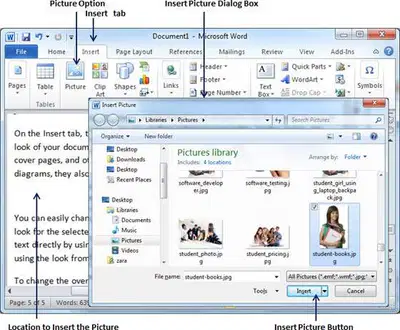
Visuals and graphics, such as pictures, charts, and tables, can help explain ideas better and make the document more interesting. They can break up large blocks of text and make the information easier to understand. For example, a picture can show what you are talking about, making it clearer for the reader.
5
Multiple Choice
What is one benefit of using visuals and graphics in a document?
a) They make the document longer
b) They help explain ideas and make the document more interesting
c) They take up too much space
d) They make the text harder to read
6
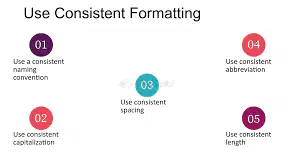
Consistent formatting means that you use the same font, size, and style for similar types of text throughout your document. For example, if you use a bold font for all headings, you should do that for every heading in the document. This helps the reader know what to look for and makes the document look professional.
7
Fill in the Blanks
8
Margins are the blank spaces around the edges of your document. You can set them to be wider or narrower depending on how much space you want around your text. Borders are lines that can be added around the entire page or around specific sections. Setting margins and borders helps organize the content and makes it look neat.
9
Fill in the Blanks
10
Line spacing is the amount of space between each line of text in a paragraph. By increasing the line spacing, you can make the text easier to read because it prevents the lines from being too close together. This is especially helpful in longer documents.
11
Multiple Choice
1.Line spacing helps to make the text in a document easier to read by adding space between the lines.
True
False
12
Adding images or tables can actually make a document more organized. They can help present information clearly and visually. For example, a table can summarize data in a way that is easy to read, and an image can illustrate a point you are making in the text.
13
Multiple Choice
Adding an image or table to a document makes it less organized.
False
True
Topic: Formatting Document
Subject: Literacy with ICT
Class: VI
By Tsheltrim Wangdi
Show answer
Auto Play
Slide 1 / 13
SLIDE
Similar Resources on Wayground

11 questions
Ancient Egyptian Pharaohs
Presentation
•
6th Grade
11 questions
DiSC Assessment
Presentation
•
6th Grade
10 questions
Comparing Integers
Presentation
•
6th Grade
10 questions
Analyze Text Structure
Presentation
•
6th Grade
10 questions
Write One-Step Equations
Presentation
•
6th Grade
10 questions
Force and type of forces
Presentation
•
6th Grade
9 questions
Biomes: Concentration on Intro of Terrestrial Biome
Presentation
•
6th Grade
9 questions
Common Grammar Mistakes
Presentation
•
6th Grade
Popular Resources on Wayground
11 questions
Hallway & Bathroom Expectations

Quiz
•
6th - 8th Grade
10 questions
HCS SCI 03 Summer School Assessment 2
Quiz
•
3rd Grade
11 questions
Home Scope
Quiz
•
7th - 8th Grade
12 questions
2026 TAP Technology in the Classroom
Presentation
•
Professional Development
15 questions
HCS SCI 05 Summer School Assessment 2 Review
Quiz
•
5th Grade
15 questions
HCS SCI 04 Summer School Review 2
Quiz
•
4th Grade
59 questions
Geometry Unit 3 Review
Quiz
•
9th - 12th Grade
14 questions
FAST ELA READING SMAPLE TEST MATERIALS

Passage
•
3rd Grade