
ACA Test Prep - Project 2
Authored by Dawn Egan
Arts
9th Grade
Used 35+ times


AI Actions
Add similar questions
Adjust reading levels
Convert to real-world scenario
Translate activity
More...
Content View
Student View
15 questions
Show all answers
1.
MULTIPLE CHOICE QUESTION
1 min • 1 pt
You want to expand the canvas downward 300 pixels to create a space for a title. What menu do you use?
2.
MULTIPLE CHOICE QUESTION
30 sec • 1 pt
You took a picture of your front yard, and there’s a pesky squirrel sitting in the grass that you want to remove. The easiest way is to.....
3.
MULTIPLE CHOICE QUESTION
30 sec • 1 pt
You have an image of the ocean, and the horizon line is slightly askew. What is the easiest way to crop and straighten the image?
hold the Hand tool to reveal the Rotate tool. Click and drag to rotate the image until it looks straight.
Retake the picture
Crop tool, then from the Options bar, choose the Straighten tool. Drag a line across the horizon, and the image will rotate along the line you drew.
Use the crop tool and crop until it is vertical
4.
MULTIPLE CHOICE QUESTION
30 sec • 1 pt
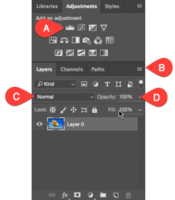
Where should you click to change the Blending Mode of a layer?
5.
MULTIPLE CHOICE QUESTION
30 sec • 1 pt

Which of the following tools allows you to sample colors by clicking on a desired color in your image?
6.
MULTIPLE CHOICE QUESTION
30 sec • 1 pt
Which tool allows you to make a selection by drawing a freehand shape?
Clone Stamp
Marquee
Lasso Tool
Line Tool
7.
MULTIPLE CHOICE QUESTION
30 sec • 1 pt
What is the best method for saving an image that will be used in a website?
File save as a .psd
File > Export > Save for Web, then check Convert to sRGB.
File save as .tiff
File save as a .jpg; large file
Access all questions and much more by creating a free account
Create resources
Host any resource
Get auto-graded reports

Continue with Google

Continue with Email

Continue with Microsoft
or continue with

%20(1).png)
Apple

Others
By signing up, you agree to our Terms of Service & Privacy Policy
Already have an account?


