
5th grade nonfiction text features
Authored by Elzbieta Mulica
English
5th - 6th Grade
CCSS covered
Used 76+ times


AI Actions
Add similar questions
Adjust reading levels
Convert to real-world scenario
Translate activity
More...
About
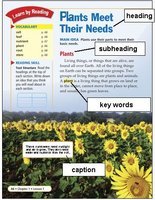
This quiz focuses on nonfiction text features, covering the essential organizational and visual elements that help readers navigate and comprehend informational texts. Designed for 5th grade students, the assessment evaluates students' ability to identify and understand the purpose of key text features including table of contents, glossary, index, headings and subheadings, captions, diagrams, timelines, bold text, bulleted lists, and footnotes. Students need foundational knowledge of how authors structure nonfiction texts to make information accessible and how different visual and organizational elements serve specific functions in supporting reader comprehension. The questions require students to match text features with their primary purposes, demonstrating understanding of how these elements work together to guide readers through complex informational content and enhance understanding of the subject matter. Created by Elzbieta Mulica, an English teacher in the US who teaches grades 5 and 6. This quiz serves as an excellent tool for introducing students to nonfiction text structure or reinforcing their understanding of how informational texts are organized. Teachers can use this assessment as a warm-up activity before reading nonfiction texts, as guided practice during text feature instruction, or as a formative assessment to gauge student understanding before moving to more complex informational reading tasks. The quiz works particularly well as homework reinforcement or as a review activity before standardized testing periods when students need to demonstrate their ability to navigate nonfiction texts independently. This assessment directly supports CCSS.ELA-LITERACY.RI.5.5 and RI.5.7, which require students to compare and contrast the overall structure of events, ideas, concepts, or information in two or more texts and draw on information from multiple print or digital sources to answer questions or solve problems.
Content View
Student View
17 questions
Show all answers
1.
MULTIPLE CHOICE QUESTION
15 mins • 1 pt
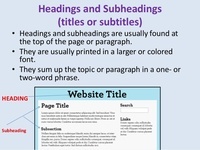
Which text feature helps you locate different categories in the text?
Tags
CCSS.RI.1.5
CCSS.RI.2.5
CCSS.RI.K.5
2.
MULTIPLE CHOICE QUESTION
15 mins • 1 pt
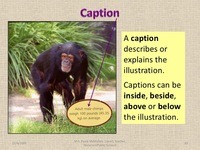
Which text feature helps you see what you are reading about and understand what you are looking at?
Tags
CCSS.RI.1.5
CCSS.RI.2.5
CCSS.RI.K.5
3.
MULTIPLE CHOICE QUESTION
15 mins • 1 pt
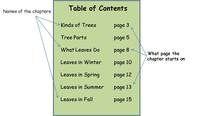
Which text feature helps you identify key topics in the book and the order in which they are presented?
Tags
CCSS.RI.1.5
CCSS.RI.2.5
CCSS.RI.K.5
4.
MULTIPLE CHOICE QUESTION
15 mins • 1 pt
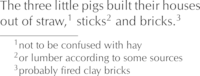
Which text feature helps you explain a word/phrase or gives more information about something in the text? Also, uses small numbers to show its location.
Tags
CCSS.RI.1.5
CCSS.RI.2.5
CCSS.RI.K.5
5.
MULTIPLE CHOICE QUESTION
15 mins • 1 pt
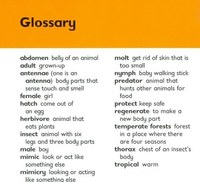
Which text feature helps you define words contained in the text?
Tags
CCSS.RI.1.5
CCSS.RI.2.5
CCSS.RI.K.5
6.
MULTIPLE CHOICE QUESTION
15 mins • 1 pt
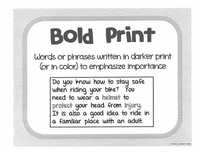
Which text feature signals that a word/words are important?
Tags
CCSS.RI.1.5
CCSS.RI.2.5
CCSS.RI.K.5
7.
MULTIPLE CHOICE QUESTION
15 mins • 1 pt
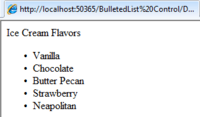
Which text feature emphasizes key points with a symbol like a black dot in front of each one?
Tags
CCSS.RI.1.5
CCSS.RI.2.5
CCSS.RI.K.5
Access all questions and much more by creating a free account
Create resources
Host any resource
Get auto-graded reports

Continue with Google

Continue with Email

Continue with Classlink

Continue with Clever
or continue with

Microsoft
%20(1).png)
Apple

Others
Already have an account?


