
Blockly Grok Microbit Level 1
Authored by M S
Computers
7th - 8th Grade
Used 31+ times


AI Actions
Add similar questions
Adjust reading levels
Convert to real-world scenario
Translate activity
More...
Content View
Student View
14 questions
Show all answers
1.
MULTIPLE CHOICE QUESTION
30 sec • 1 pt

What does this bar on the side provide access to.
Lessons and Puzzles
Shapes to use
Dot points
2.
MULTIPLE CHOICE QUESTION
30 sec • 1 pt
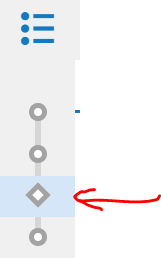
What type of activity do the diamonds represent?
YOU do challenge
WE do unpacking
I do teaching
3.
MULTIPLE CHOICE QUESTION
30 sec • 1 pt
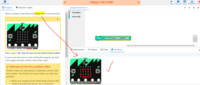
I have correctly completed the puzzle according to the description and have ran it to test. How can I upload it now?
Click run, click save, click mark.
Click run, click next.
Click run, click save, click next.
It will upload automatically.
4.
MULTIPLE CHOICE QUESTION
30 sec • 1 pt
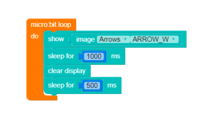
What does the orange loop code do?
Makes the micro:bit start code.
Makes the micro:bit redo this code repeatedly.
Makes an arrow appear
Makes the code execute when the GND power loop is closed.
5.
MULTIPLE CHOICE QUESTION
30 sec • 1 pt
The 5x5 LED array on the microbit can be used to give information to the user. What sort of data can be represented with lights that are on or off?
Binary
Image
Text
Luminescence
6.
MULTIPLE CHOICE QUESTION
30 sec • 1 pt
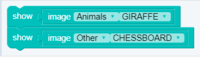
In the following image lines of code are run. Which one is run first!
display.show(Image.GIRAFFE)
display.show(Image.CHESSBOARD)
7.
MULTIPLE CHOICE QUESTION
30 sec • 1 pt
How many LEDs does the microbit have?
Access all questions and much more by creating a free account
Create resources
Host any resource
Get auto-graded reports

Continue with Google

Continue with Email

Continue with Microsoft
or continue with

%20(1).png)
Apple

Others
By signing up, you agree to our Terms of Service & Privacy Policy
Already have an account?

