
CSC134_Chapter 1: Introduction to Computers
Authored by Juliana Kamaroddin
Computers
University
Used 1K+ times


AI Actions
Add similar questions
Adjust reading levels
Convert to real-world scenario
Translate activity
More...
Content View
Student View
25 questions
Show all answers
1.
MULTIPLE CHOICE QUESTION
30 sec • 1 pt

Keyboard is a (an) _______ device.
output
input
software
memory
2.
MULTIPLE CHOICE QUESTION
30 sec • 1 pt

_______________ is known as the brain of a computer.
Monitor
Keyboard
CPU
System
3.
MULTIPLE SELECT QUESTION
30 sec • 1 pt
Choose an example of an output device.
Keyboard
Speakers
Mouse
Monitor
4.
MULTIPLE CHOICE QUESTION
45 sec • 1 pt
Which of the following is a storage device?
5.
MULTIPLE CHOICE QUESTION
45 sec • 1 pt
This computer is small enough to fit on your lap and is very portable.
6.
MULTIPLE CHOICE QUESTION
30 sec • 1 pt
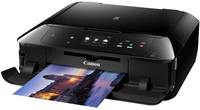
A _____ is used to print documents, photos, and anything else that appears on your screen.
Camera
Smartphone
Printer
e - Reader
7.
MULTIPLE CHOICE QUESTION
30 sec • 1 pt

What is this?
Pointy thingy
Cursor
Marker
Indicator

Access all questions and much more by creating a free account
Create resources
Host any resource
Get auto-graded reports

Continue with Google

Continue with Email

Continue with Microsoft
or continue with

%20(1).png)
Apple

Others
Already have an account?

