
Grade 5 C Google Docs - November
Authored by Payal Chhabra
Computers
6th - 7th Grade


AI Actions
Add similar questions
Adjust reading levels
Convert to real-world scenario
Translate activity
More...
Content View
Student View
15 questions
Show all answers
1.
MULTIPLE CHOICE QUESTION
30 sec • 1 pt

This row of items in Google Docs is known as the _____________.
menu bar
tool bar
user bar
icons
2.
MULTIPLE CHOICE QUESTION
30 sec • 1 pt
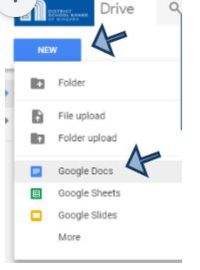
To create a word processing document, select NEW from Drive and _____.
Drive
Slides
Sheets
Docs
3.
MULTIPLE CHOICE QUESTION
30 sec • 1 pt
To Insert and Image from Drive, the path is ___________.
insert > image > camera
insert > image > by URL
insert > image > Drive
insert > image > photos
4.
MULTIPLE CHOICE QUESTION
30 sec • 1 pt
The user can also utilize the Insert Menu Bar to Insert a _________, which takes the user to a web page, or to another document.
link
table
image
drawing
5.
MULTIPLE CHOICE QUESTION
30 sec • 1 pt
Under the _________ Menu Bar, looks for Bulleted Lists or Numbered Lists to make your document lists appear organized.
file
tools
format
insert
6.
MULTIPLE CHOICE QUESTION
30 sec • 1 pt
To create space between lines of your typed document, the path is ____________.
format > line spacing
file > page setup
format > columns
insert > tables
7.
MULTIPLE CHOICE QUESTION
30 sec • 1 pt
If there's some formatting you wish to use but cannot find the feature, use the _______ Menu Bar item to search a variety of topics.
file
format
help
insert
Access all questions and much more by creating a free account
Create resources
Host any resource
Get auto-graded reports

Continue with Google

Continue with Email

Continue with Classlink

Continue with Clever
or continue with

Microsoft
%20(1).png)
Apple

Others
Already have an account?



