
Photoshop Basics
Authored by Dawn Cousins
Computers
7th - 8th Grade


AI Actions
Add similar questions
Adjust reading levels
Convert to real-world scenario
Translate activity
More...
Content View
Student View
17 questions
Show all answers
1.
MULTIPLE CHOICE QUESTION
2 mins • 1 pt
When editing an image, it is important to use multiple _____ to separate parts of your image
2.
MULTIPLE CHOICE QUESTION
30 sec • 1 pt
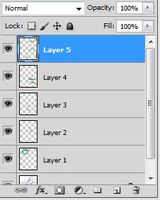
This is called the...
3.
MULTIPLE CHOICE QUESTION
30 sec • 1 pt

The colored boxes in this image represent...
4.
MULTIPLE CHOICE QUESTION
30 sec • 1 pt

This tool is called...
5.
MULTIPLE CHOICE QUESTION
30 sec • 1 pt

This tool is called...
6.
MULTIPLE CHOICE QUESTION
30 sec • 5 pts
When you finish working on an assignment, what should you do?
Tell the teacher and ask what to do.
7.
MULTIPLE CHOICE QUESTION
30 sec • 1 pt
To undo the last change made to your graphic design, the ______ keys must be used.


Access all questions and much more by creating a free account
Create resources
Host any resource
Get auto-graded reports

Continue with Google

Continue with Email

Continue with Classlink

Continue with Clever
or continue with

Microsoft
%20(1).png)
Apple

Others
Already have an account?
Popular Resources on Wayground

15 questions
Fractions on a Number Line

Quiz
•
3rd Grade
20 questions
Equivalent Fractions
Quiz
•
3rd Grade
25 questions
Multiplication Facts
Quiz
•
5th Grade
29 questions
Alg. 1 Section 5.1 Coordinate Plane
Quiz
•
9th Grade
22 questions
fractions
Quiz
•
3rd Grade
11 questions
FOREST Effective communication

Lesson
•
KG
20 questions
Main Idea and Details
Quiz
•
5th Grade
20 questions
Context Clues
Quiz
•
6th Grade
