
CLASE 4 - 2 AÑO
Authored by Sandra Castro
Computers
8th Grade
Used 1+ times


AI Actions
Add similar questions
Adjust reading levels
Convert to real-world scenario
Translate activity
More...
Content View
Student View
10 questions
Show all answers
1.
MULTIPLE CHOICE QUESTION
2 mins • 1 pt
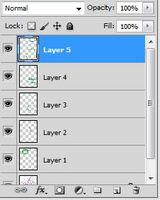
El elemento seleccionado se llama
Cosas de Photoshop
Dibujos
Capas
Modos de Color
2.
MULTIPLE CHOICE QUESTION
2 mins • 1 pt
Al presionar la Tecla "T" seleccionamos directamente la herramienta
Selección
Texto
Filtro
Capas
3.
MULTIPLE CHOICE QUESTION
30 sec • 1 pt
Sirve para escalar y hacer modificaciones en un texto o imagen
Ctrl + N
Ctrl + T
Ctrl + D
Ctrl + ENTER
4.
MULTIPLE CHOICE QUESTION
30 sec • 1 pt
Sirve para acercar o alejar una Imagen
Pluma
Pincel
Zoom
Goma
5.
MULTIPLE CHOICE QUESTION
30 sec • 1 pt
Define el nivel de transparencia de la capa
Capa
Fusión
Transparencia
Opacidad
6.
MULTIPLE CHOICE QUESTION
30 sec • 1 pt

LAS CAPAS NO PUEDEN SER NOMBRADAS
VERDADERO
FALSO
7.
MULTIPLE CHOICE QUESTION
30 sec • 1 pt

LA IMAGEN SE EMPLEA PARA:
COPIAR IMAGEN
MOVER IMAGEN
SELECCIONAR IMAGEN

Access all questions and much more by creating a free account
Create resources
Host any resource
Get auto-graded reports

Continue with Google

Continue with Email

Continue with Classlink

Continue with Clever
or continue with

Microsoft
%20(1).png)
Apple

Others
Already have an account?


