
Intro to Graphic/Photoshop Workspace Test
Authored by Lucinda Stukes
Computers
12th Grade
Used 23+ times


AI Actions
Add similar questions
Adjust reading levels
Convert to real-world scenario
Translate activity
More...
Content View
Student View
40 questions
Show all answers
1.
MULTIPLE CHOICE QUESTION
1 min • 5 pts
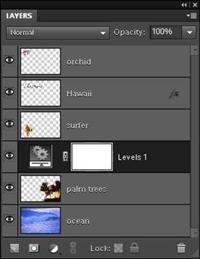
These are your...
Photoshop stuff
Drawings
Layers
Pictures
2.
MULTIPLE CHOICE QUESTION
1 min • 5 pts

What tool is shown bellow?
3.
MULTIPLE CHOICE QUESTION
45 sec • 5 pts

This tool is called the ______ tool
4.
MULTIPLE CHOICE QUESTION
30 sec • 5 pts

What does this tool do and what is its name?
Pencil Tool: draws hard edged lines and strokes (under Brush tool)
History Brush Tool: paints using data from a previous state
Lasso: Draws a free-form shape and selects the area with in the shape
Brush Tool: Paints lines and strokes with selected colors and brush settings.
5.
MULTIPLE CHOICE QUESTION
30 sec • 5 pts

What does this tool do and what is its name?
Polygonal Lasso: Draws a shape with a straight edge and selects the area within the shape.
Quick Select: Paints a selection area – under Magic Wand
Lasso: Draws a free-form shape and selects the area with in the shape
Magic Wand: selects all pixels of the same color with a single click
6.
MULTIPLE CHOICE QUESTION
10 sec • 5 pts

It displays the different icons that are use to modify or edit your image.
7.
MULTIPLE CHOICE QUESTION
10 sec • 5 pts

It has all the controls that are use to customize the tool that is being use. It is also called as the "Settings of your Tools"
Access all questions and much more by creating a free account
Create resources
Host any resource
Get auto-graded reports

Continue with Google

Continue with Email

Continue with Classlink

Continue with Clever
or continue with

Microsoft
%20(1).png)
Apple

Others
Already have an account?



