
DESAIN BUSANA (Disain Digital)
Authored by Wiwin Susanti
Design
1st Grade
Used 15+ times


AI Actions
Add similar questions
Adjust reading levels
Convert to real-world scenario
Translate activity
More...
Content View
Student View
10 questions
Show all answers
1.
MULTIPLE CHOICE QUESTION
1 min • 1 pt
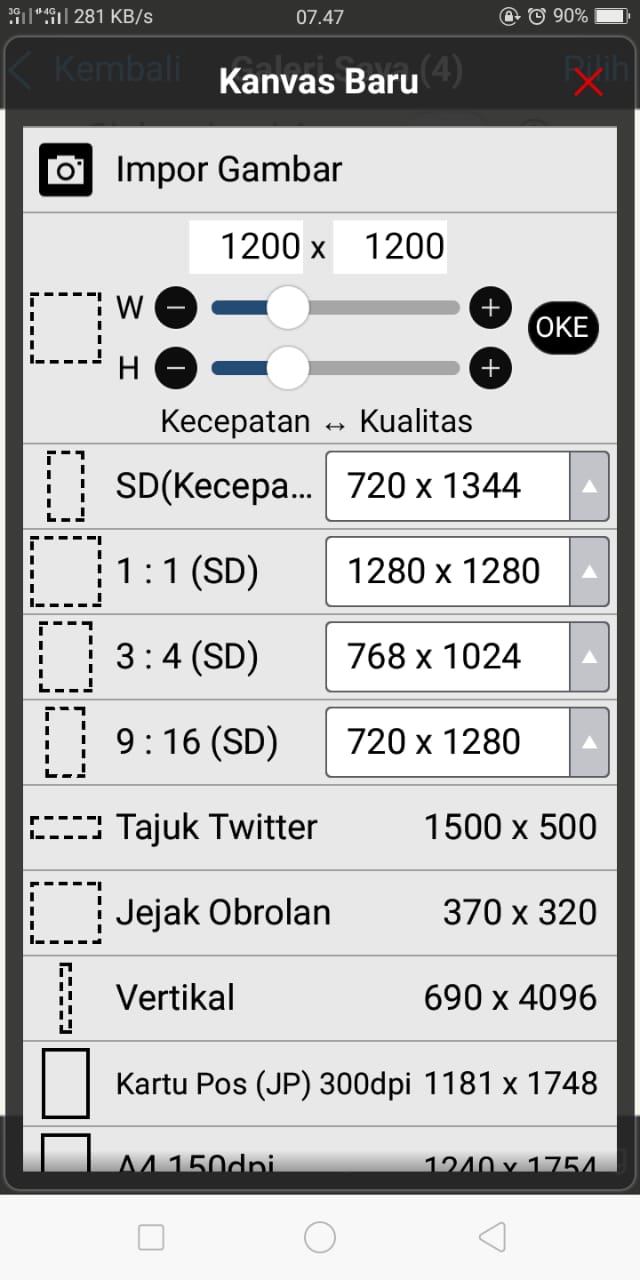
Tampilan gambar tersebut merupakan layar pada aplikasi ibis paint pada saat menentukan…
Tampilan layar utama ibis paint
Menentukan pilihan canvas
Menentukan pilihan jenis kuas
Menentukan ukuran kuas
Menentukan color
2.
MULTIPLE CHOICE QUESTION
1 min • 1 pt
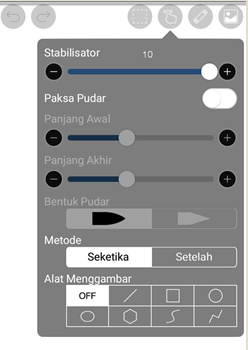
OFF
Line
Square (persegi)
Round (lingkaran)
Elips
3.
MULTIPLE CHOICE QUESTION
1 min • 1 pt
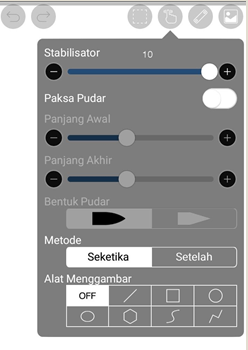
Perhatikan gambar tampilan pada layar ibis paint tersebut. Ketika kita akan membuat garis, agar goresan tidak keriting dan tidak terlalu berbelok, yang diatur adalah ….
Alat menggambar
Paksa Pudar
Panjang akhir
Metode
Stabilisator
4.
MULTIPLE CHOICE QUESTION
1 min • 1 pt
Untuk menentukan warna yang sama tanpa membuka tools color (warna), kita bisa menggunakan tool…
Brush
Eraser
Blur
Eye Droper
Laso
5.
MULTIPLE CHOICE QUESTION
1 min • 1 pt
Tool yang menyediakan bermacam-macam kuas seperti cat air, pensil, dll dalam aplikasi ibis paint adalah…
Brush
Eraser
Blur
Eye dropper
Laso
6.
MULTIPLE CHOICE QUESTION
1 min • 1 pt

Perhatikan gambar tampilan layar pada aplikasi ibis paint. Jenis kuas yang digunakan untuk mengarsir warna transparan adalah…
Dip pen soft
Dip pen hard
Drawing pen
Watercolor opaque
Air Brush (normal)
7.
MULTIPLE CHOICE QUESTION
1 min • 1 pt
Pada aplikasi ibis paint, jenis kuas yang biasa digunakan untuk membuat sketsa disain adalah...
Dip Pen Soft
Dip pen hard
Drawing pen
Watercolor opaque
Air brush (normal)


Access all questions and much more by creating a free account
Create resources
Host any resource
Get auto-graded reports

Continue with Google

Continue with Email

Continue with Microsoft
or continue with

%20(1).png)
Apple

Others
By signing up, you agree to our Terms of Service & Privacy Policy
Already have an account?

