
Cybersecurity Awareneness
Authored by Fritzi Lescano
Other
Professional Development
Used 1+ times


AI Actions
Add similar questions
Adjust reading levels
Convert to real-world scenario
Translate activity
More...
Content View
Student View
5 questions
Show all answers
1.
MULTIPLE CHOICE QUESTION
20 sec • 1 pt
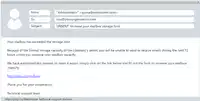
Read the email and determine whether it is genuine or phishing attempt.
Yes, it is a genuine email
No, it is a phishing email
Answer explanation
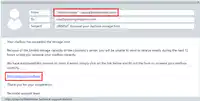
The email's sender is NOT related to your organization. The hyperlink included in the message shows a site that does not belong to your organization. These two clues indicate that this is a phishing attempt.
If you follow the instructions given and fill out the form, you will be disclosing information, such as your user ID and password, to a cybercriminal.
2.
MULTIPLE CHOICE QUESTION
20 sec • 1 pt
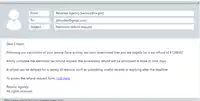
Read the email and determine whether it is genuine or phishing attempt.
Yes, it is a genuine email
No, it is a phishing email
Answer explanation
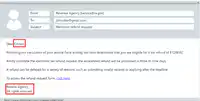
The salutation is generic. A government revenue agency would never provide specific information, such as a refund amount, in an email.
In addition, the domain name in the URL at the bottom of the message is different than the sender's name, and no additional contact information was provided.
You cannot tell where the "click here" link will take you, unless you hover over the link with your mouse.
Also, lookout for spelling errors.
3.
MULTIPLE CHOICE QUESTION
20 sec • 1 pt
TRUE or FALSE: Attachments should always be treated with caution, even if you know the sender.
True
False
Answer explanation
Attachments should be treated with caution—even from known senders—because accounts can be hacked and files may contain malware. Always verify unexpected attachments before opening.
4.
MULTIPLE CHOICE QUESTION
20 sec • 1 pt
A small business discovers that all of its customer files have been encrypted and a note on the screen demands payment in cryptocurrency to restore access.
What type of cybercrime is this?
Ransomware attack
Password spraying
Social media impersonation
Insider data theft
Answer explanation
This option describes malicious software that encrypts data and demands payment to provide the decryption key, matching the scenario.
In a ransomware attack, criminals typically spread malware via email attachments, compromised websites, or vulnerable remote access tools. Once executed, the malware silently encrypts files across the system or network and then displays a ransom note, usually demanding payment in cryptocurrency because it is harder to trace. The victims may face downtime, data loss, and reputational damage.
Good defenses include regular offline backups, patching systems, using endpoint protection, and training staff not to open suspicious attachments or links.
5.
MULTIPLE CHOICE QUESTION
20 sec • 1 pt
Employee Awareness & Defense: What should you do if you suspect an email might be a phishing attempt?
Forward the email to a colleague to ask for their opinion
Click on the link to see where it takes you
Double-check the details and report it to your supervisor or IT department
Interact directly with the sender to confront them
Answer explanation
The safest action is to not engage with the suspicious email. You should verify its authenticity through official channels and immediately report it so security professionals can investigate.
Access all questions and much more by creating a free account
Create resources
Host any resource
Get auto-graded reports

Continue with Google

Continue with Email

Continue with Classlink

Continue with Clever
or continue with

Microsoft
%20(1).png)
Apple

Others
Already have an account?

