
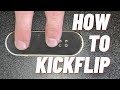
Fingerboard Tricks and Techniques

Interactive Video
•
Fun, Physical Ed, Life Skills
•
5th - 8th Grade
•
Practice Problem
•
Hard

Ethan Morris
FREE Resource
Read more
10 questions
Show all answers
1.
MULTIPLE CHOICE QUESTION
30 sec • 1 pt
What is the first thing Jack suggests you need for a fingerboard setup?
A stable fingerboard
A loose truck
Grip tape, trucks, and wheels
A flat surface
2.
MULTIPLE CHOICE QUESTION
30 sec • 1 pt
Where should you place your index finger on the fingerboard?
In the middle of the board
On the tail
On the side
On the nose
3.
MULTIPLE CHOICE QUESTION
30 sec • 1 pt
What is the purpose of practicing Ollies before attempting a kickflip?
To check the grip tape
To balance the board
To warm up your fingers
To adjust the trucks
4.
MULTIPLE CHOICE QUESTION
30 sec • 1 pt
How should you flick the board to perform a kickflip?
Sideways
Upwards
Diagonally and toward the side
Straight down
5.
MULTIPLE CHOICE QUESTION
30 sec • 1 pt
What should you watch for as the fingerboard flips?
The grip tape side
The trucks
The tail
The wheels
6.
MULTIPLE CHOICE QUESTION
30 sec • 1 pt
What is the key to landing a cleaner kickflip?
Practicing on a rough surface
Using a different finger position
Flicking the board harder
Landing with all four wheels on the surface at the same time
7.
MULTIPLE CHOICE QUESTION
30 sec • 1 pt
What should you do if you don't get the kickflip quickly?
Try a different trick
Change your fingerboard
Give up
Keep practicing
Access all questions and much more by creating a free account
Create resources
Host any resource
Get auto-graded reports

Continue with Google

Continue with Email

Continue with Classlink

Continue with Clever
or continue with

Microsoft
%20(1).png)
Apple

Others
Already have an account?


