
Understanding the Write Function

Interactive Video
•
Computers, Instructional Technology
•
5th - 8th Grade
•
Practice Problem
•
Hard

Aiden Montgomery
FREE Resource
Read more
9 questions
Show all answers
1.
MULTIPLE CHOICE QUESTION
30 sec • 1 pt
What is the primary purpose of the write function?
To draw shapes on the screen
To add text labels to the screen
To animate objects
To change the background color
2.
MULTIPLE CHOICE QUESTION
30 sec • 1 pt
What must be included inside the parentheses of the write function?
The text to display
The background color
The screen resolution
The animation speed
3.
MULTIPLE CHOICE QUESTION
30 sec • 1 pt
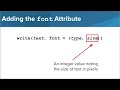
How can you modify the size of the text label?
By using the font attribute
By adjusting the screen brightness
By using the color attribute
By changing the screen resolution
4.
MULTIPLE CHOICE QUESTION
30 sec • 1 pt
Which of the following is NOT a valid font name mentioned?
Times New Roman
Comic Sans
Futura
Arial
5.
MULTIPLE CHOICE QUESTION
30 sec • 1 pt
What does the align attribute control?
The size of the text
The position of the text relative to Tracy
The speed of text appearance
The color of the text
6.
MULTIPLE CHOICE QUESTION
30 sec • 1 pt
Which align option will center the text above Tracy's location?
Top
Center
Right
Left
7.
MULTIPLE CHOICE QUESTION
30 sec • 1 pt
What is the order requirement for the text and attributes in the write function?
Attributes must be first, text follows
There is no specific order
Text must be first, attributes can follow in any order
Text and attributes must be in alphabetical order
Access all questions and much more by creating a free account
Create resources
Host any resource
Get auto-graded reports

Continue with Google

Continue with Email

Continue with Microsoft
or continue with

%20(1).png)
Apple

Others
By signing up, you agree to our Terms of Service & Privacy Policy
Already have an account?

