
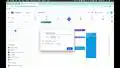
How to Set Customized Reminder Notifications for Events in Google Claendar

Interactive Video
•
Social Studies, Mathematics
•
11th Grade - University
•
Practice Problem
•
Hard

Wayground Content
FREE Resource
Read more
5 questions
Show all answers
1.
MULTIPLE CHOICE QUESTION
30 sec • 1 pt
What is the first step in setting up a reminder for daily tasks?
Send an email
Create a new calendar
Start a new event
Add a new contact
2.
MULTIPLE CHOICE QUESTION
30 sec • 1 pt
How can you ensure a reminder repeats every weekday?
Set it to repeat once a month
Select the option to repeat every weekday
Choose the option to repeat every day
Set it to repeat every weekend
3.
MULTIPLE CHOICE QUESTION
30 sec • 1 pt
What can you customize about a reminder's timing?
The color of the reminder
The sound of the reminder
The specific time it occurs
The font of the reminder text
4.
MULTIPLE CHOICE QUESTION
30 sec • 1 pt
How can you add a notification for an event?
By setting a new password
By creating a new email
By adding a notification service
By sending a text message
5.
MULTIPLE CHOICE QUESTION
30 sec • 1 pt
What is the benefit of adding multiple notifications for an event?
It changes the event date automatically
It allows you to change the event location
It enables you to invite more people
It helps in remembering the event at different times
Access all questions and much more by creating a free account
Create resources
Host any resource
Get auto-graded reports

Continue with Google

Continue with Email

Continue with Classlink

Continue with Clever
or continue with

Microsoft
%20(1).png)
Apple

Others
Already have an account?

