
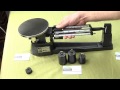
Understanding the MyWay Triple Beam Balance

Interactive Video
•
Physics, Science, Mathematics
•
6th - 7th Grade
•
Practice Problem
•
Hard

Patricia Brown
FREE Resource
Read more
10 questions
Show all answers
1.
MULTIPLE CHOICE QUESTION
30 sec • 1 pt
What is the first step to take when setting up the MyWay triple beam balance after delivery?
Calibrate the balance using the curl knob
Remove the rubber grommet from under the platform
Attach the additional weights
Slide the riders to the zero position
2.
MULTIPLE CHOICE QUESTION
30 sec • 1 pt
How does the triple beam balance get its name?
From the three different weight capacities
From the three beams used to measure mass
From the three types of materials used
From the three-step calibration process
3.
MULTIPLE CHOICE QUESTION
30 sec • 1 pt
What is the purpose of the curl knob on the triple beam balance?
To lock the balance in place
To adjust the balance to zero
To change the beam's length
To add additional weight
4.
MULTIPLE CHOICE QUESTION
30 sec • 1 pt
Where are the attachment weights stored on the MyWay triple beam balance?
Underneath the platform
In a tray beneath the balance
Attached to the side of the balance
On top of the balance
5.
MULTIPLE CHOICE QUESTION
30 sec • 1 pt
What is the actual weight of the 1,000 G attachment weight?
147.5 G
295 G
500 G
1,000 G
6.
MULTIPLE CHOICE QUESTION
30 sec • 1 pt
How do you know when the balance is level?
When the beam is at its highest point
When the attachment weights are in place
When the riders are all at the end of the beams
When the hashtag on the beam aligns with the zero point
7.
MULTIPLE CHOICE QUESTION
30 sec • 1 pt
What is the correct procedure for weighing an object using the triple beam balance?
Adjust the curl knob before each measurement
Slide the smallest poise first
Add all attachment weights before weighing
Slide the largest poise until the beam goes down
Access all questions and much more by creating a free account
Create resources
Host any resource
Get auto-graded reports

Continue with Google

Continue with Email

Continue with Classlink

Continue with Clever
or continue with

Microsoft
%20(1).png)
Apple

Others
Already have an account?

