
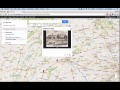
Using Google Maps for History Education

Interactive Video
•
History
•
6th - 8th Grade
•
Practice Problem
•
Hard

Patricia Brown
FREE Resource
Read more
10 questions
Show all answers
1.
MULTIPLE CHOICE QUESTION
30 sec • 1 pt
What is the first step in creating a custom Google Map for educational purposes?
Access google.com/mymaps
Download Google Maps app
Go to google.com/maps
Visit Google Earth
2.
MULTIPLE CHOICE QUESTION
30 sec • 1 pt
How can you add historical context to a location on your custom map?
By changing the map's color scheme
By using satellite view
By adding markers and images
By sharing the map with others
3.
MULTIPLE CHOICE QUESTION
30 sec • 1 pt
What is the purpose of adding layers to a custom Google Map?
To add more locations
To organize different types of information
To increase map loading speed
To change the map's appearance
4.
MULTIPLE CHOICE QUESTION
30 sec • 1 pt
What tool can be used to show the path of troop movements on the map?
Ruler tool
Zoom tool
Marker tool
Line drawing tool
5.
MULTIPLE CHOICE QUESTION
30 sec • 1 pt
Which feature allows you to measure distances between points on the map?
Line drawing tool
Ruler tool
Zoom tool
Marker tool
6.
MULTIPLE CHOICE QUESTION
30 sec • 1 pt
How can you differentiate between Confederate and Union forces on the map?
By using different colors for markers
By adding more images
By changing the map's background
By using different map layers
7.
MULTIPLE CHOICE QUESTION
30 sec • 1 pt
What can students learn by placing markers on a map?
All of the above
The distance between locations
The historical significance of events
The geographical layout of battlefields
Access all questions and much more by creating a free account
Create resources
Host any resource
Get auto-graded reports

Continue with Google

Continue with Email

Continue with Classlink

Continue with Clever
or continue with

Microsoft
%20(1).png)
Apple

Others
Already have an account?


