
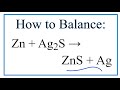
Balancing Chemical Equations Concepts

Interactive Video
•
Chemistry
•
9th - 10th Grade
•
Practice Problem
•
Hard

Olivia Brooks
FREE Resource
Read more
6 questions
Show all answers
1.
MULTIPLE CHOICE QUESTION
30 sec • 1 pt
What type of reaction is being discussed in the video?
Decomposition reaction
Double displacement reaction
Single displacement reaction
Synthesis reaction
2.
MULTIPLE CHOICE QUESTION
30 sec • 1 pt
How many silver atoms are present on the reactant side before balancing?
Four
Three
Two
One
3.
MULTIPLE CHOICE QUESTION
30 sec • 1 pt
What is the main focus when balancing the given chemical equation?
Balancing zinc atoms
Balancing sulfur atoms
Balancing oxygen atoms
Balancing silver atoms
4.
MULTIPLE CHOICE QUESTION
30 sec • 1 pt
What is the purpose of using coefficients in a chemical equation?
To change the chemical properties
To balance the number of atoms
To decrease the reaction speed
To increase the reaction speed
5.
MULTIPLE CHOICE QUESTION
30 sec • 1 pt
After balancing, how many silver atoms are on each side of the equation?
One
Four
Two
Three
6.
MULTIPLE CHOICE QUESTION
30 sec • 1 pt
What is the key takeaway regarding the placement of coefficients in a chemical equation?
Do not use coefficients
Place them randomly
Place them before the element symbol
Place them after the element symbol
Access all questions and much more by creating a free account
Create resources
Host any resource
Get auto-graded reports

Continue with Google

Continue with Email

Continue with Microsoft
or continue with

%20(1).png)
Apple

Others
By signing up, you agree to our Terms of Service & Privacy Policy
Already have an account?


