
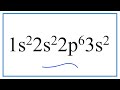
Identifying Elements and Electron Configurations

Interactive Video
•
Chemistry
•
9th - 10th Grade
•
Practice Problem
•
Hard

Liam Anderson
FREE Resource
Read more
9 questions
Show all answers
1.
MULTIPLE CHOICE QUESTION
30 sec • 1 pt
What is the main goal of the video tutorial?
To understand the history of the periodic table
To identify an element based on its electron configuration
To learn about chemical reactions
To explore the properties of metals
2.
MULTIPLE CHOICE QUESTION
30 sec • 1 pt
How many electrons are present in the given electron configuration?
10
11
12
13
3.
MULTIPLE CHOICE QUESTION
30 sec • 1 pt
Which element has an atomic number of 12?
Sodium
Silicon
Aluminum
Magnesium
4.
MULTIPLE CHOICE QUESTION
30 sec • 1 pt
What is the significance of the number 12 in the context of the video?
It is the number of protons and electrons in the element
It is the number of valence electrons
It is the atomic mass of the element
It is the number of neutrons in the element
5.
MULTIPLE CHOICE QUESTION
30 sec • 1 pt
What is the maximum number of electrons that the s orbital can hold?
4
8
2
6
6.
MULTIPLE CHOICE QUESTION
30 sec • 1 pt
Which orbital block can hold up to 10 electrons?
s
d
f
p
7.
MULTIPLE CHOICE QUESTION
30 sec • 1 pt
What is the electron configuration that ends in 3s2?
1s2 2s2 2p6 4s2
1s2 2s2 2p6 3d2
1s2 2s2 2p6 3p2
1s2 2s2 2p6 3s2
Access all questions and much more by creating a free account
Create resources
Host any resource
Get auto-graded reports

Continue with Google

Continue with Email

Continue with Microsoft
or continue with

%20(1).png)
Apple

Others
By signing up, you agree to our Terms of Service & Privacy Policy
Already have an account?

