
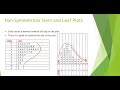
Analyzing Stem-and-Leaf Plots

Interactive Video
•
Mathematics
•
9th - 10th Grade
•
Practice Problem
•
Hard

Thomas White
FREE Resource
Read more
30 questions
Show all answers
1.
MULTIPLE CHOICE QUESTION
30 sec • 1 pt
What is the primary focus when interpreting a stem-and-leaf plot?
The size of the leaves
The number of stems
The shape and peak of the plot
The color of the plot
2.
MULTIPLE CHOICE QUESTION
30 sec • 1 pt
In a symmetrical stem-and-leaf plot, where is the majority of the data located?
At the top
At the bottom
Evenly spread
In the center
3.
MULTIPLE CHOICE QUESTION
30 sec • 1 pt
What characteristic defines a symmetrical stem-and-leaf plot?
Data forms a central peak
Data is evenly distributed
Data is random
Data is skewed to one side
4.
MULTIPLE CHOICE QUESTION
30 sec • 1 pt
How can you visually confirm the symmetry of a stem-and-leaf plot?
By rotating it 180 degrees
By rotating it 90 degrees anti-clockwise
By flipping it upside down
By coloring it
5.
MULTIPLE CHOICE QUESTION
30 sec • 1 pt
In a negatively skewed stem-and-leaf plot, where is the data concentrated?
Evenly spread
At the bottom
At the top
In the center
6.
MULTIPLE CHOICE QUESTION
30 sec • 1 pt
What direction does the tail point in a negatively skewed plot?
Left
Right
Down
Up
7.
MULTIPLE CHOICE QUESTION
30 sec • 1 pt
What term is used to describe a plot with data skewed towards the bottom?
Positively skewed
Symmetrical
Negatively skewed
Evenly distributed
Access all questions and much more by creating a free account
Create resources
Host any resource
Get auto-graded reports

Continue with Google

Continue with Email

Continue with Microsoft
or continue with

%20(1).png)
Apple

Others
By signing up, you agree to our Terms of Service & Privacy Policy
Already have an account?


