
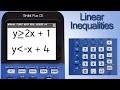
Graphing Inequalities on TI 84

Interactive Video
•
Mathematics
•
9th - 10th Grade
•
Practice Problem
•
Hard

Thomas White
FREE Resource
Read more
15 questions
Show all answers
1.
MULTIPLE CHOICE QUESTION
30 sec • 1 pt
What is the main task Rob is demonstrating in the video?
Calculating derivatives
Graphing a system of linear inequalities
Finding the area under a curve
Solving quadratic equations
2.
MULTIPLE CHOICE QUESTION
30 sec • 1 pt
Which key do you press first to start graphing on the TI 84 Plus CE?
Graph
Window
Y=
Enter
3.
MULTIPLE CHOICE QUESTION
30 sec • 1 pt
How do you select the greater than or equal to sign in the Y= menu?
Press the left or right arrow key
Press the up arrow key
Press the down arrow key
Press the number 2 key
4.
MULTIPLE CHOICE QUESTION
30 sec • 1 pt
What is the first equation Rob enters into the calculator?
y = 2x + 1
y = 3x - 1
y = -x + 4
y = x + 2
5.
MULTIPLE CHOICE QUESTION
30 sec • 1 pt
Where is the x key located on the TI 84 Plus CE?
Middle of the keypad
Bottom right of the keypad
Top right of the keypad
Top left of the keypad
6.
MULTIPLE CHOICE QUESTION
30 sec • 1 pt
What is the inequality sign for the second equation?
Greater than
Less than
Equal to
Greater than or equal to
7.
MULTIPLE CHOICE QUESTION
30 sec • 1 pt
What is the second equation Rob enters into the calculator?
y = 3x + 1
y = -x + 4
y = x - 2
y = 2x + 1
Access all questions and much more by creating a free account
Create resources
Host any resource
Get auto-graded reports

Continue with Google

Continue with Email

Continue with Classlink

Continue with Clever
or continue with

Microsoft
%20(1).png)
Apple

Others
Already have an account?


