
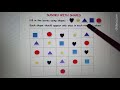
Identifying Shapes in Activities

Interactive Video
•
Mathematics
•
3rd - 4th Grade
•
Hard

Thomas White
FREE Resource
Read more
19 questions
Show all answers
1.
MULTIPLE CHOICE QUESTION
30 sec • 1 pt
What is the main activity discussed in the video?
Jigsaw puzzle
Crossword puzzle
Sudoku with shapes
Sudoku with numbers
2.
MULTIPLE CHOICE QUESTION
30 sec • 1 pt
Which of the following shapes is NOT used in the activity?
Hexagon
Star
Circle
Heart
3.
MULTIPLE CHOICE QUESTION
30 sec • 1 pt
What is the primary rule for placing shapes in the Sudoku grid?
Each shape can appear twice in a row
Shapes should form a pattern
Each shape should appear only once in each row and column
Shapes can be placed randomly
4.
MULTIPLE CHOICE QUESTION
30 sec • 1 pt
In the first row, which shape was identified as missing?
Square
Star
Circle
Heart
5.
MULTIPLE CHOICE QUESTION
30 sec • 1 pt
When filling the third row, which shape was placed first?
Heart
Star
Triangle
Square
6.
MULTIPLE CHOICE QUESTION
30 sec • 1 pt
In the third row, which shape was placed after the star?
Square
Triangle
Heart
Circle
7.
MULTIPLE CHOICE QUESTION
30 sec • 1 pt
In the first row revisited, which shape was placed in the last position?
Star
Heart
Square
Circle
Access all questions and much more by creating a free account
Create resources
Host any resource
Get auto-graded reports

Continue with Google

Continue with Email

Continue with Microsoft
or continue with

%20(1).png)
Apple

Others
By signing up, you agree to our Terms of Service & Privacy Policy
Already have an account?

