

Autodesk Inventor Part Modeling

Interactive Video
•
Other
•
10th Grade
•
Practice Problem
•
Hard

Lisa Horrell
FREE Resource
10 questions
Show all answers
1.
FILL IN THE BLANKS QUESTION
1 min • 10 pts
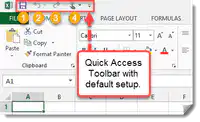
In the Quick Access Toolbar, what are 2 features?
(a)
2.
FILL IN THE BLANKS QUESTION
1 min • 1 pt
The Ribbon is full of tabs of logic action including 3D model, ______, and ________.
(a)
3.
FILL IN THE BLANKS QUESTION
1 min • 1 pt
The tabs include tools for sketch, ______, and ______.
(a)
4.
MULTIPLE CHOICE QUESTION
30 sec • 1 pt
If you hover over an icon an extended tip appears.
True
False
5.
MULTIPLE CHOICE QUESTION
30 sec • 1 pt
What is the purpose of the Quick Access Toolbar in Autodesk Inventor?
To navigate the model using the scroll wheel
To display the 3D model in the graphics window
To organize commands into tabs and panels
To provide shortcuts to frequently used tools like creating, saving, and updating models
6.
FILL IN THE BLANKS QUESTION
1 min • 1 pt
Use the scroll wheel on your mouse to ____ in and out.
To ___ the view, hold the scroll wheel down and move the mouse.
To _____, hold shift and scroll wheel to see 360 degrees.
To zoom the model to fit the graphics window, double click the scroll _____.
(a)
7.
MULTIPLE CHOICE QUESTION
30 sec • 1 pt
How can you zoom in and out of a model in the graphics window?
By right-clicking and selecting Home View
By pressing Shift and the scroll wheel
By double-clicking the scroll wheel
By using the scroll wheel on the mouse
Access all questions and much more by creating a free account
Create resources
Host any resource
Get auto-graded reports

Continue with Google

Continue with Email

Continue with Classlink

Continue with Clever
or continue with

Microsoft
%20(1).png)
Apple

Others
Already have an account?

