

TeleConnect Troubleshooting: Connection & Workflow Issues

Interactive Video
•
Professional Development
•
Professional Development
•
Practice Problem
•
Easy

Gerald Mbatha
Used 1+ times
FREE Resource
7 questions
Show all answers
1.
MULTIPLE SELECT QUESTION
45 sec • 1 pt
During a TeleConnect visit, the video freezes and the patient cannot hear you clearly. What type of issue is this?
Poor audio/video quality
Patient cannot join the visit
Answer explanation
Freezing video and unclear audio are signs of poor audio/video quality.
You can ask the patient this questions to find out what they are experiencing:
Are you connected to Wi-Fi or using mobile data right now?”
“Is your Wi-Fi signal strong, or does it keep dropping?”
“Can you hear me clearly, or is the sound cutting in and out?”
“Can you see me on your screen right now?”
“Do you see any messages asking to allow the microphone or camera?”
“Are you using headphones, Bluetooth, or the phone’s speaker?
2.
MULTIPLE CHOICE QUESTION
30 sec • 1 pt
You have tried several troubleshooting steps during a TeleConnect visit, but the video continues to freeze and the patient is becoming frustrated. When should you stop troubleshooting and escalate the issue?
After the first small technical glitch
When multiple attempts have failed and the issue is not improving
When there is still time to try more random fixes
Only after the visit has completely ended
Answer explanation
You should escalate when troubleshooting steps are not working and the issue continues.
Escalation helps protect patient safety, reduce frustration, and ensure the visit continues in the best possible way.
3.
MULTIPLE CHOICE QUESTION
30 sec • 1 pt
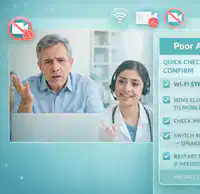
What is the first step to take when a Teleconnect glitch occurs?
Ignore the glitch and continue the visit
Act by fixing the issue right away
Pause and take a moment to calm down
Diagnose the problem immediately
Answer explanation
Pausing when a connection glitch occurs helps calm the patient and prevents confusion.
It also gives you a moment to assess what is happening before taking technical steps.
Reassuring the patient also builds trust and lets them know the issue is technical, not their fault.
4.
MULTIPLE CHOICE QUESTION
30 sec • 1 pt
What are the three steps to handle Teleconnect glitches?
Pause, Analyze, and Resolve
Stop, Diagnose, and Repair
Stop, Analyze, and Fix
Pause, Diagnose, and Act
Answer explanation
Pausing helps calm the patient and gives you a moment to understand what is happening.
Diagnosing means identifying the type of issue, such as poor audio/video, a dropped connection, or patient confusion. This step helps you choose the right solution instead of guessing.
Acting involves applying the appropriate fix, such as following the Quick Check steps
5.
MULTIPLE CHOICE QUESTION
30 sec • 1 pt
Which of the following is NOT a type of problem to diagnose during a Teleconnect glitch?
Patient's medical condition
Connection issue
Audio or video issue
Patient confusion
Answer explanation
Weak Wi-Fi signal – The internet connection is unstable or too slow.
Too many apps using bandwidth – Other apps are slowing the connection.
Microphone or camera not enabled – The device is blocking audio or video access.
Bluetooth or audio source conflict – Sound is connected to the wrong device.
Temporary app or browser glitch – TeleConnect needs to be refreshed or restarted.
Outdated browser or incompatible device – The system does not fully support the visit.
Network drop or interruption – The connection briefly disconnected.
Weak Wi-Fi signal – The internet connection is unstable or too slow.
Too many apps using bandwidth – Other apps are slowing the connection.
Microphone or camera not enabled – The device is blocking audio or video access.
Bluetooth or audio source conflict – Sound is connected to the wrong device.
Temporary app or browser glitch – TeleConnect needs to be refreshed or restarted.
Outdated browser or incompatible device – The system does not fully support the visit.
Network drop or interruption – The connection briefly disconnected.
6.
MULTIPLE CHOICE QUESTION
30 sec • 1 pt

The video freezes during a TeleConnect visit. What First stepnshould you take to resolve the issue?
Pause
diagnose
Act
Escalate
Answer explanation
Pausing when a connection glitch occurs helps calm the patient and prevents confusion.
Pausing gives you a moment to assess what is happening before taking technical steps.
Reassuring the patient also builds trust and lets them know the issue is technical, not their fault.
7.
MULTIPLE CHOICE QUESTION
30 sec • 1 pt
What should you do if the issue persists after trying to fix it?
Ask the patient to reschedule the visit
Restart the teleconnect session
Follow your clinic's escalation path
End the virtual visit immediately
Answer explanation
Escalation is needed when the issue cannot be resolved quickly or safely.
Access all questions and much more by creating a free account
Create resources
Host any resource
Get auto-graded reports

Continue with Google

Continue with Email

Continue with Microsoft
or continue with

%20(1).png)
Apple

Others
Already have an account?


