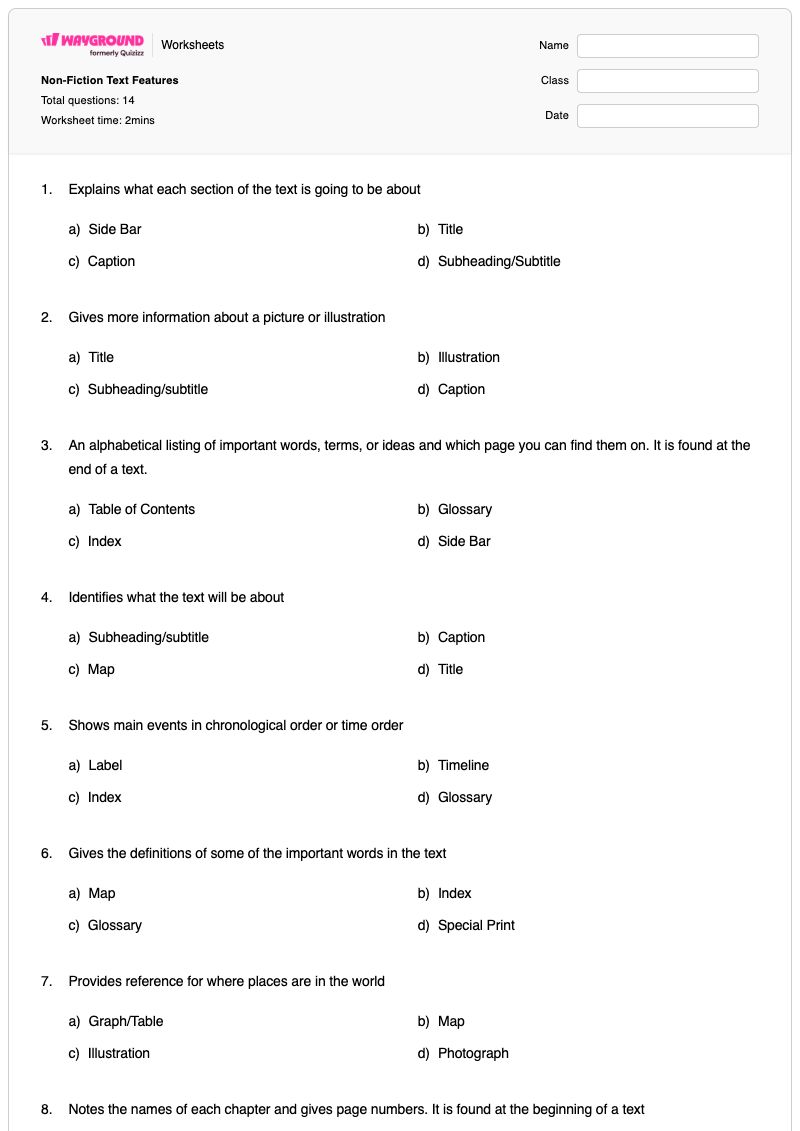
Non-Fiction Text Features is a Grade 7 English worksheet that helps students identify the purpose of common nonfiction text features, including titles, subheadings, captions, indexes, timelines, glossaries, maps, tables and graphs, special print, sidebars, photographs, illustrations, and labels. Students answer 14 multiple-choice questions by matching each feature to its definition or function, building vocabulary for navigating informational texts.
Use this worksheet to check whether students can distinguish features that organize content, explain visuals, define terms, show information, or provide additional context. It works well as guided practice after introducing nonfiction text structures, independent review, or a quick formative assessment before students analyze an informational passage. This free printable worksheet includes a complete answer key for efficient checking and feedback.
Worksheet settings
Font size
S
M
L
XL
Worksheets
Non-Fiction Text Features
Total questions: 14
Name
Class
Date
1.
Explains what each section of the text is going to be about
a)
Side Bar
b)
Title
c)
Caption
d)
Subheading/Subtitle
2.
Gives more information about a picture or illustration
a)
Title
b)
Illustration
c)
Subheading/subtitle
d)
Caption
3.
An alphabetical listing of important words, terms, or ideas and which page you can find them on. It is found at the end of a text.
a)
Table of Contents
b)
Glossary
c)
Index
d)
Side Bar
4.
Identifies what the text will be about
a)
Subheading/subtitle
b)
Caption
c)
Map
d)
Title
5.
Shows main events in chronological order or time order
a)
Label
b)
Timeline
c)
Index
d)
Glossary
6.
Gives the definitions of some of the important words in the text
a)
Map
b)
Index
c)
Glossary
d)
Special Print
7.
Provides reference for where places are in the world
a)
Graph/Table
b)
Map
c)
Illustration
d)
Photograph
8.
Notes the names of each chapter and gives page numbers. It is found at the beginning of a text
a)
Glossary
b)
Timeline
c)
Side Bar
d)
Table of Contents
9.
Bold, colored, and italicized print all help to signal that a word is important and/or found in the glossary
a)
Special Print
b)
Side Bar
c)
Table/Graph
d)
Photograph
10.
A text box that provides additional or more in-depth information
a)
Table of Contents
b)
Caption
c)
Illustration
d)
Side Bar
11.
Provides information in a visual way
a)
Photograph
b)
Table/Graph
c)
Label
d)
Map
12.
A real image that shows what something looks like
a)
Illustration
b)
Map
c)
Photograph
d)
Index
13.
A drawing or sketch that shows what something looks like
a)
Illustration
b)
Map
c)
Photograph
d)
Table/Graph
14.
Tells the names and parts of a diagram, photo, or illustration
a)
Caption
b)
Index
c)
Side Bar
d)
Label
Answer Key
Non-Fiction Text Features
Total questions: 14
1.
d)
Subheading/Subtitle
2.
d)
Caption
3.
c)
Index
4.
d)
Title
5.
b)
Timeline
6.
c)
Glossary
7.
b)
Map
8.
d)
Table of Contents
9.
a)
Special Print
10.
d)
Side Bar
11.
b)
Table/Graph
12.
c)
Photograph
13.
a)
Illustration
14.
d)
Label
140 %
Browse by subjects
Browse by grades
Browse by format
FAQs
What does the Non-Fiction Text Features worksheet cover?
This Grade 7 English worksheet uses 14 multiple-choice questions to assess whether students can identify the purpose of nonfiction text features. Students distinguish features such as a title, subheading, caption, index, glossary, timeline, map, table or graph, special print, sidebar, photograph, illustration, and label by the information or function each provides.
How can I use this worksheet to teach nonfiction text features?
Introduce the features with an informational text that contains several of them, asking students to point out what each feature contributes to the page. Then use the worksheet’s definition-based multiple-choice questions for guided practice, prompting students to explain why an option such as a glossary, caption, or table/graph fits the described function. Review the choices afterward and have students locate the same features in a real nonfiction text.
What mistakes should I watch for when students complete this worksheet?
Students may confuse features that appear near visuals, especially captions, labels, illustrations, and photographs. They may also mix up organizational tools such as the table of contents and index, or confuse a glossary with special print because both can support unfamiliar vocabulary. Ask students to focus on each feature’s specific job: for example, an index points to page numbers, while a glossary provides definitions.
How do I assign and grade this worksheet?
The Non-Fiction Text Features worksheet is available as a printable PDF and as a digital quiz on Wayground, so you can use the 14 multiple-choice items for paper practice or online assessment. It includes a complete answer key, and printable submissions can be graded by scanning student work with the Wayground for Teachers app. The printable format can also support schools that are reducing screen time.
How can I differentiate this nonfiction text features worksheet for my students?
Use the worksheet’s Advanced Settings to adjust font spacing or increase the font size so the feature definitions and answer choices are easier to track. You can also apply a dyslexia-friendly font or translate the worksheet into another language, helping students access the vocabulary used in the multiple-choice questions.
Where can I find more worksheets like this on Wayground?
Wayground offers a comprehensive collection of free printable worksheets and practice problems across subjects, with downloadable PDFs and answer keys to help students master essential skills and concepts. Browse more resources at https://wayground.com/en-us/worksheets.


 Worksheets