NONFICTION TEXT FEATURES -Table of Contents, Glossary, Index
Created by Christina Lorenz
9 questions
3rd Grade
ELA
Updated May 2025
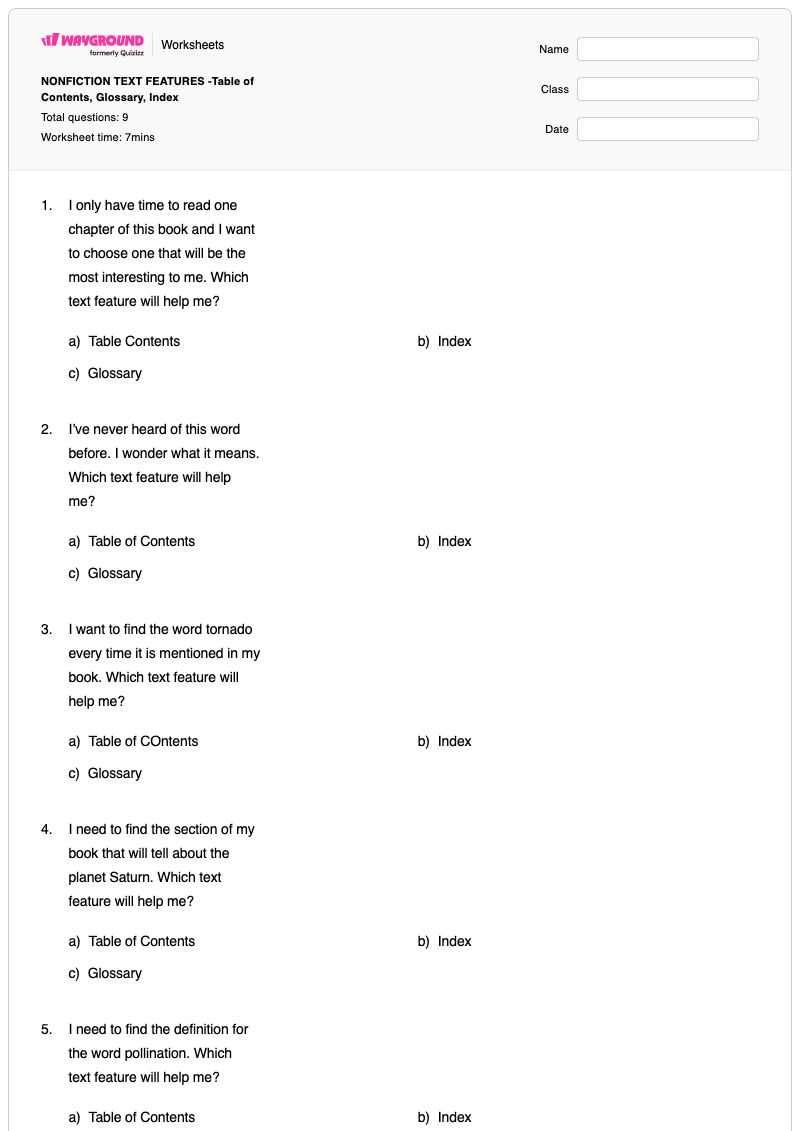
Nonfiction Text Features: Table of Contents, Glossary, Index is a Grade 3 English worksheet that helps students distinguish among three common nonfiction text features. Through 8 multiple-choice questions and 1 multiple-select question, students identify which feature helps them preview chapters, locate a section such as information about Saturn, find every mention of a word such as tornado, or determine the meaning of an unfamiliar word.
The worksheet also reinforces where these features appear in a nonfiction book: the Table of Contents is in the front, while the Index and Glossary are in the back. Students apply these distinctions to practical reading tasks, including using a Table of Contents to locate information about Mali’s rainy season. This free printable worksheet includes a complete answer key and is useful for independent practice, small-group instruction, or a quick comprehension check after introducing nonfiction text features.
Worksheet settings
Font size
S
M
L
XL
Worksheets
NONFICTION TEXT FEATURES -Table of Contents, Glossary, Index
Total questions: 9
Name
Class
Date
1.
I only have time to read one
chapter of this book and I want
to choose one that will be the
most interesting to me. Which
text feature will help me?
a)
Table Contents
b)
Index
c)
Glossary
2.
I’ve never heard of this word
before. I wonder what it means.
Which text feature will help
me?
a)
Table of Contents
b)
Index
c)
Glossary
3.
I want to find the word tornado
every time it is mentioned in my
book. Which text feature will
help me?
a)
Table of COntents
b)
Index
c)
Glossary
4.
I need to find the section of my
book that will tell about the
planet Saturn. Which text
feature will help me?
a)
Table of Contents
b)
Index
c)
Glossary
5.
I need to find the definition for
the word pollination. Which
text feature will help me?
a)
Table of Contents
b)
Index
c)
Glossary
6.
My homework assignment is to
make my own dictionary of
important animal words. Which
text feature will help me?
a)
Table of Contents
b)
Index
c)
Glossary
7.
This TEXT FEATURE is found in the front of a nonfiction book?
a)
Table of Contents
b)
Index
c)
Glossary
8.
These text features are found in the back of a nonfiction book? (Pick 2)
a)
Table of Contents
b)
Index
c)
Glossary
9.
Based on this Table of Contents, which chapter should a
student read to find out when the rainy season occurs in
Mali?
a)
Chapter 1
b)
Chapter 2
c)
Chapter 3
d)
Chapter 4
Answer Key
NONFICTION TEXT FEATURES -Table of Contents, Glossary, Index
Total questions: 9
1.
a)
Table Contents
2.
c)
Glossary
3.
b)
Index
4.
a)
Table of Contents
5.
c)
Glossary
6.
c)
Glossary
7.
a)
Table of Contents
8.
b)
Index
, c)
Glossary
9.
d)
Chapter 4
140 %
Browse by subjects
Browse by grades
Browse by format
FAQs
What does this nonfiction text features worksheet cover?
This Grade 3 worksheet teaches students to distinguish the Table of Contents, Index, and Glossary by matching each feature to a specific reading purpose. Its 8 multiple-choice and 1 multiple-select questions ask students to choose a chapter, locate every mention of a topic, find definitions, and identify which features appear in the front or back of a nonfiction book.
How can I use this worksheet to teach the difference between a Table of Contents, Index, and Glossary?
Introduce each feature with a nonfiction book and model the task it supports: preview chapters with the Table of Contents, locate repeated topics with the Index, and find word meanings in the Glossary. Then have students explain why a feature fits each scenario on the worksheet, such as finding the definition of “pollination” or locating information about Saturn, before completing the questions independently.
What mistakes should I watch for when students complete this worksheet?
Students may confuse the Index with the Table of Contents because both help locate information; emphasize that the Table of Contents lists chapters or sections, while the Index points to mentions of a word or topic. They may also select the Glossary for a topic-location question instead of a definition question, overlook that the worksheet’s multiple-select item requires two answers, or reverse which features appear in the front and back of a nonfiction book.
How do I assign and grade this worksheet?
This worksheet is available as a printable PDF and as a digital quiz on Wayground, and it includes a complete answer key for all 9 questions. For printable submissions, scan student work with the Wayground for Teachers app to grade responses efficiently. The printable format can also support schools that are reducing screen time.
How can I differentiate this Table of Contents, Index, and Glossary worksheet for my students?
Use the worksheet’s Advanced Settings to adjust font spacing or increase the font size so the text-feature scenarios and answer choices are easier to navigate. You can also select a dyslexia-friendly font or translate the worksheet into another language when that better supports access to the multiple-choice and multiple-select items.
Where can I find more worksheets like this on Wayground?
Wayground offers a comprehensive collection of free printable worksheets and practice problems across all subjects, with downloadable PDFs and answer keys to help students master essential skills and concepts. Browse more resources at https://wayground.com/en-us/worksheets.


 Worksheets