
 Worksheets
EOC MICROSOFT REVIEW
Total questions: 91
Worksheet time: 1hrs 27mins
Name
Class
Date
1.
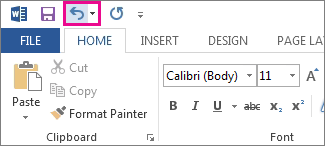
a)
Undo
b)
Redo
c)
Font size
d)
Save
2.
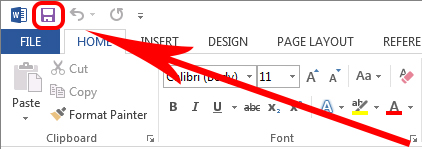
a)
Save
b)
Undo
c)
Redo
d)
Underline
3.
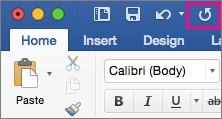
a)
Redo
b)
Undo
c)
Save
d)
Align center
4.

a)
Font name
b)
Font size
c)
Font color
d)
Save
5.

a)
Font size
b)
Increase Font
c)
Font color
d)
Font Name
6.

a)
Increase font
b)
Decrease font
c)
Font size
d)
Font name
7.

a)
Decrease font
b)
Increase font
c)
Font size
d)
Font color
8.

a)
Bold
b)
Underline
c)
Italic
d)
Font name
9.

a)
Italic
b)
Bold
c)
Underline
d)
Center align
10.

a)
Undo
b)
Underline
c)
Center
d)
Bold
11.
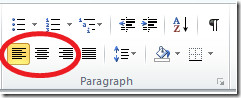
a)
Left align
b)
Font size
c)
Font name
d)
Save
12.

a)
Center align
b)
Font name
c)
Increase font
d)
Underline
13.
Saves the file
a)
Save
b)
Bold
c)
Font size
d)
Left align
14.

a)
Font color
b)
Font name
c)
Increase font
d)
Bold
15.
Undoes an action
a)
Undo
b)
Redo
c)
Save
d)
Center align
16.
Redoes an action
a)
Redo
b)
Undo
c)
Save
d)
Bold
17.
Changes the kind of type being used
a)
Font name
b)
Font color
c)
Save
d)
Undo
18.
Changes the size of the type
a)
Font size
b)
Font name
c)
Font color
d)
Undo
19.
Makes the type bigger
a)
Increase font size
b)
Decrease font size
c)
Font name
d)
Font color
20.
Makes the type smaller
a)
Decrease font size
b)
Increase font size
c)
Redo
d)
Save
21.
Makes the type thicker and heavier
a)
Bold
b)
Italic
c)
Underline
d)
Font name
22.
Makes the type slanted
a)
Italic
b)
Bold
c)
Underline
d)
Redo
23.
Puts a line under the type
a)
Underline
b)
Bold
c)
Italic
d)
Left align
24.
Changes the color of the type
a)
Font color
b)
Font name
c)
Increase font size
d)
Font size
25.
Moves the type to the left of the page
a)
Left align
b)
Center align
c)
Increase font size
d)
Bold
26.
Moves the type to the center of the page
a)
Center align
b)
Left align
c)
Bold
d)
Increase font size
27.
To update an existing document use _________
a)
Save
b)
Save as
28.

To save a new file or an existing file in its same storage location, which commonly used shortcut key or keyboard key combination is used?
a)
CTRL + S
b)
ALT + S
c)
CTRL + V
d)
Shift +S
29.
If you wanted to 'Select All' of the text on the page, what keyboard shortcut would you use?
a)
CTRL and Z
b)
CTRL and A
c)
CTRL and C
d)
CTRL and X
30.
If you wanted to 'copy' a word or sentence in your document, what keyboard shortcut would you use?
a)
CTRL and C
b)
CTRL and Z
c)
CTRL and B
d)
CTRL and P
31.
You are ready to 'paste' a sentence that you copied from another document. What keyboard shortcut are you going to use?
a)
CTRL and V
b)
CTRL and C
c)
CTRL and P
d)
CTRL and X
32.
You need to copy and delete a sentence to move to the top of your document. What keyboard shortcut would you use to 'cut'?
a)
CTRL C
b)
CTRL J
c)
CTRL V
d)
CTRL X
33.
UH OH! You deleted your entire paragraph accidentally! What keyboard shortcut can you use to 'undo' the delete?
a)
CTRL C
b)
CTRL U
c)
CTRL Z
d)
CTRL B
34.
In one of your paragraphs, you need to bold a word quickly. You can highlight the word and use what keyboard shortcut to do this quickly?
a)
CTRL and H
b)
CTRL and B
c)
CTRL and C
d)
CTRL and Z
35.
In your online science journal, you need to underline vocabulary words. What keyboard shortcut can you use to underline words quickly?
a)
CTRL and B
b)
CTRL and U
c)
CTRL and I
d)
CTRL and Z
36.
These move the cursor one character at a time.
a)
arrow keys
b)
enter
c)
tab
d)
shift
37.
Press the ________________key(s) to erase one character to the right of the insertion point.
a)
CTRL + HOME
b)
DELETE
c)
BACKSPACE
d)
END
38.
Press the _________ key(s) to erase one character to the left of the insertion point
a)
CTRL + HOME
b)
DELETE
c)
BACKSPACE
d)
END
39.
How do you print an image?
a)
ctrl v
b)
ctrl p
c)
ctrl pr
d)
ctrl r
40.
CTRL + Y
a)
Undo
b)
Redo
c)
Close
d)
Cancel
41.
Left Align
a)
CTRL + A
b)
CTRL + R
c)
CTRL + O
d)
CTRL + L
42.
Right Align
a)
ALT + R
b)
CTRL + R
c)
CTRL + A
d)
Alt + A
43.
What is the name of the view that provides data about documents and contains a set of commands to help a user manage documents?
a)
Backstage
b)
Properties
c)
Document
d)
Normal
44.
To close a window, use the shortcut:
a)
CTRL + Z
b)
CTRL + W
c)
CTRL + Y
d)
CTRL + 2
45.
Double Space
a)
CTRL + 1
b)
CTRL + 2
c)
CTRL + 3
d)
CTRL + 5
46.
To center the text, press:
a)
CTRL + L
b)
CTRL + R
c)
CTRL + C
d)
CTRL + E
47.
Save a new document with _______
a)
Save
b)
Save as
48.
Which Presentation View is the default view?
a)
Normal
b)
Outline View
c)
Reading View
d)
Slide Sorter
49.

Which Presentation View will show you thumbnails of your presentation?
a)
Slide
b)
Normal
c)
Notes
d)
Outline
50.
Which is NOT a New Slide option?
a)
Title Only
b)
Blank
c)
Two Content
d)
Content Only
51.
Which option will automatically be selected if you set up your slide show to be browser at a kiosk?
a)
Loop continuously
b)
Play music
c)
Play all the slides
d)
Requires clicking to advance to the next slide
52.

What will this button do in PPT?
a)
Add shapes to my presentation
b)
That button is not available in PPT
c)
Add images to my presentation
d)
All of the above
53.

What will this button do in PPT?
a)
Provide slide show options
b)
Allow me to rehearse timings
c)
Start the slide show
d)
Record my slide show
54.
Themes are pre-created designs that include color and font.
a)
True
b)
False
55.
These are used when changing from one slide to another slide.
a)
Transitions
b)
Animations
c)
Images
d)
Changers
56.

Which of these is NOT a transition?
a)
Honeycomb
b)
Dissolve
c)
Flip
d)
Float in
57.

What will this button do in PPT?
a)
Insert a SmartArt
b)
Insert an image
c)
Insert a table
d)
Insert WordArt
58.

What will this button do in PPT?
a)
Insert a chart
b)
Insert an image
c)
Insert a table
d)
Insert a SmartArt
59.

What will this button do?
a)
make a bulleted list
b)
make a numbered list
c)
indent text
d)
nothing
60.
When you are part of an audience you should make eye contact with the speaker.
a)
YES
b)
NO
61.
Is it possible to add sound or video clips to your presentation?
a)
YES
b)
NO
62.
I want to show a cool website during my presentation. I do NOT want to minimize PowerPoint. I would like to have a hyperlink to the website. How do I add this?
a)
Home tab
b)
Insert tab
c)
Slideshow tab
d)
View tab
63.
I want the slideshow to advance automatically. I do NOT want to have to push the arrow keys or the mouse to move to the next slide. Which tab is this option in?
a)
Insert tab
b)
Animations tab
c)
Slide show tab
d)
Design tab
64.
I would like the presentation to fade in and out of each slide. Where do I go to add a transition?
a)
Animations tab
b)
Slide show tab
c)
Insert tab
d)
Transitions tab
65.
I have typed a few notes under some of the slides. I would like to see all of the notes for each slide. Where do I go to see this information?
a)
View tab
b)
Slideshow tab
c)
You cannot type notes in PowerPoint
d)
Review tab
66.
I have created a slide with a bulleted list. I would like each item to show up one at a time during my presentation. Where do I go to make this happen?
a)
Animations tab
b)
Transitions tab
c)
Slide show tab
d)
You cannot make each item show up one at a time during a presentation
67.
I have added a new slide, but the layout is wrong. Where do I go to fix it?
a)
Insert tab
b)
Design tab
c)
Home tab
d)
Delete the slide and insert the correct slide
68.
Action buttons cannot do the same things as hyperlinks.
a)
FALSE
b)
TRUE
69.
Action buttons are built-in button shapes you can add to a presentation and set to:
a)
Link to another slide
b)
Play a sound
c)
When someone clicks or moves over the button, the selected action will occur.
d)
All of these
70.
What menu category do you need to be in to change the font from bold to italics?
a)
Design tab
b)
Animations tab
c)
Insert tab
d)
Home tab
71.
Membolehkan anda melihat sesuatu slide dengan skala yang lebih besar.
a)
Presentation
b)
Normal View
c)
Slide Show
d)
Animation Review
72.
Membolehkan anda melangkaui ke slaid lain atau yang tersembunyi tanpa mengikut urutan secara automatik
a)
Presentation
b)
Slide Navigation
c)
Animation Effects
d)
Custom Animation
73.
Untuk mencetak sesuatu dokumen, arahan yang perlu dipilih ialah File > Printer.
a)
Betul
b)
Salah
74.
Speaker berfungsi untuk memasukkan bunyi.
a)
Betul
b)
Salah
75.
Microsoft Powerpoint dapat menghasilkan kaedah komunikasi yang menarik, baik dan mudah difahami.
a)
Betul
b)
Salah
76.
Microsoft Powerpoint adalah perisian persembahan elektronik yg mudah dan efektif
a)
Betul
b)
Salah
77.
Satu daripada cara terbaik untuk menyediakan persembahan yang berkesan adalah dengan tidak memasukkan grafik dan clip art.
a)
Betul
b)
Salah
78.
MIcrost Powerpoint juga dikenali sebagai perisian persembahan
a)
Betul
b)
Salah
79.
Kekunci yang boleh digunakan untuk tangkap gambar skrin dan simpan dalam Clipboard dikenali sebagai Kekunci print screen
a)
Betul
b)
Salah
80.
It is possible to move slides around in a presentation.
a)
True
b)
False
81.
Variants are the different color options you can choose from for your background theme.
a)
True
b)
False
82.
WordArt can only be added to the first slide of a presentation.
a)
True
b)
False
83.
You are not able to delete a slide once it is inserted into a presentation.
a)
True
b)
False
84.
You are not able to delete a slide once it is inserted into a presentation.
a)
True
b)
False
85.
A presentation must always start with the "Title Slide"
a)
True
b)
False
86.
You must use the same transition on every slide in a presentation.
a)
True
b)
False
87.
A chart can be added to a slide to visually present numerical data.
a)
True
b)
False
88.
What menu option can you use if you want to add a new slide?
a)
Home
b)
Insert
c)
Slide Show
d)
Home and Insert
89.
What option do you choose when you want to add an effect of how your text or other item comes on to the slides?
a)
Animations
b)
Themes
c)
Transitions
d)
Text Effects
90.
What option do you choose when you want to add an effect of how your text or other item comes on to the slides?
a)
Animations
b)
Themes
c)
Transitions
d)
Text Effects
91.
What option do you choose when you want to add an effect to how your slide comes on to the screen?
a)
Animations
b)
Themes
c)
Transitions
d)
Slide Effects
100 %

