
NEW
Font size
S
M
L
XL
 Worksheets
Google Apps
Total questions: 20
Worksheet time: 9mins
Name
Class
Date
1.
Used to create presentations
a)
Docs
b)
Slides
c)
Sheets
d)
Forms
2.
Used to collect data and charts
a)
Docs
b)
Slides
c)
Sheets
d)
Forms
3.
Which App will let you change the font of a character?
a)
Docs
b)
Sheets
c)
Slides
d)
All the Above
4.
I need to create a pie chart to show the percentages of students who passed my class. What app do I use?
a)
Docs
b)
Sheets
c)
Slides
d)
Docs and Forms
5.
Google Docs, Sheets, Slides, and Forms are all apps?
a)
True
b)
False
6.
You must have a flashdrive to save all you documents on Google Docs.
a)
True
b)
False
7.
Where can you find ALL of your stored work?
a)
Google Classroom
b)
Google Drive
c)
Google Docs
d)
Google Search
8.
Where do you turn in class work?
a)
Google Drive
b)
Google Classroom
9.
Used to create documents like letters, essays, tables, ect.
a)
Docs
b)
Sheets
c)
Slides
d)
Forms
10.
True or False: You must always remember to hit the "save" button before closing a Google Doc.
a)
True
b)
False
11.

Files saved to Drive can be opened on a different computer or a smartphone.
a)
True
b)
False
12.
Microsoft Word is to Google Docs as Microsoft Excel is to
a)
Google Docs
b)
Google Classroom
c)
Google Calendar
d)
Google Sheets
13.
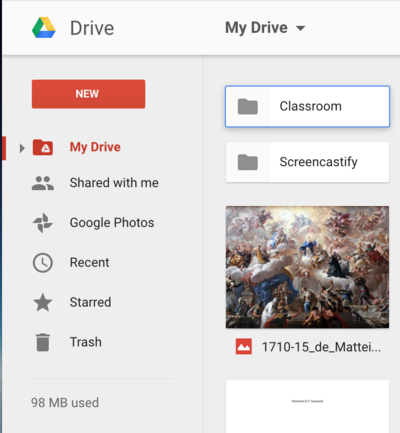
How do you create a new folder?
a)
Click "New"
b)
Click "Drive" (Left)
c)
Click "Drive" (Upper Center)
d)
Click "Trash
14.
Where are documents that you place on Google Drive stored?
a)
On your school network
b)
On a flash drive
c)
Somewhere in California
d)
In the cloud
15.
How do you share a document with someone?
a)
Put it in a box with a bow on it
b)
Click the "share" icon and type in their email
c)
Email them the link
d)
Tell them to ask nicely
16.

What is the best browser for Google Drive?
a)
Internet Explorer
b)
Safari
c)
Chrome
d)
Netscape
17.
Why is there no Save button for your files?
a)
No changes are ever saved.
b)
Google Drive uses autosave, which automatically and immediately saves your files as you edit them.
c)
The Save button is in the “File” submenu.
d)
You “Right-Click” to get the Save function.
18.

What is this icon/button for?
a)
Adjust Line Spacing
b)
Searching Text
c)
Centering Text
d)
Adjust Settings for Form
19.
In Google Forms, what type of question allows you to select more than one answer?
a)
Paragraph
b)
Checkboxes
c)
Multiple Choice
d)
List
20.

What does this icon represent?
a)
Drive
b)
Office
c)
Doc
d)
Word
Reset

