
NEW
Font size
S
M
L
XL
 Worksheets
C1 Unit 1 Test Review
Total questions: 27
Worksheet time: 14mins
Name
Class
Date
1.

Name this computer.
a)
Desktop
b)
Laptop
c)
Tablet
d)
Smartphone
2.
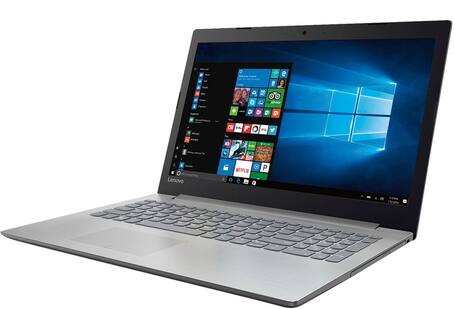
Name this computer.
a)
Desktop
b)
Laptop
c)
Tablet
d)
Smartphone
3.

Name this computer.
a)
Desktop
b)
Laptop
c)
Tablet
d)
Smartphone
4.

Name this computer.
a)
Desktop
b)
Laptop
c)
Tablet
d)
Smartphone
5.
This is the most powerful of all computers.
a)
Desktop
b)
Laptop
c)
Tablet
d)
Smartphone
6.
This computer is portable, all-in-one.
a)
Desktop
b)
Laptop
c)
Tablet
d)
Smartphone
7.
This computer has a touch screen and is handheld.
a)
Desktop
b)
Laptop
c)
Tablet
d)
Smartphone
8.
This computer is primarily used for communications.
a)
Desktop
b)
Laptop
c)
Tablet
d)
Smartphone
9.
Because computers and humans speak different languages we need this.
a)
Operating System
b)
Applications
c)
Monitor
d)
Mouse
10.

What are these?
a)
Operating Systems
b)
Productivity Apps
c)
Entertainment Apps
d)
Communications Apps
11.
This is a personal assistant for Windows 10.
a)
Cortana
b)
Siri
c)
Alexa
d)
Billy
12.
This is a personal assistant for Mac OS X.
a)
Cortana
b)
Siri
c)
Alexa
d)
Billy
13.
The action center is a feature of
a)
Windows 10
b)
Mac OS Sierra
c)
Linux
d)
Google
14.
Files and folders automatically sync to the cloud is a feature of
a)
Windows 10
b)
Mac OS Sierra
c)
Linux
d)
Google
15.
Apple Pay is a feature of
a)
Windows 10
b)
Mac OS Sierra
c)
Linux
d)
Google
16.
Tablet mode is a feature of
a)
Windows 10
b)
Mac OS Sierra
c)
Linux
d)
Google
17.
A type of software that allows you to perform specific tasks.
a)
Operating System
b)
Application
c)
Google Drive
d)
Microsoft Office
18.

What type of Application (App) is this?
a)
Productivity
b)
Entertainment
c)
Communication
d)
None of the these
19.

What type of Application (App) is this?
a)
Productivity
b)
Entertainment
c)
Communication
d)
None of the these
20.

What type of Application (App) is this?
a)
Productivity
b)
Entertainment
c)
Communication
d)
None of the these
21.
A collection of different websites you can access through the Internet.
a)
World Wide Web
b)
Internet
c)
Google
d)
Network
22.
A global network of billions of computers and other electronic devices.
a)
World Wide Web
b)
Internet
c)
Google
d)
Network
23.
The internet and the World Wide Web are the same.
a)
True
b)
False
24.
What do you open to access the world wide web?
a)
Browser
b)
Window
c)
Tab
d)
File
25.
Type in the web address, also called the ______________ to access a website on the world wide web.
a)
URL
b)
link
c)
location
d)
search
26.
What do you call the words that are blue and underlined on a webpage?
a)
hyperlink
b)
url
c)
website
d)
application
27.
The ____ contains link to other sections of the website.
a)
Navigation Bar
b)
Tab
c)
Bookmarks Bar
d)
Home Button
Reset

