
 Worksheets
1.5 OS and Utility Software
Total questions: 31
Worksheet time: 16mins
Name
Class
Date
1.
Describe the purpose of an operating system?
a)
Includes operating system and utilities software. Tells computer hardware what to do and provides a user interface (OS). Maintains, optimises and cleans a computer (Utilities).
b)
A set of programs that controls how the user interacts with the hardware and software of a computer.
2.
Name four commonly used operating systems
a)
Windows, Mac OSX, Android, IOS
b)
PowerPoint, Word, Publisher, Notepad
3.
What is meant by a user interface?
a)
Allows a user to interact with the computer (hardware)
b)
A screen overlay for the monitor
4.
What is meant by a Command Line Interface (CLI)?
a)
The user has to type in specific commands to do things like moving and copying files.
b)
The user communicates with the operating system using windows, icons, menu and pointers (WIMP) e.g. Windows
5.
What is meant by a Graphical User Interface (GUI)?
a)
The user has to type in specific commands to do things like moving and copying files.
b)
The user communicates with the operating system using windows, icons, menu and pointers (WIMP) e.g. Windows
6.
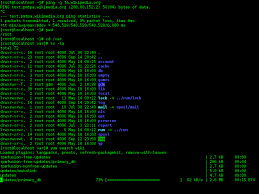
GUI or CLI?
a)
GUI
b)
CLI
7.

GUI or CLI?
a)
GUI
b)
CLI
8.
Operating systems have five functions - what are they?
a)
Memory management/multitasking, providing a user interface, peripheral management and drivers, user management and file management.
b)
Human resource management, memory management, pedestrian management, user management and file management.
9.
What is meant by memory management? (A function of an o/s)
a)
Windows, Linux, OSX and Android are multitasking operating systems. A multitasking operating system allows more than one program to run at the same time.
b)
In charge of the RAM. Programs often use RAM throughout their operation, some use more memory than others. The memory manager checks requests from programs for memory space are valid and then allocates memory space.It also de-allocates space.
10.
What is meant by multitasking? (A function of an o/s)
a)
Windows, Linux, OSX and Android are multitasking operating systems. A multitasking operating system allows more than one program to run at the same time.
b)
In charge of the RAM. Programs often use RAM throughout their operation, some use more memory than others. The memory manager checks requests from programs for memory space are valid and then allocates memory space.It also de-allocates space.
11.
What is meant by peripheral management? (A function of an o/s)
a)
Manages all of the computer input and output by managing requests from programs to use devices like printers, speakers, keyboards and hard disk drives.
It communicates with devices through software called drivers.
It communicates with devices through software called drivers.
b)
Controls files on system e.g. text, graphic files. Controls file permissions: to open a file, write to it and delete it. Helpful for security and to help organise files e.g. sorting. In windows file management is completed using windows explorer. (Right click the windows logo)
12.
What is meant by file management? (A function of an o/s)
a)
Manages all of the computer input and output by managing requests from programs to use devices like printers, speakers, keyboards and hard disk drives.
It communicates with devices through software called drivers.
It communicates with devices through software called drivers.
b)
Controls files on system e.g. text, graphic files. Controls file permissions: to open a file, write to it and delete it. Helpful for security and to help organise files e.g. sorting. In windows file management is completed using windows explorer. (Right click the windows logo)
13.
What is meant by user management? (A function of an o/s)
a)
Manages all of the computer input and output by managing requests from programs to use devices like printers, speakers, keyboards and hard disk drives.
Operating systems allow for different accounts to be setup.The operating system can assign certain user access rights:- Read (view and open) but not change files or folders- Write: allows file/folder to be changed or deleted- Execute: gives user right to run an executable application.
Operating systems allow for different accounts to be setup.The operating system can assign certain user access rights:- Read (view and open) but not change files or folders- Write: allows file/folder to be changed or deleted- Execute: gives user right to run an executable application.
b)
Controls files on system e.g. text, graphic files. Controls file permissions: to open a file, write to it and delete it. Helpful for security and to help organise files e.g. sorting. In windows file management is completed using windows explorer. (Right click the windows logo)
14.
Define the term 'peripheral'
a)
A driver is a piece of software designed to tell a peripheral what to do.
b)
Any input, output or storage device that connects to a motherboard. (keyboard, mouse, web cam, printer, hard disk drive)
15.
Define the term 'device driver'
a)
A driver is a piece of software designed to tell a peripheral what to do.
b)
Any input, output or storage device that connects to a motherboard. (keyboard, mouse, web cam, printer, hard disk drive)
16.
An advantage of having different user accounts on a computer
a)
They are cheap, fast and reliable.
b)
They are easy to use for all users
c)
They can be time consuming to setup
d)
You can setup security for different users, particularly helpful with children so they don't delete your files and restrict their access
17.
What is meant by utility systems software?
a)
Software that manages file handling and storage.
b)
Software that is designed for security, maintenance, system optimisation and backup.
18.
What is the purpose of anti-virus software (Utility systems software)?
a)
For security - scramble data using a key to encrypt so it can't be understood. To decrypt a key is needed to put it into its original form.
b)
For security - prevents unwanted access to or from a private network or the internet. Messages can be blocked based on criteria e.g. website addresses.
c)
For security - scans for and removes malicious files.
d)
For security - to block and remove programs designed to get your personal information.
19.
What is the purpose of encryption software (Utility systems software)?
a)
For security - scramble data using a key to encrypt so it can't be understood. To decrypt a key is needed to put it into its original form.
b)
For security - prevents unwanted access to or from a private network or the internet. Messages can be blocked based on criteria e.g. website addresses.
c)
For security - scans for and removes malicious files.
d)
For security - to block and remove programs designed to get your personal information.
20.
What is the purpose of a firewall(Utility systems software)?
a)
For security - scramble data using a key to encrypt so it can't be understood. To decrypt a key is needed to put it into its original form.
b)
For security - prevents unwanted access to or from a private network or the internet. Messages can be blocked based on criteria e.g. website addresses.
c)
For security - scans for and removes malicious files.
d)
For security - to block and remove programs designed to get your personal information.
21.
What is the purpose of spyware detectors (Utility systems software)?
a)
For security - scramble data using a key to encrypt so it can't be understood. To decrypt a key is needed to put it into its original form.
b)
For security - prevents unwanted access to or from a private network or the internet. Messages can be blocked based on criteria e.g. website addresses.
c)
For security - scans for and removes malicious files.
d)
For security - to block and remove programs designed to get your personal information.
22.
What is the purpose of system clean-up tools (Utility systems software)?
a)
For system optimisation - to rearrange parts of files on a hard drive that have become fragmented. This puts then back together for quicker access.
b)
For system optimisation - to search and remove files no longer needed.
c)
For system optimisation - to make files smaller so they take up less space.
d)
For backing up - copying files to a second medium away from the originals for safe keeping.
23.
What is the purpose of disk defragmentation (Utility systems software)?
a)
For system optimisation - to rearrange parts of files on a hard drive that have become fragmented. This puts then back together for quicker access.
b)
For system optimisation - to search and remove files no longer needed.
c)
For system optimisation - to make files smaller so they take up less space.
d)
For backing up - copying files to a second medium away from the originals for safe keeping.
24.
What is the purpose of file compression software (Utility systems software)?
a)
For system optimisation - to rearrange parts of files on a hard drive that have become fragmented. This puts then back together for quicker access.
b)
For system optimisation - to search and remove files no longer needed.
c)
For system optimisation - to make files smaller so they take up less space.
d)
For backing up - copying files to a second medium away from the originals for safe keeping.
25.
What is the purpose of backup programs (Utility systems software)?
a)
For system optimisation - to rearrange parts of files on a hard drive that have become fragmented. This puts then back together for quicker access.
b)
For system optimisation - to search and remove files no longer needed.
c)
For system optimisation - to make files smaller so they take up less space.
d)
For backing up - copying files to a second medium away from the originals for safe keeping.
26.
What is mean by a full backup?
a)
All files are backed up onto external storage away from the original - usually done on the first backup only
b)
New files or files that have changed since the last backup are backed up and kept with the original full backup
27.
What is mean by an incremental backup?
a)
All files are backed up onto external storage away from the original - usually done on the first backup only
b)
New files or files that have changed since the last backup are backed up and kept with the original full backup
28.
Why is compressing a file, so that it is smaller good?
a)
Compressed files are better quality
b)
Compressed files take less hard disk space.
29.
What is meant by lossy compression?
a)
Removes data to reduce the file size. When the file is uncompressed, only a part of the original information is still there (There will be some loss of quality). Examples: mp3 and jpeg.
b)
As the file size is compressed, the quality remains the same - it does not get worse. Also, the file can be decompressed to its original quality. Examples: GIF and FLAC. File sizes are larger than lossy.
30.
What is meant by lossless compression?
a)
Removes data to reduce the file size. When the file is uncompressed, only a part of the original information is still there (There will be some loss of quality). Examples: mp3 and jpeg.
b)
As the file size is compressed, the quality remains the same - it does not get worse. Also, the file can be decompressed to its original quality. Examples: GIF and FLAC. File sizes are larger than lossy.
31.
Why do we use a backup utility instead of copying and pasting files onto a memory stick?
a)
Its an easy interface to use.
b)
It optimises the files that are fragmented by puttin gthem back together.
c)
Because it is automated, the users will not forget to backup to a designated drive.
d)
It cleans the computer of viruses and other malicious software
100 %

