
 Worksheets
Google Docs
Total questions: 13
Worksheet time: 7mins
Name
Class
Date
1.

Name this icon.
a)
Google Drive
b)
Google Keep
c)
Google Doc
d)
Google Classroom
2.
Do you use folders to organize your Drive?
a)
Yes, and they are color coded.
b)
Yes
c)
No
d)
Folders? I didn't know that there were folders.
3.
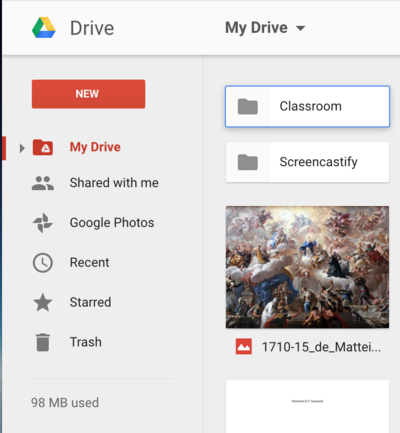
How do you create a new folder?
a)
Click "New"
b)
Click "Drive" (Left)
c)
Click "Drive" (Upper Center)
d)
Click "Trash
4.
Documents you create using Google Docs are stored:
a)
On your computer
b)
In your Google Drive.
c)
In a file cabinet.
d)
On your iPad.
5.
Rather than open a different tab, you can search the web right in your Google Doc using what tool?
a)
Define
b)
Word Count
c)
Keep Notepad
d)
Explore
6.
Which word can you replace in a URL to "force" someone to make a copy of a document?
a)
Edit
b)
View
c)
Access
d)
Copy
7.
Voice Typing is available in
a)
Google Keep Mobile App
b)
Google Docs
c)
Google Slides Presenter Notes
d)
All of the above
8.
Voice typing is under which menu?
a)
Tools
b)
File
c)
Insert
d)
Edit
9.
You can share documents you create by:
a)
Sending a link
b)
Sharing directly with a person's email address.
c)
Both
d)
Neither
10.
When sharing directly with a person (or people), you can give them permission to:
a)
Edit
b)
Comment
c)
View
d)
All of the above
11.
How do you control the accessibility of your Google documents?
a)
Delete everything
b)
Email your documents
c)
Import the image of a large "X" on anything you don't want people to see
d)
Modify the "Share" settings of your documents
12.

Which image represents the setting "private"?
a)
a
b)
b
c)
c
d)
d
13.

An Add-on is:
a)
An app in the Chrome Web Store
b)
A tool that enhances Google Docs, Sheets, & Forms
c)
Something you add to your Chrome Browser
d)
A bookmark on your browser
100 %

