
 Worksheets
User Interfaces STARTER
Total questions: 20
Worksheet time: 9mins
Name
Class
Date
1.
GUI stands for Good User Interface
a)
true
b)
false
2.
Every GUI program requires a window
a)
true
b)
false
3.
Which term is used to describe the fact that software should be able to be used by ALL types of users?
a)
Accessibility
b)
Useability
c)
Optimisation
4.
What type of interface would only suit an expert user?
a)
Menu Driven
b)
GUI - Graphical User Interface
c)
WIMP - Windows Icon Menu Pointer
d)
Command Driven
5.
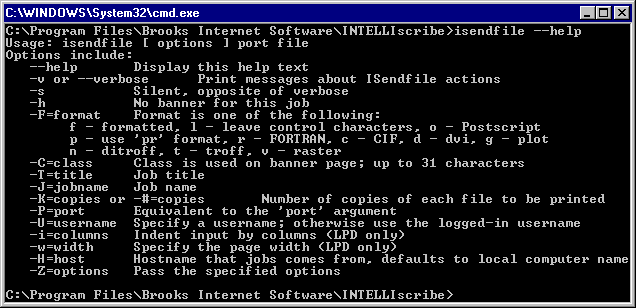
Which Interface is this an example of?
a)
Command Line
b)
Graphical
c)
Voice Command
6.
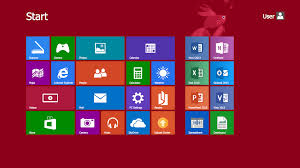
Which Interface is this an example of?
a)
Command Line
b)
Graphical
c)
Voice Command
7.

Which Interface is this an example of?
a)
Command Line
b)
Graphical
c)
Voice Command
8.
Below are 2 advantages and 1 disadvantage for Voice Command Interface.
Choose the disadvantage
Choose the disadvantage
a)
Suitable for disabled users
b)
Requires very little training
c)
May have difficulty understanding accents
9.

A Cashpoint machine (ATM) uses this type of interface?
a)
Forms interface
b)
Menu Interface
c)
GUI interface
d)
Command Line Interface
10.

This type of Interface doesn't need huge amounts of processing power or memory.
a)
Command Line Interface
b)
GUI Interface
c)
Forms Interface
d)
WIMP Interface
11.

This is the type of interface used on a smart phone
a)
Forms Interface
b)
Menu Interface
c)
GUI Interface
d)
Command Line Interface
12.
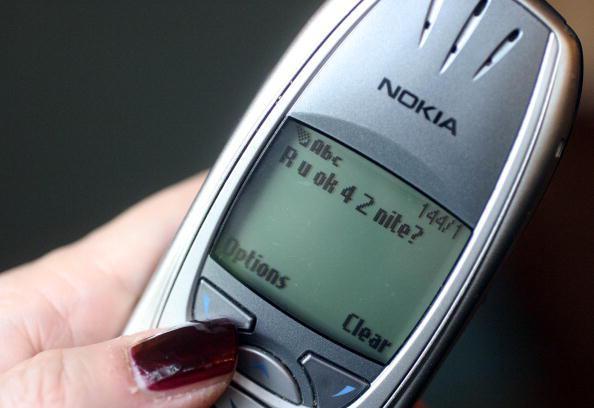
What type of interface was used on the older styles of mobile phones? (see picture)
a)
Menu Interface
b)
GUI Interface
c)
Forms Interface
d)
Command Line Interface
13.

This type of interface has to distinguish between different accents, dialects and slang.
a)
Natural Language Interface
b)
Dialogue Interface
14.

What does WIMP stand for?
a)
Windows, Icons, Mouse, Pull down menus
b)
Windows, Interface, Menu, Pointers
c)
Windows, Interface, Mouse, Pull down menus
d)
Windows, Icons, Menus, Pointers
15.
Which of these is the standard interface for inputting data into the computer?
a)
Keyboard
b)
Mouse
c)
Screen
d)
Speech
16.

What does WYSIWYG stand for?
a)
What you see is what you've got
b)
What you see is what you get
c)
What you see is white, yellow and green
17.
Which operating system makes extensive use of a command line interface?
a)
MAC OSX
b)
MS-DOS
c)
Windows Vista
18.
Which user interface allows the user to interact with the computer by typing instructions?
a)
Menu driven interface
b)
Graphical user interface
c)
Command line interface
19.

what is this an example of ?
a)
Output Device
b)
Input device
20.
what is the CPU usually called?
a)
the brain of the computer
b)
the heart of the computer
100 %

