
 Worksheets
สารสนเทศเพื่อการเรียนรู้
Total questions: 25
Worksheet time: 11mins
Name
Class
Date
1.

บอกชื่ออุปกรณ์ต่อไปนี้
a)
CPU
b)
USB
c)
RAM
d)
ROM
2.

บอกชื่ออุปกรณ์ต่อไปนี้
a)
CPU
b)
USB
c)
RAM
d)
ROM
3.

บอกชื่ออุปกรณ์ต่อไปนี้
a)
CPU
b)
USB
c)
RAM
d)
ROM
4.

This is an image of what type of hardware?
a)
USB Port
b)
USB Cable
c)
Portable Storage
d)
CD/DVD Drive
5.

computer program to help find information on the Internet
a)
search engine
b)
Internet
c)
e-commerce
d)
social networking
6.

online system to send and receive messages through a computer; users don't have to be on the Internet at the same time
a)
email
b)
social networking
c)
instant messaging (IM) & chat
d)
website
7.

connected to others through the internet
a)
online
b)
communicate
c)
online dating
d)
website
8.

a)
I don't know
b)
laughing out loud
c)
be right back
d)
confused
9.

a)
video chat
b)
social media
c)
facebook
d)
text message
10.

a)
video chat
b)
social media
c)
text messaging
d)
online chat
11.

a)
looking up information
b)
streaming videos
c)
looking for a job
d)
sending an email
12.

a place on the Internet where you can find information
a)
website
b)
online auction
c)
communicate
d)
instant messaging (IM) & chat
13.

Name the computer hardware shown.
a)
Printer
b)
Speakers
c)
CPU and Internal Hard Drive
d)
Keyboard
14.

Name the computer hardware shown.
a)
Keyboard
b)
Cables
c)
USB Flash Drive Port
d)
Printer
15.

Name the computer hardware shown.
a)
Keyboard
b)
Monitor
c)
Mouse
d)
CPU and Internal Hard Drive
16.

Name the computer hardware shown.
a)
Keyboard
b)
Cables
c)
Printer
d)
USB Flash Drive
17.

Name the computer hardware shown.
a)
CPU and Internal Hard Drive
b)
Mouse
c)
Monitor
d)
Speakers
18.

What is the name of the company Bill Gates started?
a)
IBM
b)
Apple
c)
Microsoft
d)
Dell
19.

What is Mark Zuckerberg famous for?
a)
He co-founded Apple?
b)
He founded Microsoft?
c)
He started Twitter
d)
He co-founded Facebook?
20.
An application used to access and view websites
a)
Google Docs
b)
Microsoft Word Online
c)
browser
d)
app
21.

a)
Waiting Cursor
b)
Cursor
c)
Printer
d)
Monitor
22.

a)
Mouse
b)
Keyboard
c)
Icon
d)
Waiting Cursor
23.

What are these called?
a)
Headphones
b)
Keyboard
c)
Microphone
d)
Keyboard
24.
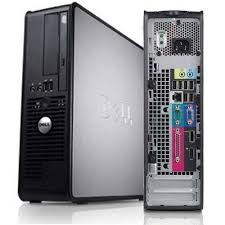
What part of the computer is this?
a)
Central Processing Unit
b)
Computer
c)
Tower
d)
Box
25.
ชื่อเว็บไซต์ที่ลงท้ายด้วย .ac.th เป็นข้อมูลที่เกี่ยวกับข้อใด
a)
หน่วยงานเอกชน
b)
องค์กรของรัฐ
c)
ผู้ให้บริการเครือข่าย
d)
การศึกษาไทย
100 %

