wayground logo

Free Printable Worksheets

Font size

S
M
L
XL
Worksheets

Year 10 Term 1 Final Exam 2018

Total questions: 82

Worksheet time: 53mins

Name
Class
Date
1.
The purpose of data compression is to decrease file sizes .
a)
True
b)
False
2.
Data compression usually works by..
a)
Finding repeating patterns.
b)
Deleting random bits data
3.
What type of compression would you use to compress a text file?
a)
Lossy
b)
Lossless
4.
What type of compression would you use to compress a video?
a)
Lossy
b)
Lossless
5.
What is Lossless Compression?
a)
No information is lost but file size is increased
b)
There is no loss of information at all after compression
c)
Files which have the exact same data after compression
d)
Compression involves an algorithm
6.
The audio file format MP3 is:
a)
Lossy
b)
Lossless
7.
Has this been compressed using Lossy or Lossless?
a)
Lossy
b)
Lossless
8.
How many bits make up one byte?
a)
4
b)
16
c)
8
d)
10
9.
The following is true about metadata:
a)
It is data about data.
b)
It is corrupted data.
c)
It significantly increases file sizes.
10.
Metadata is used in the following files:
a)
All of these.
b)
Images
c)
MP3 files
d)
Webpages
11.

Which of the following is true of lossy and lossless compression techniques?

a)

Lossless compression throws away unimportant details that a human being will likely be unable to detect.

b)

Lossy compression is only possible on files that are at least one gigabyte in size before compression.

c)

Lossy compression techniques are no longer commonly used.

d)

Lossless compression is fully reversible, meaning the original file can be recreated bit for bit.

12.
What is the purpose of registers in the CPU?
a)
To hold temporary data while a software program is running.
b)
To store files including graphics, sound and text files.
13.
What is the purpose of the program counter?
a)
Holds the current instruction to be executed, having been fetched from memory.  Contents are transferred to control unit for decoding.
b)
Stores the memory address of the next instruction. Incremented by one after an instruction is fetched. 
14.
What is the purpose of the Memory Address Register (MAR)?
a)
Holds the location in memory (address) of the next piece of data or program to be fetched (or stored).
b)
Stores result of fetch from memory which is either an instruction or data. It receives instructions or data from memory via the data bus.
15.
What is the purpose of the Memory Data Register (MDR)?
a)
•Stores the result of fetch from memory which is either an instruction or data.
b)
Holds the location in memory (address) of the next piece of data or program to be fetched (or stored).
16.
What is the purpose of the Current Instruction Register (CIR)?
a)
Stores the memory address of the next instruction. Incremented by one after an instruction is fetched.
b)
Holds the current instruction to be executed, having been fetched from memory. Contents are transferred to control unit for decoding.
17.
What is the purpose of the Accumulator?
a)
•Holds the current instruction to be executed, having been fetched from memory. •Contents are transferred to control unit for decoding.
b)
•Stores a running total of the calculation that is currently being executed.
18.
1.1 a 
CPU stands for Computer Processing Unit
a)
TRUE
b)
FALSE
19.
1.1 a 
CPU processes all data and instructions
a)
TRUE
b)
FALSE
20.
1.1 b 
Which register is being described?
Stores the results of the calculations done by the ALU
a)
MAR
b)
MDR
c)
Accumulator
d)
Program Counter
21.
1.1 b 
Which register is being described?
Holds the memory address about to be used by the CPU
a)
MAR
b)
MDR
c)
Accumulator
d)
Program Counter
22.
1.1 b 
Which register is being described?
Holds the data / instructions that have been fetched from memory
a)
MAR
b)
MDR
c)
Accumulator
d)
Program Counter
23.
1.1 b 
Which register is being described?
Holds the memory address of the instruction for each cycle
a)
MAR
b)
MDR
c)
Accumulator
d)
Program Counter
24.
1.1 b 
Which statement is TRUE?
a)
Registers are super fast memory, stores tiny instructions which can be accessed by the CPU quickly
b)
Registers are super fast memory, stores lots of instructions which can be accessed by the CPU slowly
25.
1.1 c
What part of the CPU is being described.
Executes instructions and controls the flow of data
a)
ALU
b)
Control Unit
c)
Cache
26.
1.1 c
What part of the CPU is being described.
Carries out arithmetic operations and performs logical comparisons.
a)
ALU
b)
Control Unit
c)
Cache
27.
1.1 c
What part of the CPU is being described.
Very fast memory which stores regularly used instructions. CPU can access instructions held here quicker than from RAM
a)
ALU
b)
Control Unit
c)
Cache
28.
The correct order is
a)
Fetch, Decode, Execute
b)
Decode, Execute, Fetch
c)
Execute, Decode, Fetch
d)
Decode, Fetch, Execute
29.
Instructions are fetched from main memory
a)
True
b)
False
30.
Which part of the fetch execute cycle involves retrieving an instruction from a memory address
a)
Fetch
b)
Execute
c)
Decode
31.
The fetch execute cycle runs continuously when the computer is turned on.
a)
True
b)
False
32.
During the fetch execute cycle, the CPU fetches, decodes and executes a _________
a)
instruction
b)
bit
c)
token
d)
message
33.
BARCODE READER is an ----------device
a)
output
b)
input
34.
The reflected light is read by sensors
a)
true
b)
false
35.
In barcode, each digit is represented by
a)
guard bars
b)
analoge
36.

Hold 7000 digits (storage)

a)

QR Codes

b)

2D Scanners

c)

3D Scanners

d)

barcode Readers

37.

Converts hard copy info into electronic

a)

QR Codes

b)

2D Scanners

c)

3D Scanners

d)

barcode Readers

38.

parallel lines vary in thickness

a)

QR Codes

b)

2D Scanners

c)

3D Scanners

d)

barcode Readers

39.

are read by red laser/LED

a)

QR Codes

b)

2D Scanners

c)

3D Scanners

d)

barcode Readers

40.

scans solid objects

a)

QR Codes

b)

2D Scanners

c)

3D Scanners

d)

barcode Readers

41.

can be read using an app

a)

QR Codes

b)

2D Scanners

c)

3D Scanners

d)

barcode Readers

42.

uses unique lines representing 0-9

a)

QR Codes

b)

2D Scanners

c)

3D Scanners

d)

barcode Readers

43.

takes images at several points x,y,z

a)

QR Codes

b)

2D Scanners

c)

3D Scanners

d)

barcode Readers

44.

made up of a dark squares

a)

QR Codes

b)

2D Scanners

c)

3D Scanners

d)

barcode Readers

45.

images become Jpegs

a)

QR Codes

b)

2D Scanners

c)

3D Scanners

d)

barcode Readers

46.

Examples of this are tomographic scanners

a)

QR Codes

b)

2D Scanners

c)

3D Scanners

d)

barcode Readers

47.

Can hold up to 30 digits

a)

QR Codes

b)

2D Scanners

c)

3D Scanners

d)

barcode Readers

48.

stores web addresses / urls

a)

QR Codes

b)

2D Scanners

c)

3D Scanners

d)

barcode Readers

49.

Is used in Airports for passport scanning

a)

QR Codes

b)

2D Scanners

c)

3D Scanners

d)

barcode Readers

50.

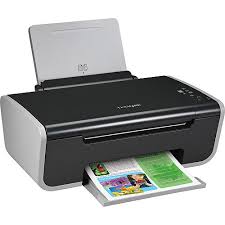
Is this device Input or Output?

Printer

a)

Input

b)

Output

51.
Is this device Input or Output?
Keyboard
a)
Input
b)
Output
52.
Is this device Input or Output?
Monitor
a)
Input
b)
Output
53.
Is this device Input or Output?
Mouse
a)
Input
b)
Output
54.
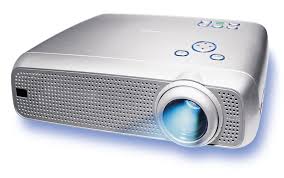
Is this device Input or Output?
Projector
a)
Input
b)
Output
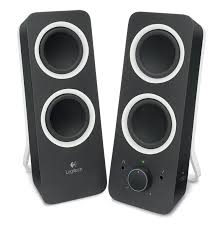
55.
Is this device Input or Output?
Speaker
a)
Input
b)
Output
56.
a)
input
b)
output
57.
a)
input
b)
output
58.
a)
input
b)
output
59.
a)
input
b)
output
60.
What type of device is this? Smartphone screen
a)
Input
b)
Output
c)
Input and Output
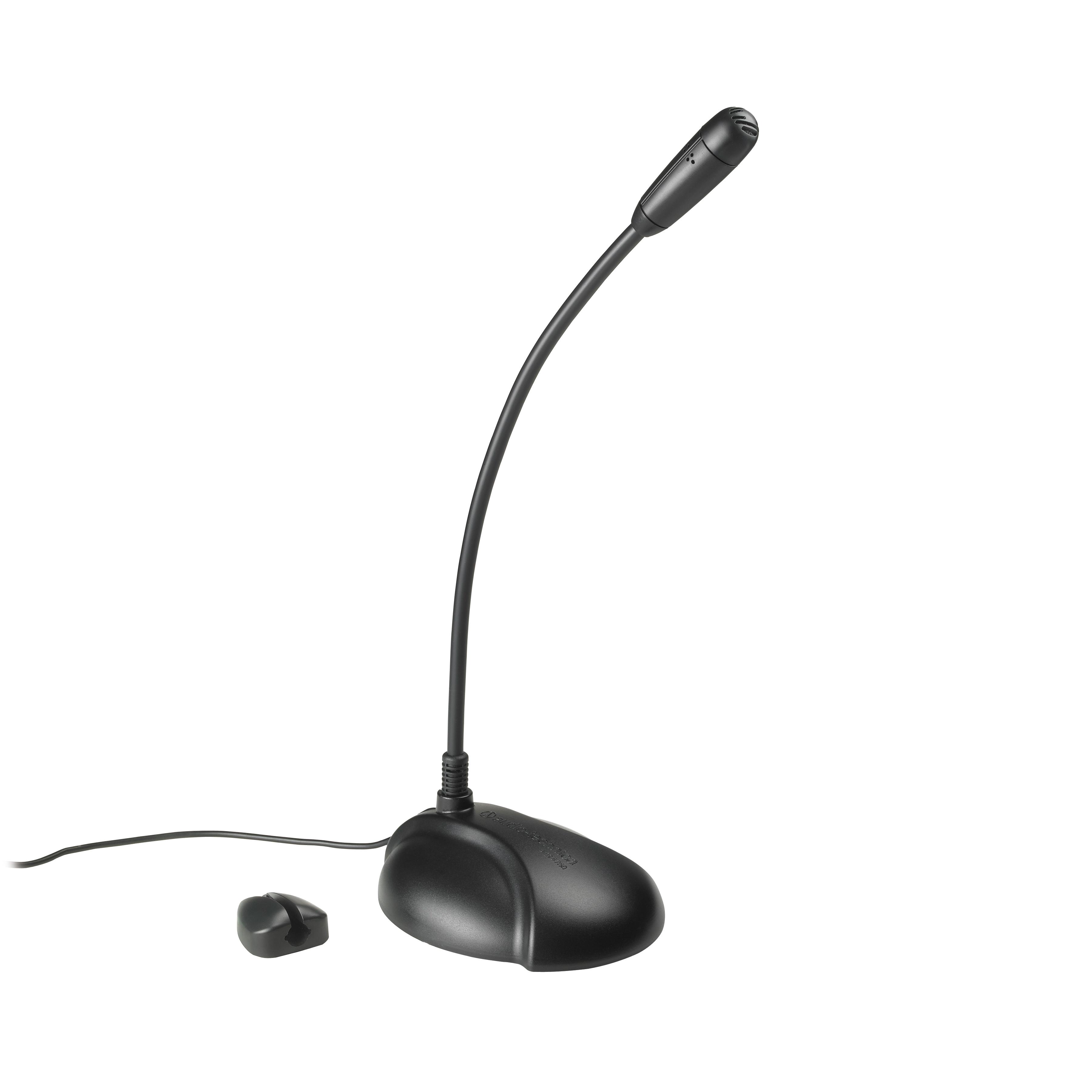
61.
What type of device is this? Microphone
a)
Input
b)
Output
c)
Storage
62.
What does RAM stand for?
a)
Random All Memory
b)
Read All Memry
c)
Random Access Memory
d)
Read Access Memory
63.
True or False:
RAM is Fast temporary memory
a)
TRUE
b)
FALSE
64.
More memory usually means that the computer is faster
a)
TRUE
b)
FALSE
65.
If the RAM is upgraded from 512MB to 4GB, what will be the biggest benefit?
a)
More programs and data can be opened at the same time
b)
The operating system will be faster
c)
There will be more hard drive space
d)
The computer will be quicker if you open a document
66.
What does HDD stand for?
a)
Hard Disk Drive
b)
Hard Drive Disk
c)
High Density Drive
d)
Hard DOS Disk
67.
What does SSD stand for?
a)
Solid State Drive
b)
Solid Snake Drive
c)

Sequential State Drive

d)
Serial Sata Drive
68.
In computing, a bit is
a)
8 bytes
b)
a single    0 or 1     on or off
69.
A byte is
a)
8 bits
b)
4 bits
70.
a kilobyte is
a)
1024 bits
b)
1024 bytes
71.
How many megabytes are in 1 gigabyte?
a)
1024
b)
1
c)
1024 x 10 = 10240
72.
Each song on an mp3 player is 5 megabytes.
how many songs will fit on a 500 gigabyte hard disk?
a)
(500x1024) divided by 5 = 102400
b)
(500 divided by 1024) x 5 = 2.44
c)
5 * 1024 * 1024 = 5242800
73.
A 15 minute video clip has a size of 65 megabytes
How many of these videos will fit on a 2gb usb stick?
a)
15
b)
2 x 1024 divided by 65 = 31
c)
2 x 1024 x 1024 divided by 65 = 32263
74.

HOw many Bytes are used in Unicode

a)

8

b)

16

c)

1

d)

2

75.

The ASCII code is represented by using 16 bits

a)

TRUE

b)

FALSE

76.

The ASCII code is capable of representing non-European languages

a)

TRUE

b)

FALSE

77.

Upper and lower case letters have a different ASCII code

a)

TRUE

b)

FALSE

78.

A character set is...

a)

What language can be used in a computer system

b)

The fonts that a computer has installed

c)

The possible characters that can be represented by a computer system

79.

ASCII can represent more characters than Unicode

a)

TRUE

b)

FALSE

80.

ASCII stands for...

a)

American Standard Code for Information Interchange

b)

American Scientific Code for Information Interchanging

c)

Absolute Standard Codes for Instruction Interchange

81.
Character Sets can't be stored in the computer as
a)
Hex
b)
Letters
c)
Denary
d)
Binary
82.
The main purpose of character sets is:
a)
To allow humans to express alphanumeric characters in a binary table
b)
To run the Internet
c)
To simplify computer programming