
 Worksheets
ICTL Input Output device
Total questions: 30
Worksheet time: 15mins
Name
Class
Date
1.

Namakan jenis komputer seperti yang ditunjukkan
a)
Komputer mini
b)
Komputer super
c)
Komputer mikro
d)
Kerangka utama
2.

Peralatan ICT yang ditunjukkan adalah dalam kategori
a)
Peranti input
b)
Peranti output
c)
Storan
d)
Pemproses
3.

Peralatan ICT yang ditunjukkan adalah dalam kategori
a)
Peranti input
b)
Peranti output
c)
Storan
d)
Pemprose
4.

Peralatan ICT yang ditunjukkan adalah dalam kategori
a)
Peranti input
b)
Peranti output
c)
Storan
d)
Pemproses
5.

Peralatan ICT yang ditunjukkan adalah dalam kategori
a)
Peranti input
b)
Peranti output
c)
Storan
d)
Pemproses
6.

Peralatan ICT yang ditunjukkan adalah dalam kategori
a)
peranti input
b)
peranti output
c)
storan
d)
pemproses
7.

Nama perkakasan paling tepat untuk gambar ini ialah
a)
Monitor LED
b)
Monitor LCD
c)
Monitor CRT
d)
Monitor CCTV
8.

Peralatan ICT yang ditunjukkan adalah dalam kategori
a)
peranti input
b)
peranti output
c)
storan
d)
pemproses
9.

Peralatan ICT yang ditunjukkan adalah dalam kategori
a)
peranti input
b)
peranti output
c)
storan
d)
pemproses
10.

Peralatan ICT yang ditunjukkan adalah dalam kategori
a)
peranti input
b)
peranti output
c)
storan
d)
pemproses
11.

Peralatan ICT yang ditunjukkan adalah dalam kategori
a)
peranti input
b)
peranti output
c)
storan
d)
pemproses
12.

Nama PALING TEPAT untuk peralatan ini ialah
a)
CPU
b)
Unit sistem
c)
Pemproses
d)
Unit Pemproses
13.

Nama storan ini ialah
a)
Cakera Padat
b)
Kad Memori
c)
Cakera Liut
d)
Cakera Keras
14.

Nama peralatan ini ialah
a)
cakera liut
b)
cakera padat
c)
cakera keras
d)
kad memori
15.

Peralatan ICT yang ditunjukkan adalah dalam kategori
a)
peranti input
b)
peranti output
c)
storan
d)
pemproses
16.

Peralatan ICT yang ditunjukkan adalah dalam kategori
a)
peranti input
b)
peranti output
c)
storan
d)
pemproses
17.

Pencetak ini mencetak dengan kelajuan paling tinggi. Pencetak ini ialah pencetak
a)
dot matrik
b)
dakwat
c)
laser
18.
Yang manakah di antara berikut bukan kategori komputer mikro
a)
PDA
b)
Komputer Desktop
c)
Stesen kerja
d)
komputer terbenam
19.

Kegunaan peralatan ini adalah untuk:
a)
Memadamkan data
b)
Menyambungkan kabel
c)
Membina laman web
d)
Menyimpan Data
20.
An input device that downloads information from the internet.
a)
mouse
b)
PDA
c)
scanner
21.
An input device you take out of your digital camera and put directly into your computer to download pictures.
a)
graphic tablet
b)
keyboard
c)
SD Card
22.
A Camera attached to a computer that put short videos on your computer
a)
Digital Camera
b)
Security Camera
c)
Webcam
23.
If you want to put some old paper pictures into your computer, you could use a
a)
SD Card
b)
flash drive
c)
scanner
24.
Output device, used to listen to audio, which is worn on the ears.
a)
Headphones
b)
Speakers
c)
Joystick
d)
Keyboard
25.
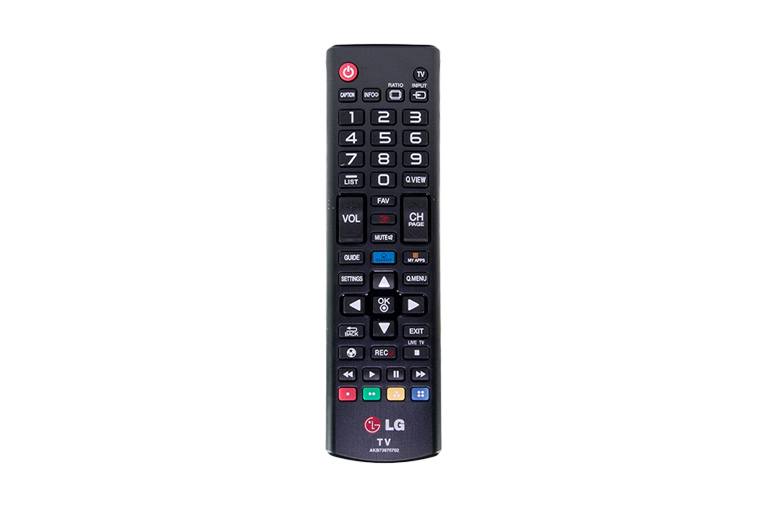
What type of device is this? (Remote Control)
a)
Input
b)
Output
26.

What type of device is this? (Smartphone screen)
a)
Input
b)
Output
c)
Input and Output
27.

What type of device is this? (Interactive whiteboard)
a)
Input
b)
Output
c)
Input and Output
28.
___________ is any data or instruction you enter into the memory of a computer.
a)
Input
b)
Output
c)
Process
d)
Storage
29.
Sim is a secretary of the Computer Club. She is preparing the Club's annual report. She is using a ____________ to produce a report in hard copy.
a)
scanner
b)
laser printer
c)
digital camera
d)
mouse
30.
Three types of input devices are:
a)
Projector, Monitor and Printer
b)
Remote Control, Touch Screen and joystick
c)
Microphone, Video Cameras, Projector
d)
Graphic Tablet, LCD monitor, scanner
100 %

